What is CORS? Complete guide to Cross-Origin Resource Sharing (with fixes)

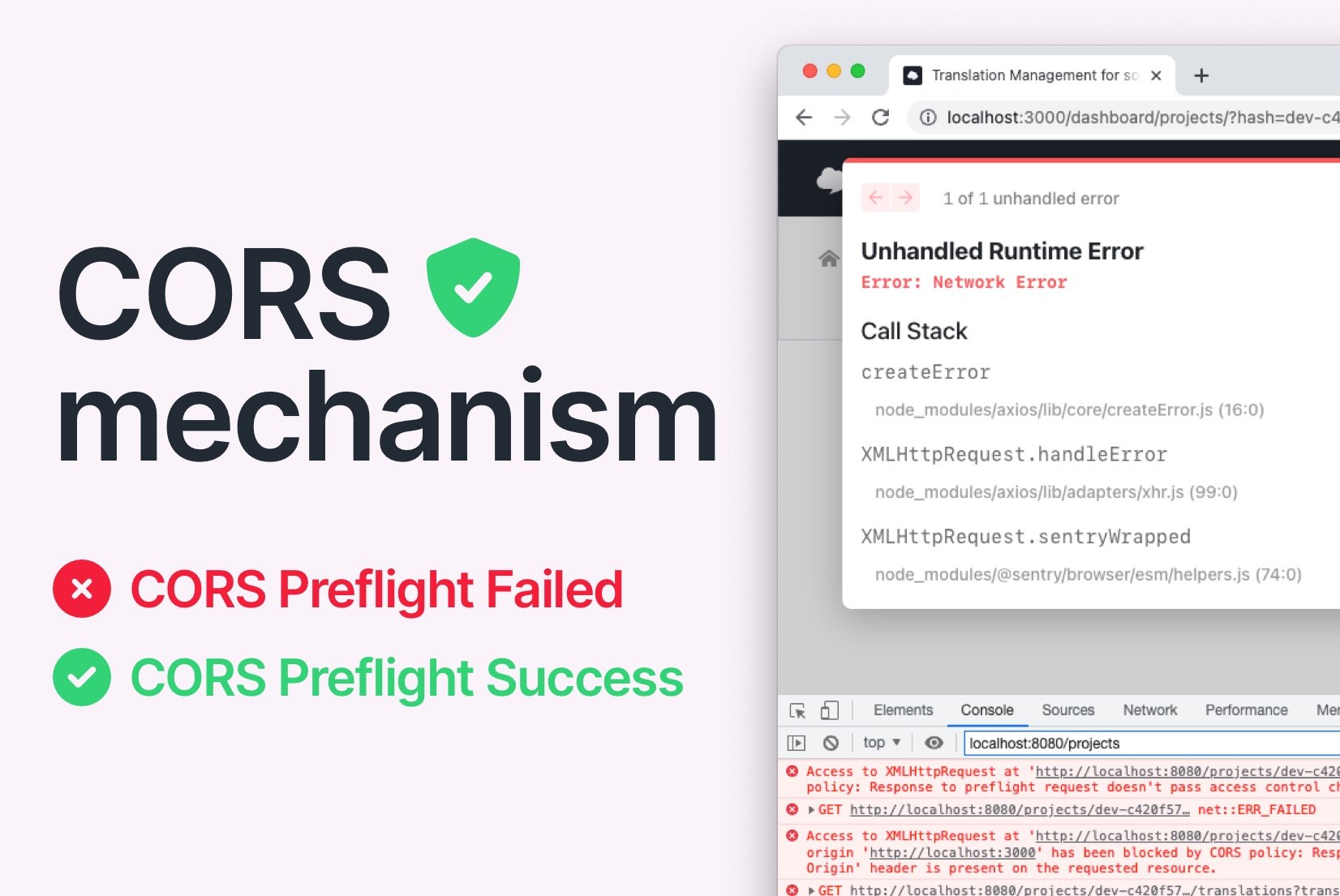
If you've ever seen this in your browser console:
Access to fetch at 'https://cdn.simplelocalize.io/...' from origin 'https://yourapp.com'
has been blocked by CORS policy: No 'Access-Control-Allow-Origin' header is present
on the requested resource.
... you've hit a CORS error. This guide explains what CORS is, how it actually works under the hood, and how to fix it, including the edge cases most articles skip.
CORS becomes directly relevant in localization when translations are served from an external API or CDN, a pattern covered in our complete technical guide to i18n and software localization.
What is CORS?
Cross-Origin Resource Sharing (CORS) is an HTTP-based security mechanism enforced by the browser. It controls whether a web page running at one origin (domain + scheme + port) is allowed to request resources from a different origin.
It was designed as a controlled relaxation of the Same-Origin Policy (SOP) — a browser security rule that, without CORS, would block all cross-origin requests from JavaScript entirely.
CORS is enforced by the browser, not the server. This is why tools like curl, Postman, and Insomnia never hit CORS errors; only browser-based requests are affected. Your server still receives the request; it just won't let your JavaScript read the response.
CORS is implemented in all modern browsers and was accepted as a W3C Recommendation in January 2014.
What counts as a "different origin"?
Two URLs share the same origin only if all three of these match exactly:
| Component | Example |
|---|---|
| Protocol | https:// |
| Domain | yourapp.com |
| Port | 443 (default for HTTPS) |
So https://yourapp.com and https://api.yourapp.com are different origins, even though they share the same base domain. Same for http://localhost:3000 vs http://localhost:8080.
This catches a lot of developers off guard when loading translations from a subdomain or CDN.
How CORS works: Simple requests vs. preflight requests
Not all cross-origin requests are treated equally. The browser splits them into two categories, and understanding the difference saves a lot of debugging time.
Simple requests
A request is considered "simple" when it meets all of these conditions:
- Method is
GET,POST, orHEAD - No custom headers beyond a safe list (e.g., no
Authorization, noX-Api-Key) Content-Typeis one of:application/x-www-form-urlencoded,multipart/form-data, ortext/plain
For simple requests, the browser sends the request directly and checks the Access-Control-Allow-Origin header in the response. If the header is missing or doesn't match, the browser blocks your JavaScript from reading the response — but the request was already sent.
This is an important and often confusing point: CORS doesn't prevent the request from reaching the server — it prevents your JavaScript from reading the response. This is why you may see duplicate database writes or triggered side effects despite a CORS error in the console.
Preflight requests
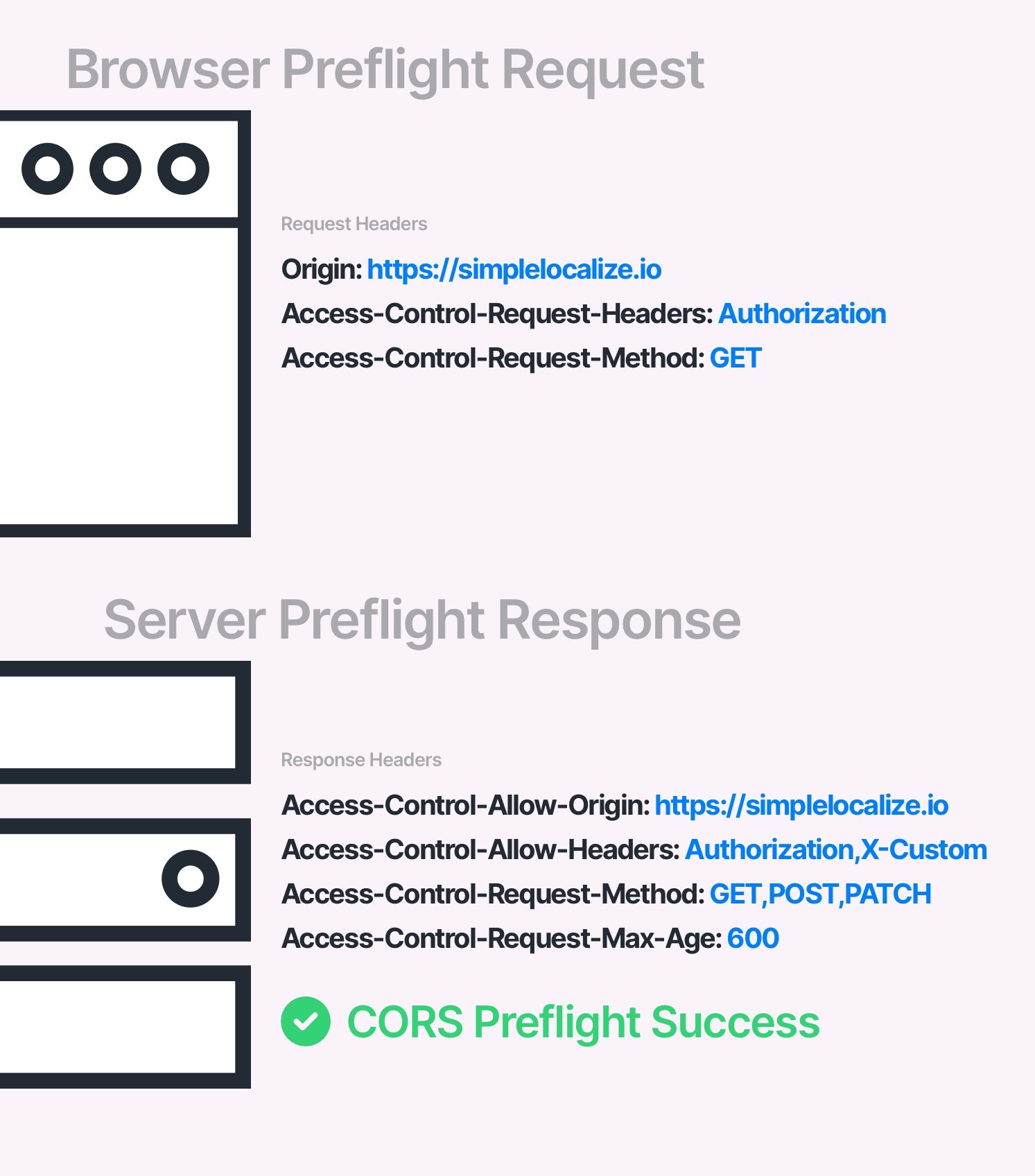
Any request that doesn't meet the simple request criteria triggers a preflight: the browser automatically sends a HTTP OPTIONS request to the server first, asking for permission before sending the real request.
This applies when you:
- Use
PUT, DELETE, PATCH, or OPTIONSmethods - Send custom headers like
AuthorizationorContent-Type: application/json - Use
credentials: 'include'infetch
# Browser sends this first:
OPTIONS /api/v1/translations HTTP/1.1
Origin: https://yourapp.com
Access-Control-Request-Method: GET
Access-Control-Request-Headers: Authorization

# Server must respond with:
HTTP/1.1 204 No Content
Access-Control-Allow-Origin: https://yourapp.com
Access-Control-Allow-Methods: GET, POST, PUT
Access-Control-Allow-Headers: Authorization
Access-Control-Max-Age: 86400
If the preflight response doesn't match, the browser never sends the actual request.
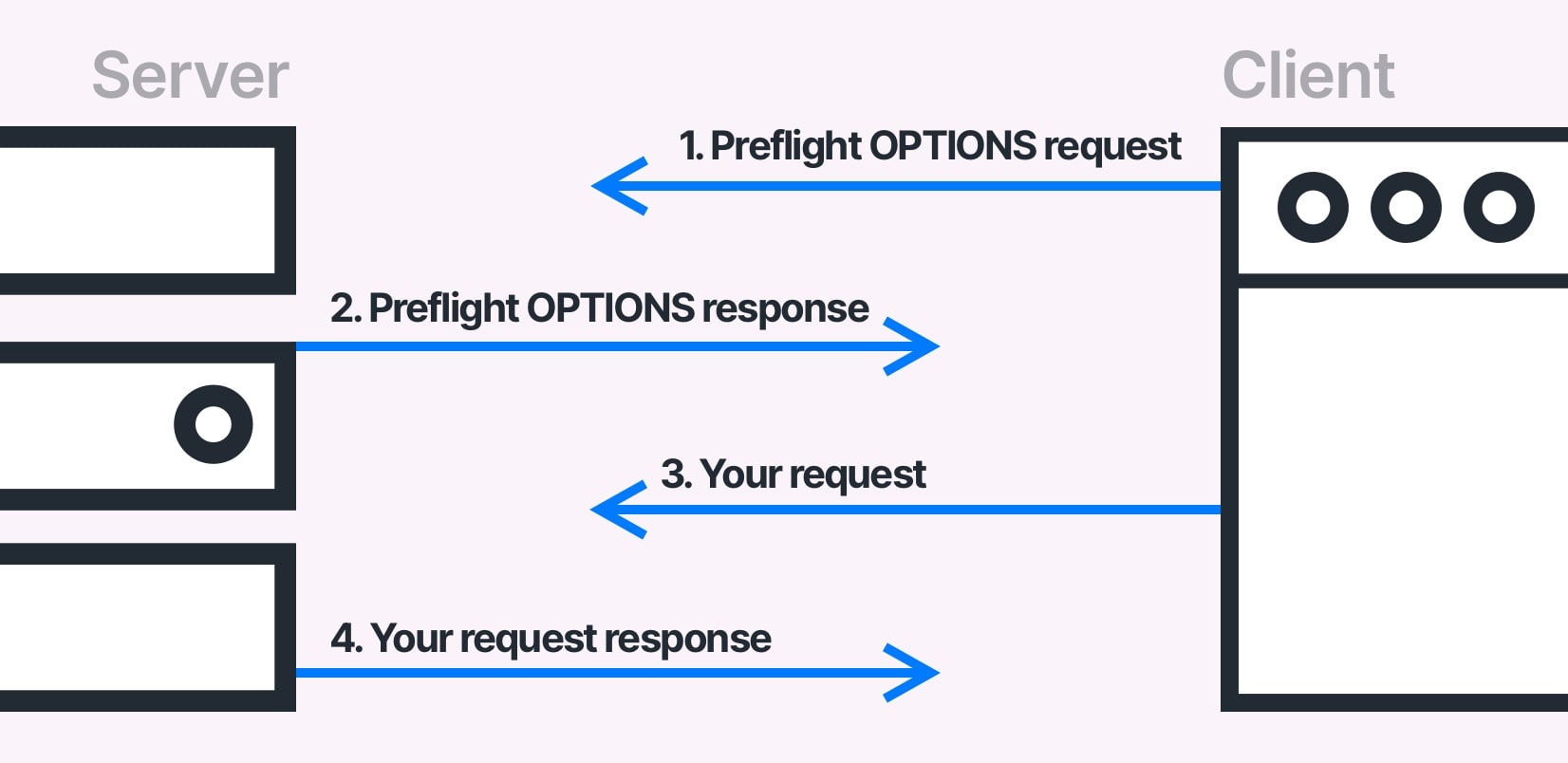
CORS preflight requests are sent regardless of the libraries or frameworks used to send requests from a web browser. That's why you won't need to conform CORS requirements when working with API from your backend application.
CORS is not going to prevent users from requesting or downloading resources. You can still make a successful request for a resource using apps like curl, Insomnia, or Postman. CORS is only going to prevent the browser from accessing the resource if the CORS policy does not allow it.
CORS headers explained
CORS headers are regular HTTP headers that are used to control the CORS policy. They are used in requests where the browser sends a CORS preflight request to the server, and the server responds with:
| Header | Purpose | Example value |
|---|---|---|
Access-Control-Allow-Origin | Which origins can access this resource | https://yourapp.com |
Access-Control-Allow-Methods | Allowed HTTP methods | GET,POST,PUT |
Access-Control-Allow-Headers | Allowed request headers | Authorization,X-Requested-With |
Access-Control-Allow-Credentials | Whether cookies/auth are allowed (default: false) | true |
Access-Control-Max-Age | How long to cache the preflight response in seconds (default: 0) | 86400 (24 hours) |
Access-Control-Expose-Headers | Which response headers JS can read | X-Request-Id |
See a full list of CORS headers.
The credentials + wildcard conflict
This one trips up many developers. If you set Access-Control-Allow-Credentials: true, you cannot use a wildcard * for Access-Control-Allow-Origin. You must specify the exact origin. The browser will reject the response if you mix these.
# This will fail when credentials are used:
Access-Control-Allow-Origin: *
Access-Control-Allow-Credentials: true

# This works:
Access-Control-Allow-Origin: https://yourapp.com
Access-Control-Allow-Credentials: true
Don't forget Vary: Origin
If your server dynamically reflects the requesting origin (rather than always returning *), you must also include Vary: Origin in the response. Without it, CDNs and shared caches may serve a response with one origin's Access-Control-Allow-Origin to a different origin, which either silently breaks CORS or creates a security hole.
Vary: Origin
Access-Control-Allow-Origin: https://yourapp.com
CORS and localization: When your translations are on a CDN
In localization workflows, CORS errors commonly appear when translations are hosted on an external CDN or served via a Translation Hosting API and fetched client-side by your app.
For example, if your app at https://yourapp.com fetches translations from https://cdn.simplelocalize.io, the browser enforces CORS. The CDN must respond with the correct Access-Control-Allow-Origin header.
This is something SimpleLocalize's Translation Hosting handles out of the box: translations served from the CDN include proper CORS headers, so your app can fetch them from any origin without configuration on your side.
If you're building your own translation API, make sure CORS headers are set correctly on:
- The API endpoint itself
- Any CDN layer in front of it (CDNs can strip or cache headers incorrectly — see the
Vary: Originnote above) - Preflight
OPTIONSresponses, not just the main request
Why is your request blocked by CORS policy?
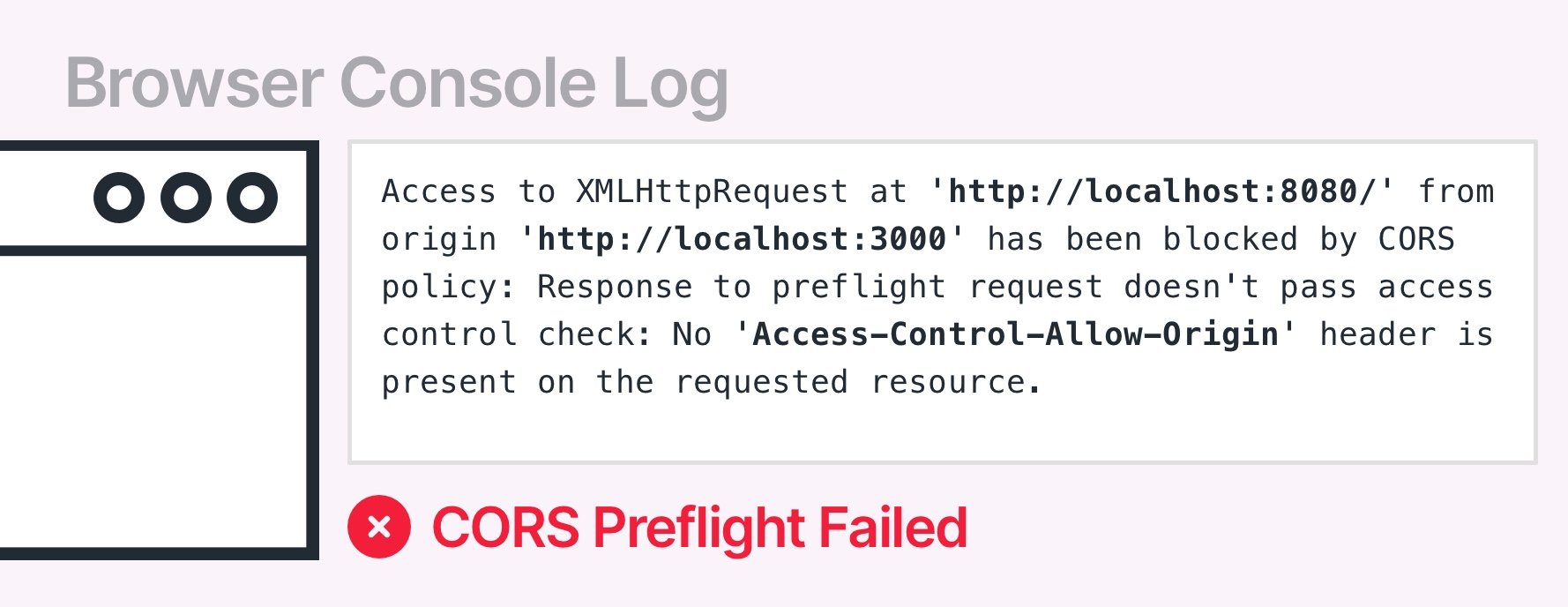
The most common CORS error message:
Access to XMLHttpRequest at 'http://localhost:8080/' from origin
'http://localhost:3000' has been blocked by CORS policy:
Response to preflight request doesn't pass access control
check: No 'Access-Control-Allow-Origin' header is present
on the requested resource.
The CORS error above notifies a user that the browser couldn't access a resource (https://localhost:8080) from an
origin (https://localhost:3000) because the server didn't allow it.
Common causes:
- Server doesn't return
Access-Control-Allow-Originat all - Server returns a different origin than the one making the request
- Server handles the main request but doesn't handle
OPTIONSpreflight separately - CDN or load balancer strips CORS headers from responses
Access-Control-Allow-Credentials: truecombined withAccess-Control-Allow-Origin: *- Missing
Vary: Origincausing cached responses to break for different origins
A request may be blocked by CORS policy not only because of an incorrect origin, but also because of an incorrect HTTP header, HTTP method, or Cookie header.
How to fix CORS errors
The fundamental idea of "fixing CORS" is to respond to "OPTIONS" requests sent from a client with proper headers. There are many ways to start responding with proper CORS headers. You can use a proxy server, or you can use middleware in your server.
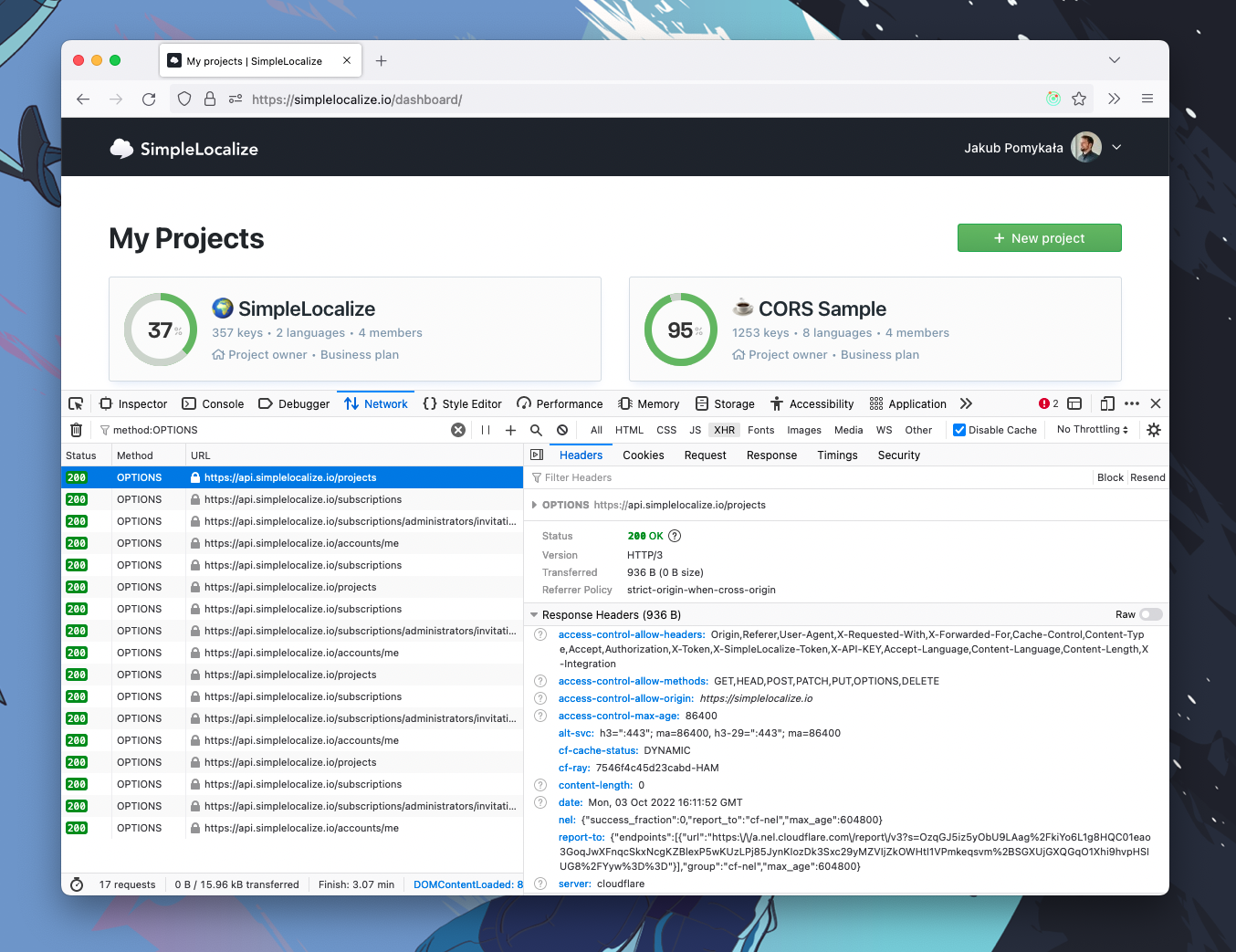
Remember that Access-Control-* headers are cached in a web browser according to the value set in Access-Control-Max-Age header.
Make sure that you clear the cache before testing the changes. You can also disable caching in your browser.
1. Configure your server (the right fix)
The only production-safe solution is configuring CORS on the server side. At minimum, return the correct Access-Control-Allow-Origin header and handle OPTIONS preflight requests.
The most common way is to use a reverse proxy, API gateway, or any other routing service that offers the ability to add headers to responses. There are many services that you can use to do this, some of them are: HAProxy, Linkerd, Istio, Kong, nginx, Apache, Traefik. If your infrastructure contains only an application without any additional layers, then you can simply add CORS support in the application code.
Here are some popular examples of enabling CORS:
- Apache: modify
.htaccess - Nginx: modify configuration file
- CloudFlare: Transform Rules → Modify Response Header
- Traefik: use middlewares
- Spring Boot: use
@EnableCORSannotation - Express.js: use
app.use(cors()) - Next.js: use request helpers
More examples at enable-cors.org.
Note on caching:
Access-Control-*headers are cached by the browser according toAccess-Control-Max-Age. Always clear the browser cache before testing CORS changes. You can also disable caching in your browser during development.
If you cannot enable CORS in the service, but you still want to make a request to it, then you need to use one of the following solutions described below.
2. Use a proxy server
If you are looking for a solution that doesn't require you to change the browser settings, or if you don't control the server you're requesting from, a proxy is the cleanest production-safe workaround. Your frontend calls your own server, which then forwards the request to the third-party API. Server-to-server calls don't have CORS restrictions.
This is also useful for adding auth headers to requests without exposing credentials in client-side code.
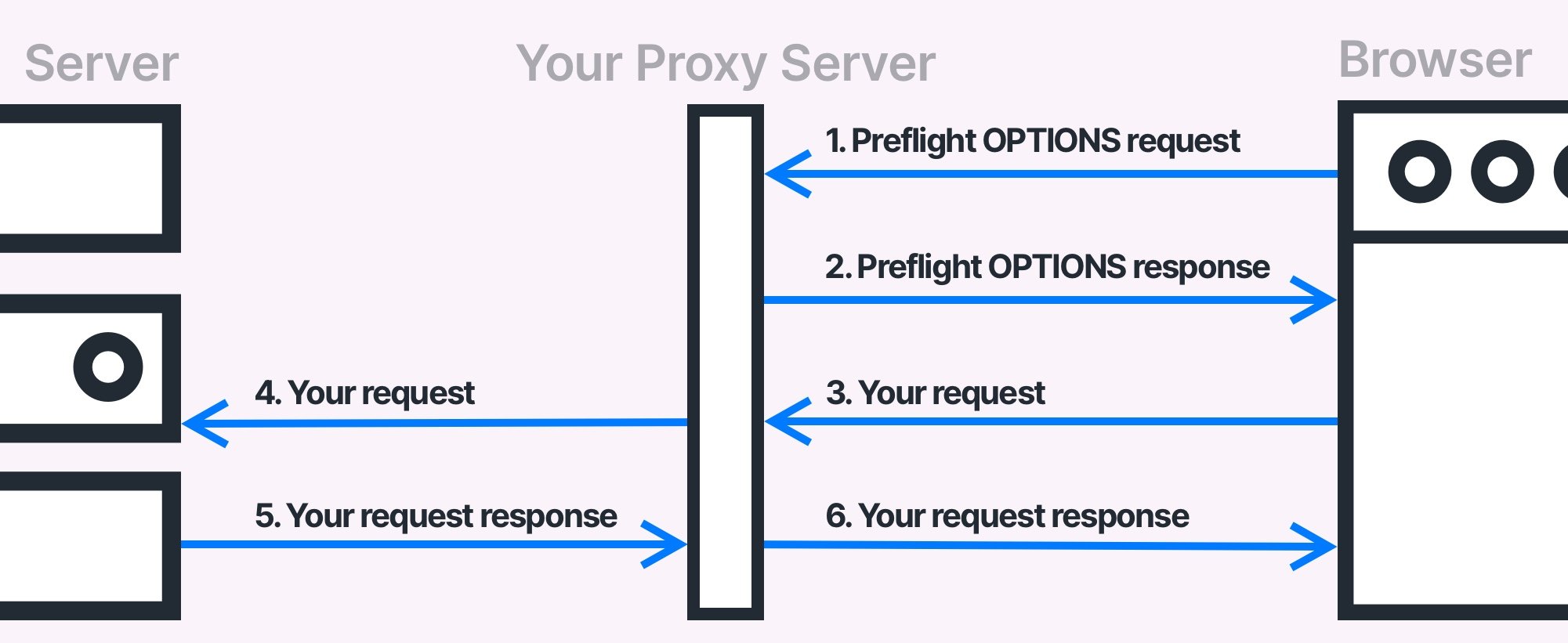
Proxy server is a good solution if you don't have access to the service you intend to use. There are ready to use and open-source proxy server services, but you should always ensure that they are not trying to intercept your requests with authorization headers and pass them to any 3rd party service. Such security breaches could be catastrophic failure for you and potential users of the service.
Open-source proxy options (review the code before using in production):
- https://github.com/Freeboard/thingproxy
- https://github.com/bulletmark/corsproxy
- https://github.com/Rob--W/cors-anywhere
3. Install a browser extension (development only)
A browser extension is a fast local fix, good for developing against a production API that doesn't have permissive CORS. The extension modifies incoming preflight responses to add the required headers.
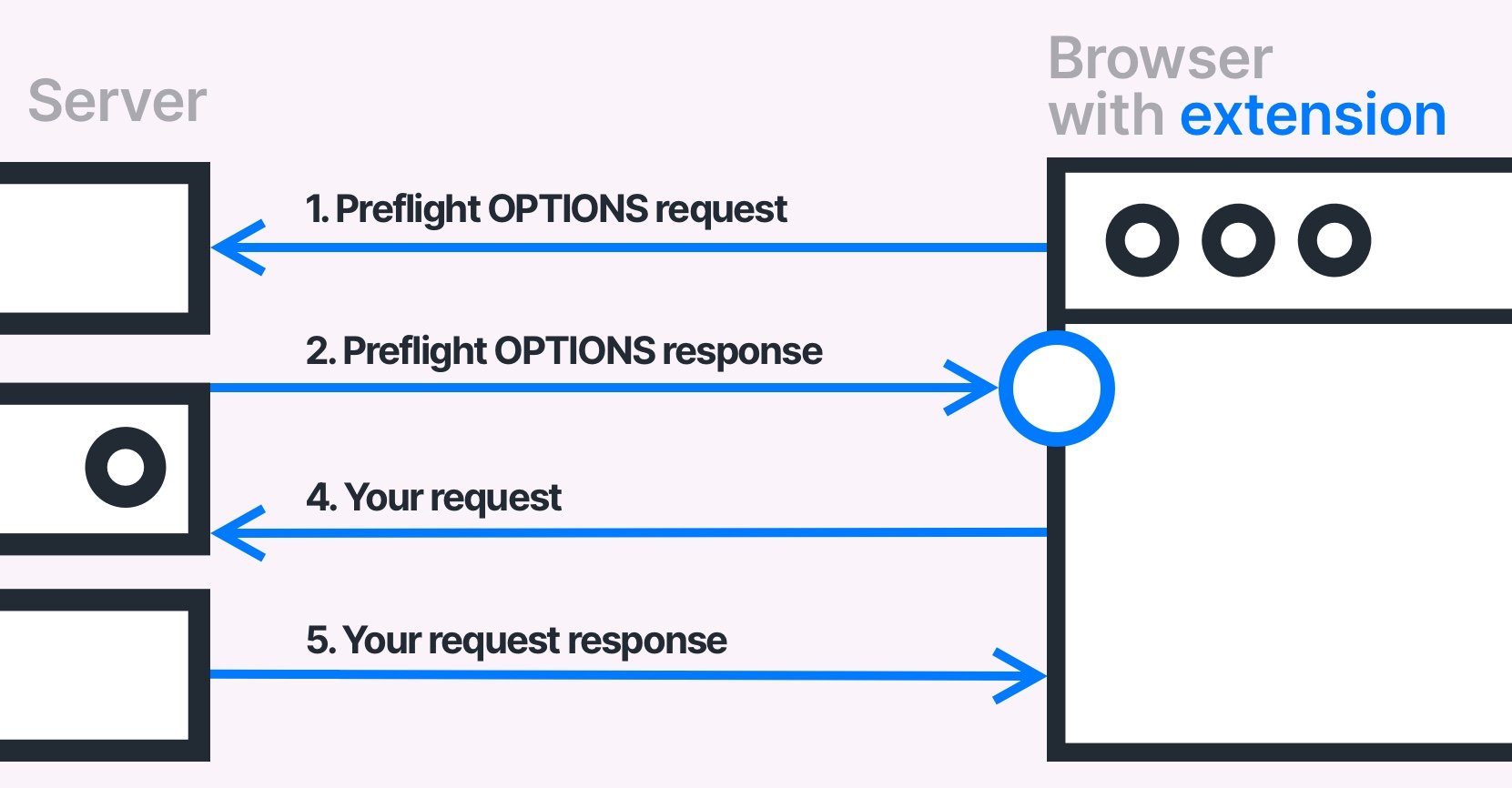
It's a handy solution to work locally with the production API that accepts requests only from the production domain.
Find them in the Google Chrome Web Store or Mozilla Add-ons Library.
In some cases, the default extension configuration might not be enough; make sure that the installed extension is configured properly.
Never leave these enabled in normal browsing, they disable a security feature designed to protect you.
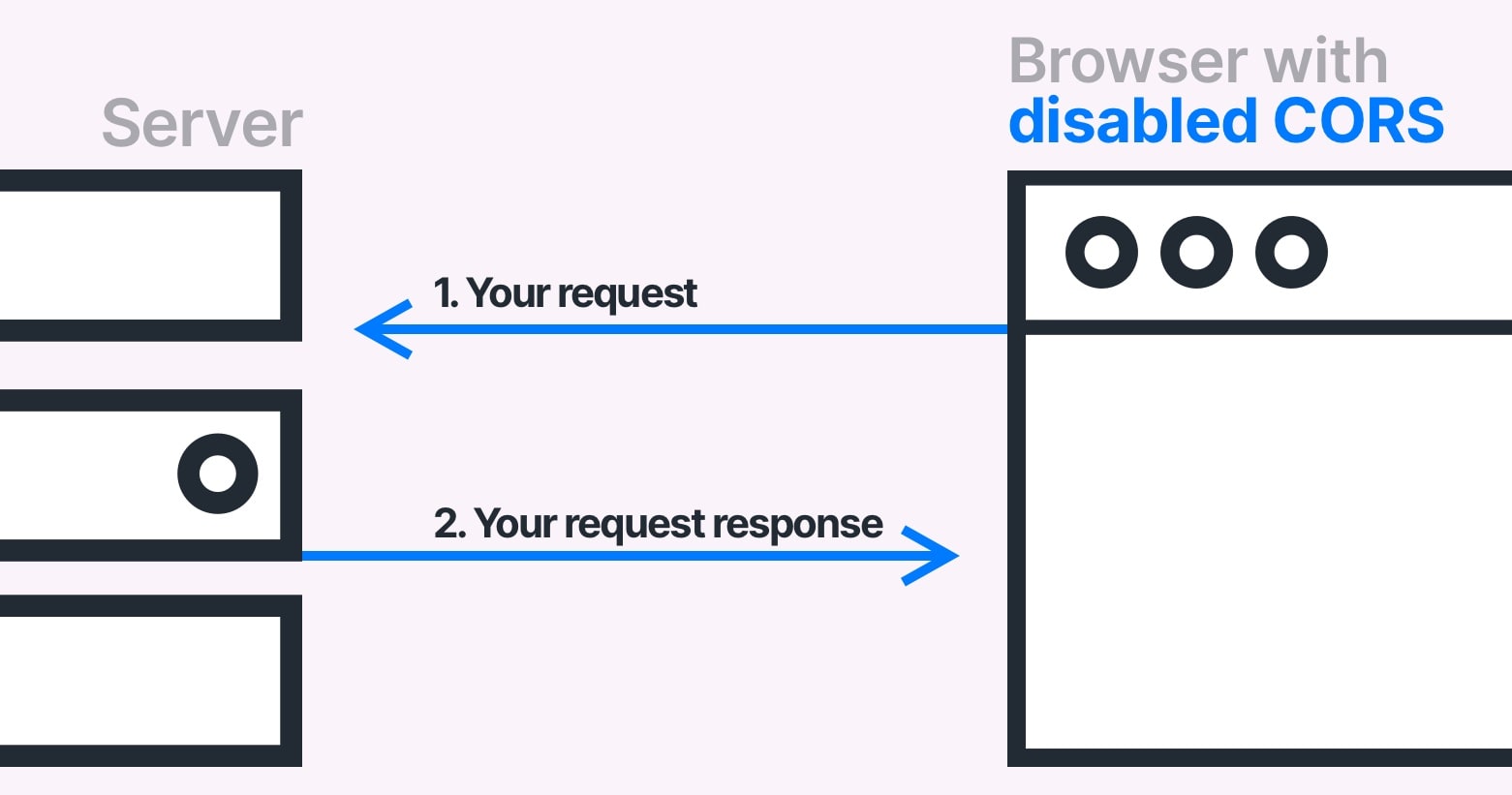
4. Disable CORS checks in Chrome (development only)
You can launch Chrome in an isolated sandbox with CORS enforcement disabled:
# Windows
chrome.exe --user-data-dir="C://chrome-dev-disabled-security" --disable-web-security --disable-site-isolation-trials

# macOS
open /Applications/Google\ Chrome.app --args --user-data-dir="/var/tmp/chrome-dev-disabled-security" --disable-web-security --disable-site-isolation-trials

# Linux
google-chrome --user-data-dir="~/chrome-dev-disabled-security" --disable-web-security --disable-site-isolation-trials
To disable CORS checks in Google Chrome, you need to close the browser and start it with the --disable-web-security and --user-data-dir flags.
By doing that, Google Chrome will not send CORS preflight requests and will not validate CORS headers.
These commands start Chrome in an isolated profile — they won't affect your main Chrome session. See the full list of available flags for Google Chrome.
How to test your CORS configuration
Browser DevTools:
Open the Network tab, find the OPTIONS preflight request, and check both its request and response headers. The browser console will also show the specific reason a CORS check failed.
Command line with curl:
curl -v -X OPTIONS https://simplelocalize.io/api/v1/translations \
  -H "Origin: https://yourapp.com" \
  -H "Access-Control-Request-Method: GET"
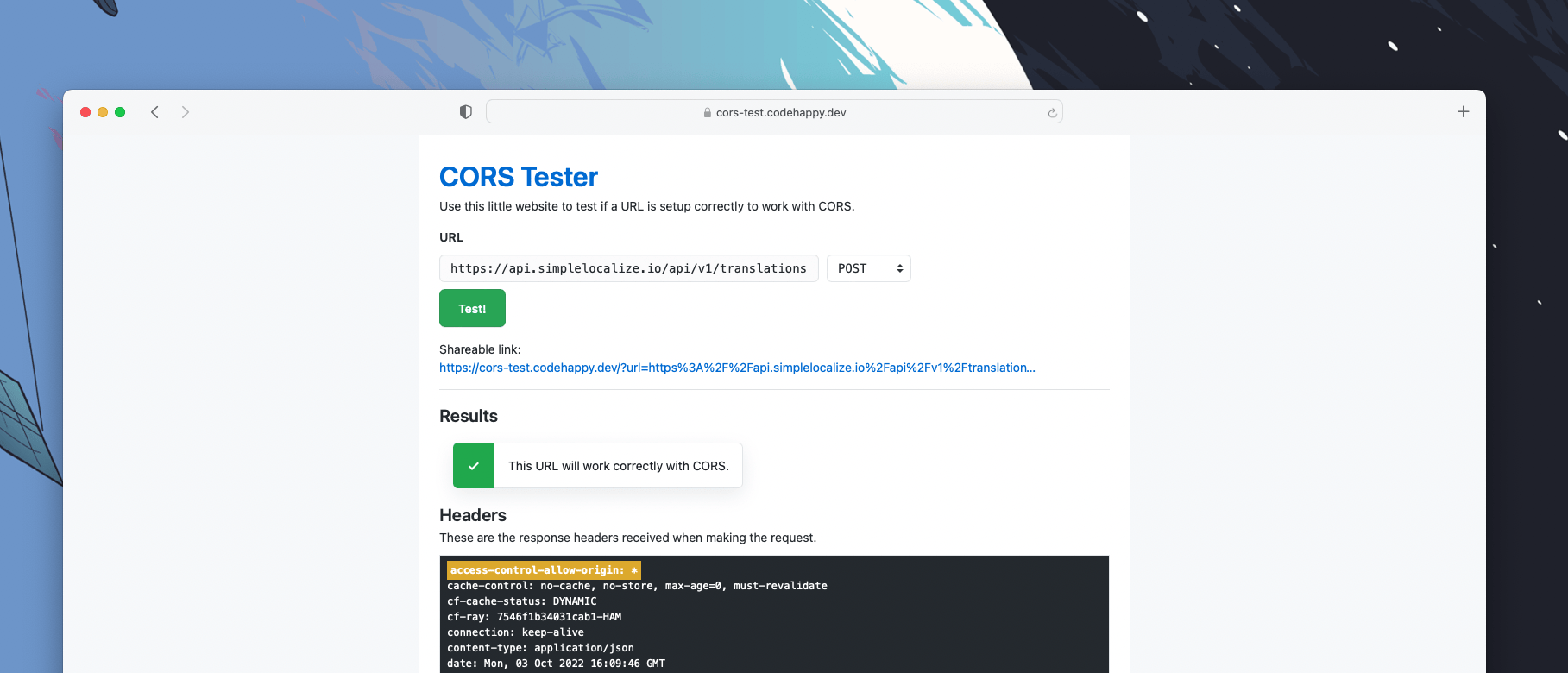
Web-based tester:
CORS Tester lets you check any endpoint without the command line.
Beware of false CORS errors
This is one of the most frustrating CORS debugging situations: you're staring at a CORS error in the console, but the actual problem is something else entirely.
When a request passes through a rate limiter, load balancer, auth proxy, or API gateway, that layer might reject the request with a non-2xx status code, but without returning any CORS headers. The browser then reports a CORS failure because the required Access-Control-Allow-Origin header is missing from the error response.
Common HTTP status codes that produce false CORS errors:
401 Unauthorized— missing or invalid auth token403 Forbidden— IP block, WAF rule, or permission issue429 Too Many Requests— rate limiter triggered500 Internal Server Error— server crashed before returning CORS headers- any other than 2XX or 3XX.
How to debug:
Always check the response status code first, not just the CORS error message. In Chrome DevTools, look at the actual response body — it often contains the real error from the upstream service.
Summary
| Scenario | What to do |
|---|---|
| You own the server | Add CORS headers server-side; handle OPTIONS preflight requests correctly |
| You use a CDN | Ensure CDN passes through CORS headers; add Vary: Origin |
| Third-party API without CORS | Build a server-side proxy |
| Development only | Use browser extension or disabled-security Chrome flag |
| Error on non-2xx response | Check status code — may be a false CORS error |
| Credentials + wildcard | Use exact origin, not *, when Allow-Credentials: true |
Conclusion
In this article, I tried to explain what CORS is, and what are the most common problems with it. I suggested 4 ways to fix CORS issues and explained the advantages and disadvantages of each one. I also explained how to configure CORS responses properly and how to test them. Moreover, I showed what are the most common issues with recognizing false CORS errors. I tried to put everything in simple terms and avoid technical nuances. If you have any questions, doubts, or suggestions, please do not hesitate to contact me.
Happy coding!