Notifications help you stay up to date with activity in your SimpleLocalize projects. You can receive in-app (Notification center) and email notifications about new comments, mentions, translation suggestions, and updates, without having to monitor the editor constantly.
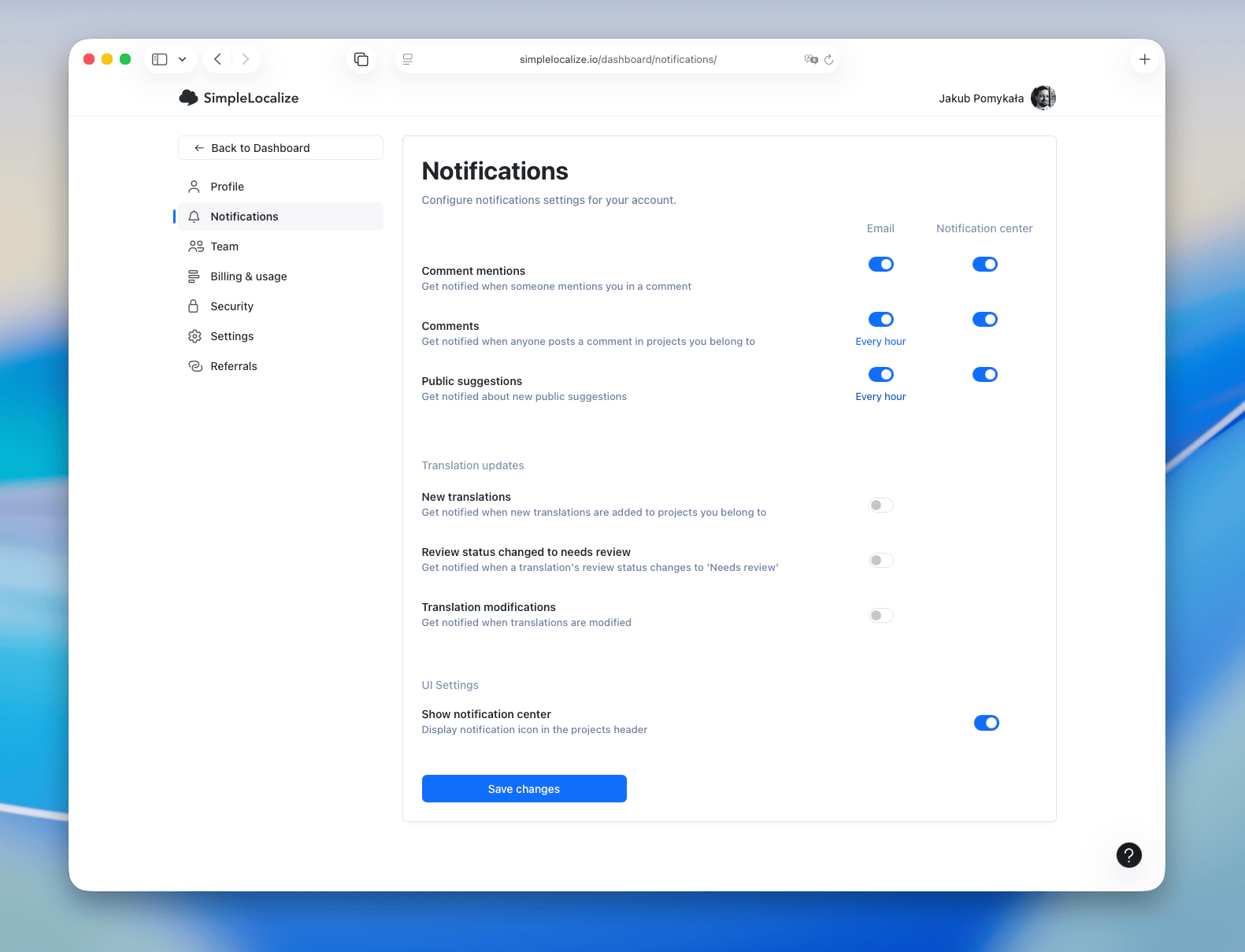
You can manage your notification settings in your user profile under Notifications.
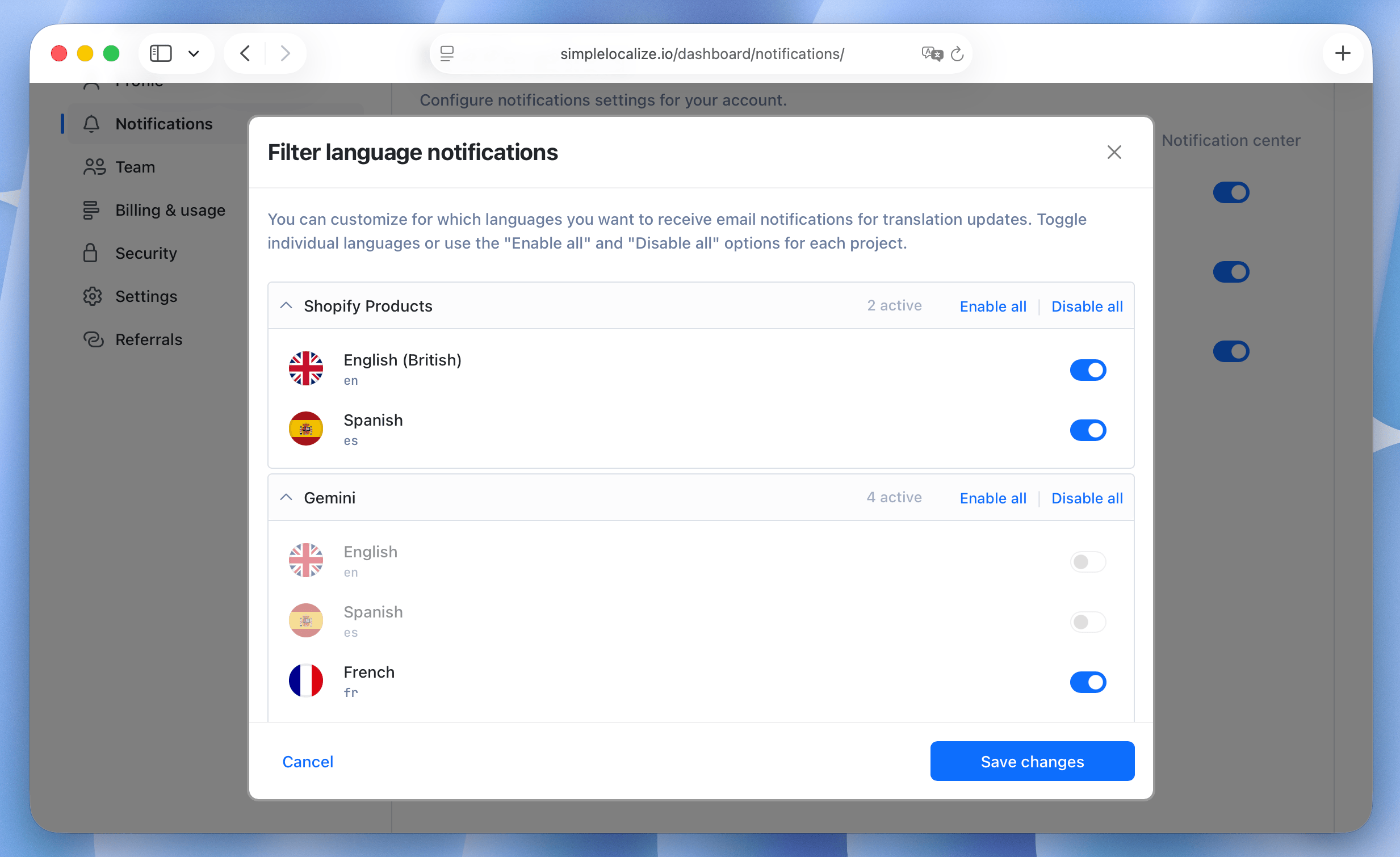
Fine-tune notifications for each project
You can customize notification preferences separately for each project you have access to.
The Fine-tune notifications for each project option allows you to:
- Enable or disable notifications per project
- Select which languages you want to receive notifications for
- Configure everything from a single, unified list of all projects you have access to
Language-based filtering applies to translation updates and other language-related notifications. You will only receive notifications for the languages you select. It does not apply to the translator summary.
Comments
Comments and suggestions notifications help you stay informed about discussions and feedback related to your translations.
Learn more about writing comments in the translation editor and public suggestions.
Mentions
Get notified only when you are mentioned in comments within your projects. They are sent immediately after the mention is made.
Comments
Get notified about any new comments added to translation keys in your projects. You can choose how often you want to receive these notifications: every hour, every 3 hours, daily, or weekly. In-app notifications are sent immediately.
Public suggestions
Get notified when new public suggestions are made for translations in your projects. You can choose how often you want to receive these notifications: every hour, every 3 hours, daily, or weekly. In-app notifications are sent immediately.
Translation updates
You can receive email notifications for key translation events, such as:
- when a new translation key is added,
- when an existing translation is updated,
- or when its review status changes to Need Review.
To adjust your preferences, open your user profile and go to Notifications.
Notifications are not sent to the user who performed the action.
To receive translation update notifications, translators must have the Change permission in the project and access to the relevant language. Project administrators and project owners always receive these notifications if they are enabled for their account. Translation updates are grouped by key, with language names listed below. Default languages appear first and are underlined.
Emails are sent at most once per hour and include up to 250 translation keys per batch.
New translations
New translations notifications are sent when new translation keys are added to your projects.
Needs review translations
Need review notifications are sent when a translation's review status changes to 'Need Review'. Users have to have permission to review translations, and the language for him must be visible.
Translation modifications
Translation modification notifications are sent when existing translations are updated in your projects. Users have to have permission to edit translations, and the language for him must be writable.
Translator summary
The translator summary is an email that tells translators what is waiting for them in a project: the number of missing translations, translations to review and translations with QA check issues in each of their languages. The email contains buttons that open the translation editor already filtered to missing, not reviewed or problematic translations.
Who receives the summary
- Only members of the project with the Translator role. People from other projects and people who have not accepted their invitation yet never receive it.
- Only languages the translator can edit (read and write access).
- Missing translations and issues are included only if the translator has the permission to change translations. Translations to review are included only if they have the permission to review translations.
- Issues are included only when quality checks are enabled in the project.
- Deprecated translation keys are skipped.
- Translators who have nothing to do in their languages do not receive an email.
- Translators who disabled email messages in their account do not receive the summary. Language selection from Fine-tune notifications for each project does not apply to it.
Daily summary
Project owners and administrators can turn on Daily summary for translators in project Settings → General. When it is on, the summary is sent every weekday (Monday to Friday) at 7:00 UTC. It is off by default.
A translator receives the daily summary only when something changed for them since their last summary. If nothing changed, the same summary is sent again at most once a week, as a reminder.
Notify translators manually
Project owners, administrators, and developers can send the summary right away with Notify translators in the project actions menu. Before sending, you see how many translators will be notified, and you can click the number to see who exactly. If nobody has anything to do, the button is disabled.
You can notify translators manually up to 5 times per hour in each project. A manual summary is always sent, even if nothing changed since the last one.
Activity
Every sent summary is recorded in the project activity as Translators notified, together with the number of notified translators. Project owners, administrators, and developers can expand the entry to see who was notified. Translators see only the number.
UI settings
If you are not interested in receiving any in-app notifications, you can hide the notification icon by disabling the Show notification center in the UI Settings section.