The role of context in AI translation: Why it matters and how to use it

Ask an AI model to translate the word "Home" on its own, and it has to guess. Is it a navigation button, or is it a house? Ask it to translate "spirit" without any surrounding information, and it has to guess again: a ghost, a mood, or a bottle of whiskey. Every one of these guesses can be wrong, and in a product with thousands of keys, a handful of wrong guesses becomes a real quality problem.
This is what context solves. Context is the information you give a translation engine beyond the raw string itself: what your product is, what a specific key is used for, what tone you want, and what should never be translated at all. With context done right, an AI model can produce translations that read nearly like a native speaker wrote them. When you skip it, you get technically correct sentences that feel off or sentences that are simply wrong.
This guide covers what context actually is in AI-powered localization, how it differs between machine translation engines and large language models, and how to structure it so your translations are accurate on the first pass instead of needing several rounds of review.
Ambiguity in language and why it matters
Human language is full of words and phrases that only make sense once you know the setting they're used in. A translation engine working purely on isolated strings has no setting to go on. It sees a sentence, and it has to produce output based on statistical patterns learned during training, with no idea what your product does or who reads the sentence it just translated.
A few examples make this concrete:
- "Home" in a navigation menu should map to a word meaning "start page" or "main screen." Translated as a building, it makes no sense in a sidebar.
- "Bank" in "Sitting by the bank" refers to a riverbank. Translated as a financial institution, the sentence becomes nonsensical.
- "Spirit" could mean a ghost, someone's mood, or a distilled drink, and each translates to a completely different word in most languages.
- A brand name like a product feature called "Pillow Menu" should often stay untranslated, but a generic translation engine has no way of knowing it's a proper noun rather than an ordinary phrase.
None of these are edge cases you'll rarely hit. Product UIs are full of short, decontextualized strings exactly like this: single words in buttons, labels, and menu items where the surrounding sentence that would normally disambiguate the meaning simply isn't there.
What context means in practice
In modern localization platforms, context is delivered to the translation engine in a few distinct layers, each solving a different part of the ambiguity problem.
Project-level context
This is a description of your product as a whole: what it does, who uses it, and what tone it should have. Something like "a fintech app for Gen Z users, informal and friendly tone" tells the model how to translate not just individual words, but the overall register of every string it touches.
In SimpleLocalize, this lives in two places depending on the provider you're using:
- For OpenAI and OpenRouter models, it's the AI Context field in Auto-translation settings.
- For DeepL, it's the Project context field in DeepL settings area.
The distinction matters because OpenAI and OpenRouter are general-purpose language models that accept a system prompt the way any LLM API call does, while DeepL is a dedicated machine translation engine with a narrower, sentence-based context field. DeepL's own guidance is specific here: context should be written as 2 to 5 complete sentences, in the same language as the source text, describing the content rather than issuing commands. An instruction like "do not translate this term" doesn't belong in a DeepL context field; that's what a glossary is for, which we'll get to below.
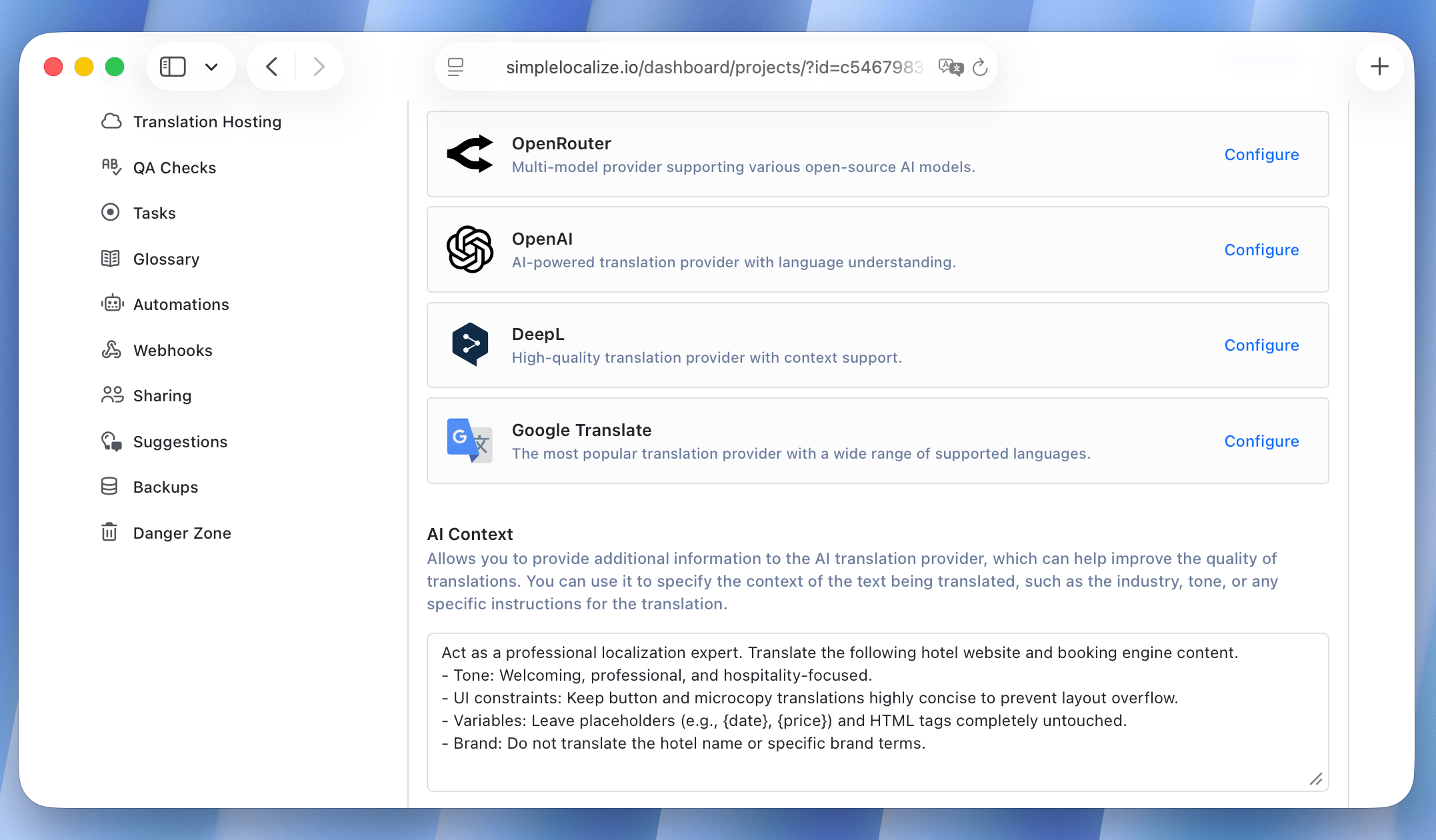
You can also provide additional context for specific languages in SimpleLocalize. This is useful if your product has a different tone or audience in one language versus another, or if you want to provide a more detailed description for a language that has more ambiguity than others.
Key-level context
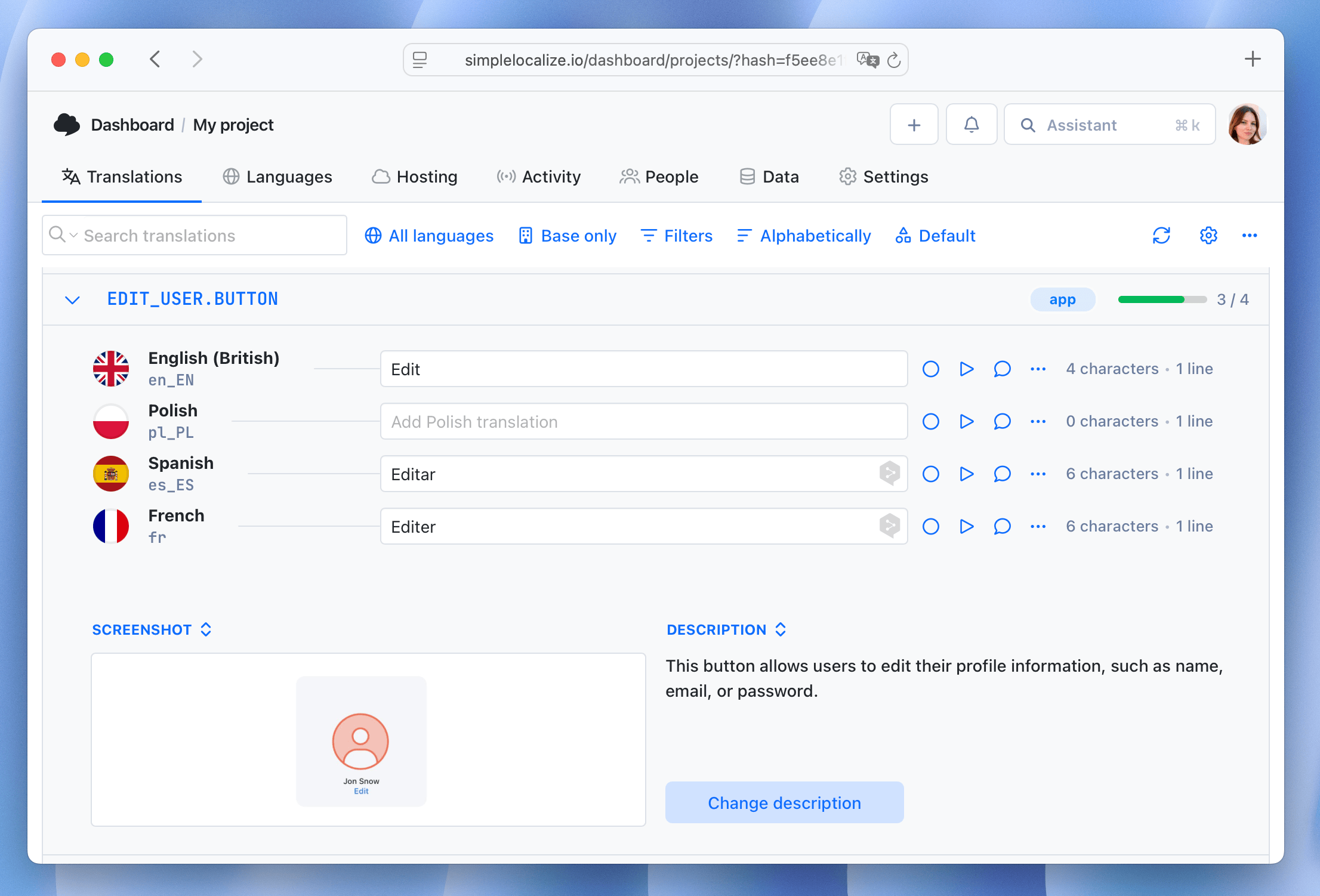
Project context sets the tone for everything, but some individual strings need their own explanation. This is where translation key descriptions come in. If you have a key called HOME_NAV_BUTTON, adding a description like "Navigation button, not a building" removes the ambiguity for that specific string without cluttering your project-wide prompt with exceptions.
SimpleLocalize automatically includes translation key descriptions, tag descriptions, and character limits as part of what gets sent to the AI model during auto-translation, on top of whatever project-level context you've configured. That means a short, well-written description on an ambiguous key does real work without any extra setup.
Constraint context
Context isn't only about meaning: it also covers constraints the AI has to respect. A character limit tells the model it can't produce a translation that will overflow a button. Placeholder and variable syntax tells it which parts of the string must be preserved exactly as they are, regardless of language. These constraints get passed alongside the descriptive context so the model treats them as hard rules rather than suggestions.
Terminology context: glossaries
Project and key context handle meaning and tone, but they're not the right tool for enforcing an exact, repeatable translation of a specific term every single time. That's what glossaries are for. A glossary is a set of predefined translations for specific words or phrases, and AI models and DeepL apply these during translation so that a brand name, product feature, or piece of technical jargon is translated the same way across your entire project, every time.
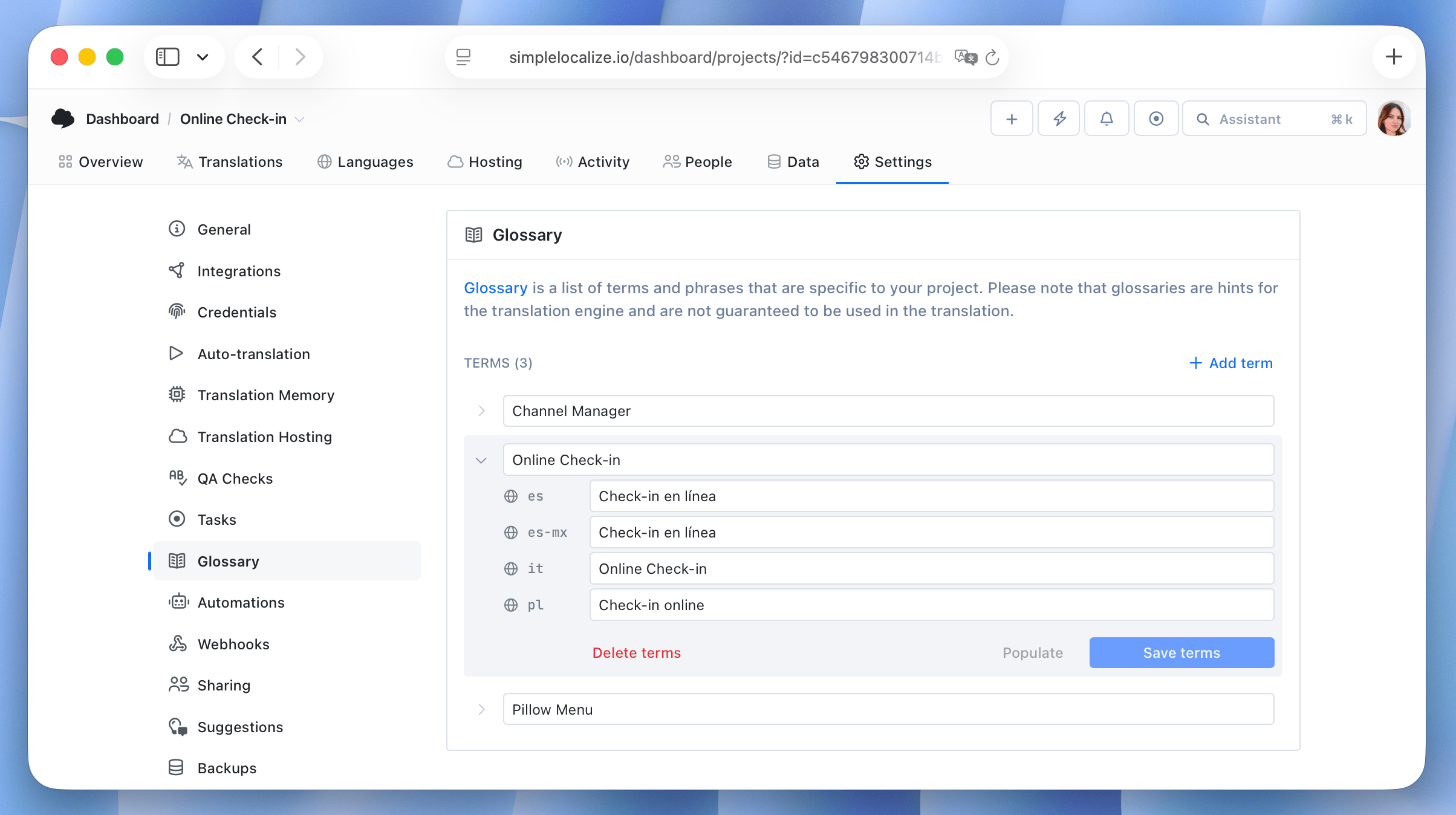
If you're setting up terminology consistency in more detail, our guide on DeepL glossaries in auto-translation walks through creating entries, common setup issues, and real examples of glossary terms changing translation output.
Machine translation vs LLM context
DeepL and Google Translate are trained specifically for translation. They're fast and consistent, but the way they accept context is narrower: DeepL's context field is a short passage of descriptive sentences, and it has no concept of a conversational instruction.
OpenAI and other models available through OpenRouter are general-purpose language models. Because they're built to follow instructions, they accept a full system prompt, which means you can be far more specific: describe your audience, specify formality per language, ask for shorter translations where space is tight, or request a particular register for marketing copy versus transactional UI text. This flexibility is also why LLMs tend to be the better choice for nuanced content like onboarding flows or marketing pages, while a dedicated MT engine can be a fast, cost-effective baseline for high-volume UI strings where nuance matters less.
In practice, many teams use both: DeepL or Google Translate for bulk translation of straightforward strings, and an LLM with a detailed system prompt for the smaller set of keys where tone and context genuinely change the outcome.
A simple before-and-after example
Take a settings screen for a printer application, with a key for the label next to a dropdown:
key: PRINTER_DRIVER_LABEL
en: "Driver"
Translated without any context into German, a model has no way of knowing this is a piece of software. "Driver" also means someone who drives, so a plausible output is "Fahrer", the word for a person behind the wheel. That's a perfectly correct translation of the word in isolation, and it makes no sense next to a dropdown of print driver versions.
Now add a key description:
key: PRINTER_DRIVER_LABEL
description: "Software driver for the printer hardware, not a person"
en: "Driver"
With that one sentence of context, the correct translation becomes "Treiber", the term German software actually uses for a device driver. The same ambiguity shows up in French ("pilote" the software vs. "conducteur" the person) and in Polish ("sterownik" vs. "kierowca"). None of these are obscure languages or rare word pairs. They're the kind of everyday, technical vocabulary that shows up constantly in settings pages, and a model translating strings in isolation has no signal to pick the right one without a description telling it which domain it's in.
Common context mistakes
A few patterns show up repeatedly when teams first start configuring context, and they're worth watching for:
- Writing context that's too vague to help.
"Translate this well" gives the model nothing to act on. Describe the actual product, audience, and tone instead. - Putting commands into a DeepL context field.
DeepL's context field expects descriptive sentences, not instructions. If you need to force a specific term or exclude something from translation, use a glossary instead. - Skipping key-level context for genuinely ambiguous strings.
Project-level context can't disambiguate every short string on its own. A one-line description on the handful of keys that need it goes a long way. - Writing project context in a different language than the source text.
DeepL specifically expects context in the same language as the text being translated; mismatched languages reduce how useful the context actually is. - Treating context as a one-time setup step.
As your product evolves, tone and terminology shift too. Revisiting your project-level context occasionally keeps it aligned with how your product actually talks to users today.
Building a context strategy for your project
A practical approach that scales reasonably well as a project grows:
- Write your project-level context once, covering what the product is, who it's for, and the tone you want. Keep it to a few sentences.
- Add key-level descriptions only where ambiguity actually exists. Short UI labels, buttons, and any string that could plausibly mean more than one thing are the highest priority. You don't need a description on every key.
- Set character limits on keys with strict UI space so the model doesn't produce translations that overflow their container.
- Use a glossary for brand names, product-specific terminology, and any term that must stay consistent and, in some cases, untranslated across every language.
- Review output for your most ambiguous or highest-visibility strings first. These are the keys most likely to need a context adjustment, and fixing context there has the biggest payoff.
Conclusion
Context is what separates AI translation that merely produces grammatically correct sentences from AI translation that actually sounds right for your product. It works in layers: project-level context sets the overall tone, key-level descriptions resolve individual ambiguous strings, character limits and placeholders enforce technical constraints, and glossaries lock down exact terminology. None of these layers is complicated to set up on its own, but used together, they turn a raw translation engine into something that understands your product well enough to translate it accurately.
For the step-by-step walkthrough of configuring System prompt and Project context fields in SimpleLocalize, see ChatGPT and DeepL translation context in auto-translation. For terminology-specific context, read DeepL glossaries in auto-translation. And for the full picture of how AI and machine translation fit into a production localization pipeline, from provider selection to caching to MCP-based workflows, see our complete AI and machine translation guide.