AI and machine translation for software localization: The complete guide

Automated translation has gone from a party trick to a core part of how software ships globally.
A developer pushes a new feature on a Monday morning. By Monday afternoon, an AI has translated every new string into fourteen languages, TMS reviewed them against character limits and placeholder rules, and published them to production via a CDN. No spreadsheets, no waiting on a vendor.
This guide explains how that pipeline actually works: the difference between machine translation and AI translation, when each is the right tool, how to get quality that holds up in production, and how to automate the whole process without trading quality for speed.
Who this guide is for
- Developers integrating automated translation into CI/CD workflows
- Product and localization managers choosing between MT and AI providers
- SaaS teams scaling from a handful of languages to dozens
- Founders evaluating whether automated translation can replace or supplement human translators
If you are looking for the strategic layer (market prioritization, ROI, team structure), start with the localization strategy guide first. For the engineering foundation underneath all of this, the i18n technical guide covers translation key architecture, file formats, and framework integration in depth. If pricing is the next question, compare the provider math in our translation cost breakdown.
Machine translation vs AI translation: What is the difference?
These two terms describe meaningfully different technologies with different strengths and failure modes:
-
Machine translation (MT) refers to specialized neural translation systems trained specifically on bilingual text corpora. DeepL and Google Translate are the dominant examples. These systems are fast, consistent, and cost-effective. They operate on individual sentences or segments, producing high-quality output for clear, well-structured prose. Their weakness is context: they have limited ability to understand what a string means in the context of your product.
-
AI translation uses large language models (LLMs) such as GPT-4, Claude, or Gemini that were trained on vast amounts of general text and are capable of following instructions. When you give an LLM a translation request along with context about your product, the audience, the tone, and what the string does in the UI, it can produce translations that feel native in a way that pure MT often cannot.
The practical distinction shows up in cases like this (MT is Google Translate):
| String | MT output (Spanish) | AI output (Spanish, with context) |
|---|---|---|
| "Home" | "Hogar" (the physical home) | "Inicio" (the navigation label) |
| "Free" | "Gratis" (free of charge) | "Libre" (free as in unoccupied, if the context is a hotel booking app) |
| "Exit" | "Salida" (generic exit) | "Salir" (if the context is a navigation button), or "Cerrar" (if the context is a modal close button) |
Context is the difference. MT systems cannot know that "Home" is a navigation label unless you tell them explicitly. LLMs, with the right context payload, can infer the correct meaning and produce the right word. If you want a deeper breakdown of context layers and real ambiguity examples, read why context matters in AI translation.
Neither approach is universally better. The right choice depends on the content type, the quality requirements, and the available context. More on that in the section on choosing a strategy.
If you want a shorter, implementation-first version of this decision, read AI translation for software teams: MT engines vs. LLMs vs. local models.
For a detailed side-by-side comparison with real output examples, see AI vs MT: Auto-translation comparison with examples.
How machine translation works
Modern MT systems are built on neural networks, specifically encoder-decoder transformer architectures trained on hundreds of millions of bilingual sentence pairs.
When a string arrives, the MT system encodes it into a high-dimensional representation, then decodes that representation into the target language. The model has learned statistical patterns for how words and phrases map across languages, but it has no persistent understanding of your product, your users, or what the string does in context.
This is why MT performs well on content with clear, unambiguous meaning (documentation, legal text, product descriptions) and struggles with short UI strings where a single word could mean different things depending on where it appears.
MT systems do improve with glossaries: predefined term pairs that tell the engine to always translate a specific source term as a specific target term. DeepL, for example, supports glossaries at the project level. If you have product-specific terminology that must be consistent across your UI (your product name, feature names, technical terms), glossaries are essential. See the guide on DeepL Glossary in auto-translation for setup instructions and practical examples.
For a comparison of the main MT providers and their strengths, see list of AI and machine translation providers.
How LLM-based AI translation works
LLMs approach translation differently. Rather than operating on a fixed statistical model, they generate output based on a prompt. That prompt can contain anything: the source string, context about the product, tone instructions, character limits, placeholder rules, and examples of desired output.
This is both the strength and the complexity of LLM translation.
The strength: given good context, an LLM can produce translations that are contextually accurate, tonally consistent, and aware of constraints. It can translate "Home" correctly as a navigation label, keep a marketing headline under 30 characters, preserve {{name}} placeholders intact, and match the informal tone you've specified for your fintech app.
The complexity: without good context, LLMs produce inconsistent, drift-prone output. Run the same string through GPT-4 twice without locking the context and you may get two different translations. This is why naive copy-paste workflows (dump your JSON into ChatGPT, copy the output back) break down at any meaningful scale.
The solution is a structured context system that sends a consistent, well-defined metadata payload with every translation request. SimpleLocalize's AI translations handle this automatically, including project-level descriptions, key-level notes, character limits, and tone instructions, so you define context once and every translation request inherits it.
The role of context in AI translation quality
Context is the single most important factor in AI translation quality, and it is the most commonly neglected one.
When you send a raw string to an LLM without context, you are asking it to guess. The model does not know if "Free" means free of charge or free as in unoccupied. It does not know if you are translating a mobile game, a legal platform, or an e-commerce checkout flow. It does not know if your audience expects formal address ("Sie" in German) or informal ("du").
-
Project-level context tells the model what your product is, who it is for, and how it should sound. A project description like "a project management tool for remote engineering teams, conversational tone" shapes every translation in the project without any additional effort.
-
Key-level context provides string-specific guidance. A description on the key
nav.homethat says "navigation button in the top menu, not a reference to a physical home" eliminates the most common AI translation error for that string type. -
Constraint context tells the model about hard limits it must respect: character limits for buttons with fixed-width containers, placeholder syntax that must not be altered (
{name},{{count}},%s), and HTML tags that must be preserved. -
Tone instructions specify formality level, regional preferences (Brazilian Portuguese vs European Portuguese), and industry-specific register.
When these four layers are combined, AI translation quality improves substantially and review cycles shrink. For a practical walkthrough of how to structure translation context, see ChatGPT and DeepL translation context in auto-translation. For a longer, strategy-first explanation of project context, key descriptions, constraints, and glossaries, see the role of context in AI translation.
AI translation quality: How to measure and improve it
Knowing your translations went through an LLM is not the same as knowing they are good. Quality measurement is a discipline, and it applies to AI output just as it does to human translation.
Automated quality checks
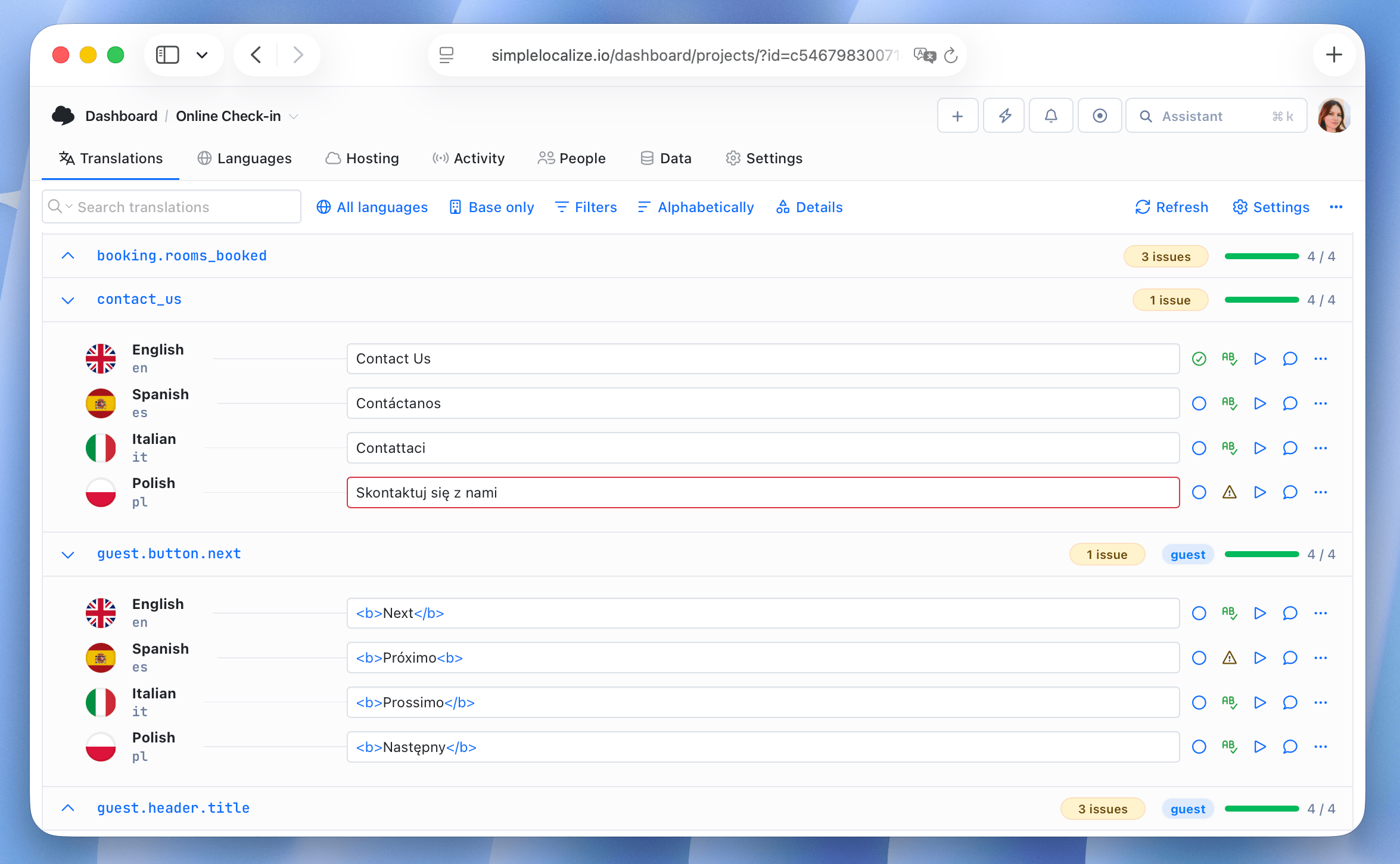
The first layer of quality assurance should be automated. Common automated checks for AI-translated strings include:
- Placeholder preservation: does the translated string contain all
{name}and%splaceholders from the source? - Character limit compliance: does the translated string fit within the specified character budget?
- HTML tag integrity: are opening and closing tags preserved and correctly nested?
- Length ratio: is the translated string within a reasonable ratio of the source string length? Extreme outliers often indicate a translation error.
- Capitalization and punctuation: does the translation follow the same capitalization pattern as the source? Are punctuation marks preserved?
SimpleLocalize's QA checks run these validations automatically and flag strings that fail before they reach production.
Human review for high-stakes content
Automated checks catch structural errors. They do not catch subtle tone drift, cultural awkwardness, or incorrect terminology that is technically valid but wrong for your product.
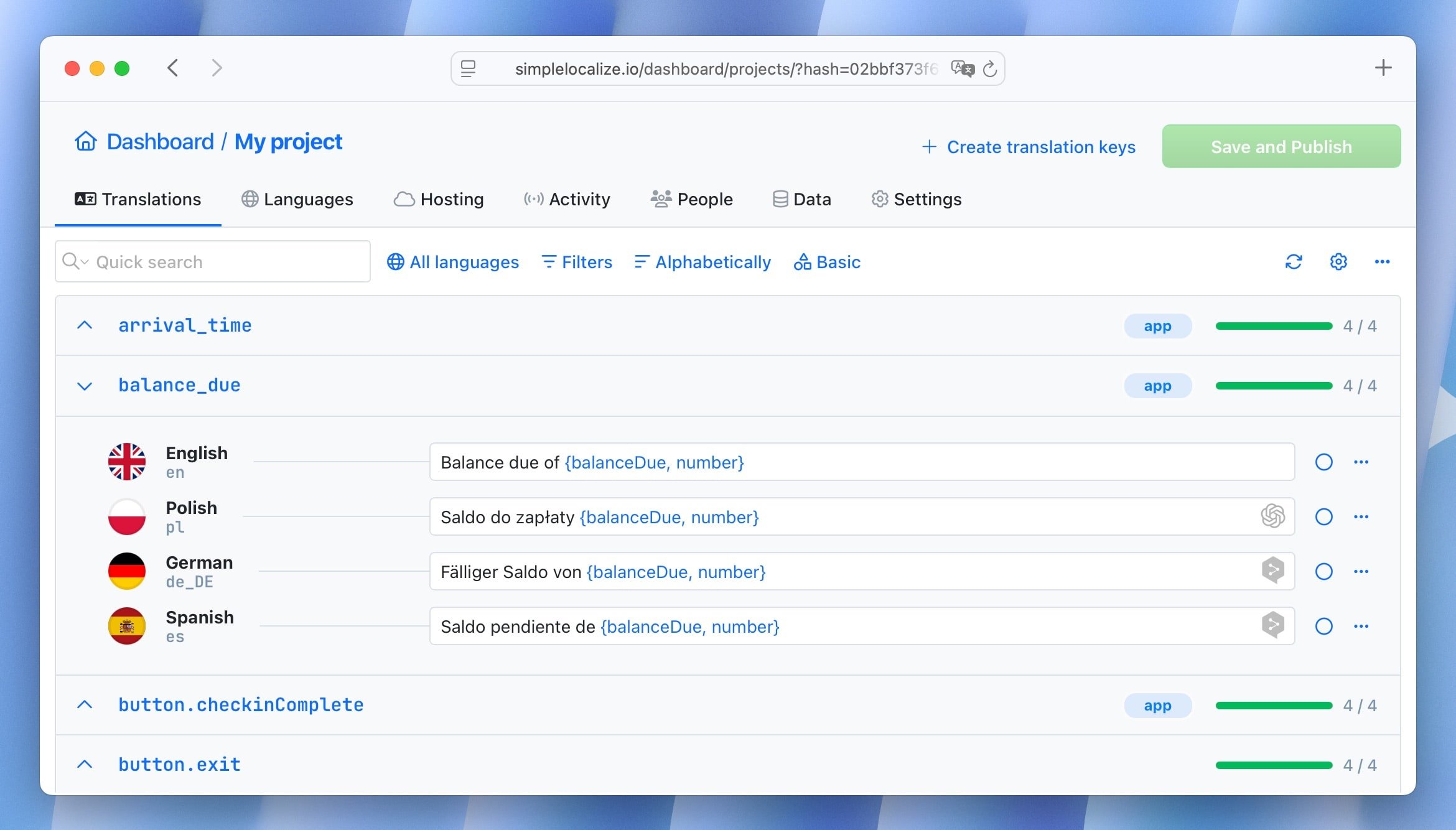
For content categories where errors carry significant consequences (legal notices, pricing copy, onboarding flows, healthcare instructions), human review of AI output is not optional. The efficient workflow is: AI produces the first draft, a human reviewer checks for accuracy and tone, and approved strings are locked so they are never re-translated unless the source changes.
This hybrid approach is often called AI post-editing: a translator reviews and corrects AI output rather than translating from scratch. It is typically 30-50% faster than full human translation and significantly more accurate than unreviewed AI output for content categories where nuance matters.
Translation memory as a quality anchor
Translation memory stores previously approved translations and reuses them when identical or similar strings appear. This is critical for quality consistency. Once a string has been approved, you want to ensure that the same translation is used every time that string appears, regardless of how many AI translation runs happen afterward. This prevents the "drift" problem where repeated AI translation of the same string produces slightly different outputs over time.
Smart caching and delta translation: Why re-translating everything is a bad idea
One of the most common mistakes teams make when adopting AI translation is re-translating their entire translation file on every run. This has two problems.
-
It is expensive. A project with 2,000 keys in 10 languages generates 20,000 translation units. If only 20 strings changed in a release, you are paying for 19,980 unnecessary translations.
-
It introduces quality drift. Each time you run an LLM over a previously approved string, there is a chance the output changes slightly. "Submit" becomes "Send", "Dashboard" becomes "Overview". None of these changes are wrong, but they are inconsistent with your approved translations. Over time, this drift erodes the consistency of your product's voice.
The solution is delta translation: identify only the strings that have changed since the last translation run, and send only those to the model. Everything else is served from the translation memory cache.
SimpleLocalize tracks key-level change history. When you trigger translation, the system calculates the delta: new keys with no translations, modified source strings, and keys where the translation has been manually cleared. Only that subset goes to the AI. A project with 2,400 keys where 3 changed sends 3 strings to the model, not 2,400.
For teams doing rough estimates: use the auto-translation cost estimation calculator to model token costs before committing to a provider.
Choosing a translation strategy
Not all content in a software product deserves the same translation approach. A pragmatic strategy allocates effort and cost proportionally to the impact of quality.
Content tiers and recommended approaches
-
Tier 1: High-stakes user-facing copy
Marketing headlines, onboarding copy, error messages that affect trust, pricing pages, legal notices. These require either human translation or AI translation with human review. Quality errors here damage user trust and conversion rates. -
Tier 2: Standard UI strings
Button labels, form field placeholders, navigation labels, status messages. AI translation with context and automated QA is appropriate. These strings are short, the context can be specified precisely, and quality issues are usually easy to catch automatically.
UI strings present unique challenges compared to prose: ambiguous meanings, tight character limits, and tone-dependent phrasing. See how context and constraints fix machine translation of UI copy for detailed solutions.
-
Tier 3: High-volume, low-stakes content
Log messages, admin-only strings, developer-facing tooltips, internal tools. MT (DeepL or Google Translate) at scale is appropriate. Speed and cost matter more than nuance. -
Tier 4: Technical strings
Error codes, API response messages, strings with heavy placeholder use. These need careful placeholder preservation rules, but the linguistic quality bar is lower. MT with strict QA checks is usually sufficient.
This tiered approach means you are not choosing between "all AI" or "all human." You are routing each content type through the most appropriate translation method.
When MT is enough
MT (DeepL, Google Translate) is the right tool when:
- The content is well-structured prose with clear meaning
- Speed and cost are the primary constraints
- You have glossaries set up for product-specific terminology
- Automated QA checks cover your quality requirements
MT is a poor fit when:
- Short UI strings require disambiguation (is "Home" a building or a navigation target?)
- Tone instructions are important (formal vs casual, regional register)
- Character limits are tight and must be respected
- The product domain is specialized and the model needs guidance
When LLM translation is worth the cost
AI translation via LLMs is the right tool when:
- Context is available and can be structured (project description, key-level notes)
- Tone consistency matters for brand voice
- The content category benefits from instruction-following (marketing copy, onboarding)
- You are working with a model via OpenRouter and can mix approaches per language or content type
The cost difference between MT and LLM translation is real but often smaller than expected once delta translation is in place. For recent pricing comparisons and token math, see how much does AI translation cost? DeepL, Google Translate, OpenAI compared and our DeepL, Google Translate, and OpenAI comparison.
AI translation providers: Strengths and trade-offs
Choosing a provider is not a permanent decision, especially if you route through an aggregator like OpenRouter. But understanding the trade-offs helps you make sensible defaults.
-
DeepL is the best general-purpose MT engine for European languages. Its output quality on German, French, Spanish, Italian, and Portuguese is consistently above Google Translate. It supports glossaries, formality controls, and handles technical content well. Less strong on Asian languages and less capable at following nuanced tone instructions.
-
Google Translate has the broadest language coverage of any provider. 100+ languages including low-resource languages where DeepL has no support. Quality is strong but slightly behind DeepL for European language pairs. Best choice when language coverage is the primary constraint.
-
OpenAI (GPT-4o, GPT-4) excels at instruction-following and contextual understanding. The best choice for marketing copy, onboarding text, and anything requiring tone adaptation. More expensive than MT at scale and slower for bulk operations. Smart caching is essential to make the cost manageable.
-
Anthropic Claude performs particularly well on nuanced, long-form content and is strong at following complex instructions. Good for content where the translation needs to reflect careful reasoning about meaning, not just surface-level word substitution.
-
Google Gemini offers a strong cost-to-quality ratio for high-volume UI string translation. Faster and cheaper than GPT-4 for bulk tasks. Less strong on highly nuanced copy.
-
OpenRouter is a unified API that routes requests to any of the above (plus Llama, Mistral, Gemma, and dozens of others) through a single endpoint. The advantage is flexibility: you can use fast, cheap models for tier-3 content and premium models for tier-1 copy, in the same workflow, without managing multiple integrations.
-
Local models via Ollama are the right choice for teams that cannot send translation data to external APIs. Regulatory requirements, NDA-protected content, or internal policy may prevent cloud API use. Models like Llama 3.1, Mistral, or Gemma run locally and produce reasonable quality for many content types, though they trail the frontier models on nuanced copy.
For a structured comparison of these providers with examples, see AI vs MT: Auto-translation comparison with examples and the list of AI and machine translation providers.
Handling UI-specific challenges in AI translation
Software UI strings have characteristics that make them harder to translate than prose. These are the most common sources of quality problems in automated translation.
Placeholders and interpolation
UI strings frequently contain interpolated values: {name}, {{count}}, %s, %(key)s, <0>link text</0>. Automated translation must preserve these exactly. An LLM that translates Hello, {name}! as Hallo {Vorname}! has broken the runtime interpolation.
Prevention strategies:
- Pass placeholder rules as constraints in the context payload
- Run automated QA checks that compare placeholder sets between source and translation
- Use format-aware translation requests that specify the placeholder syntax (e.g., "Preserve all
{{double_curly}}placeholders in the output")
Pluralization and gender
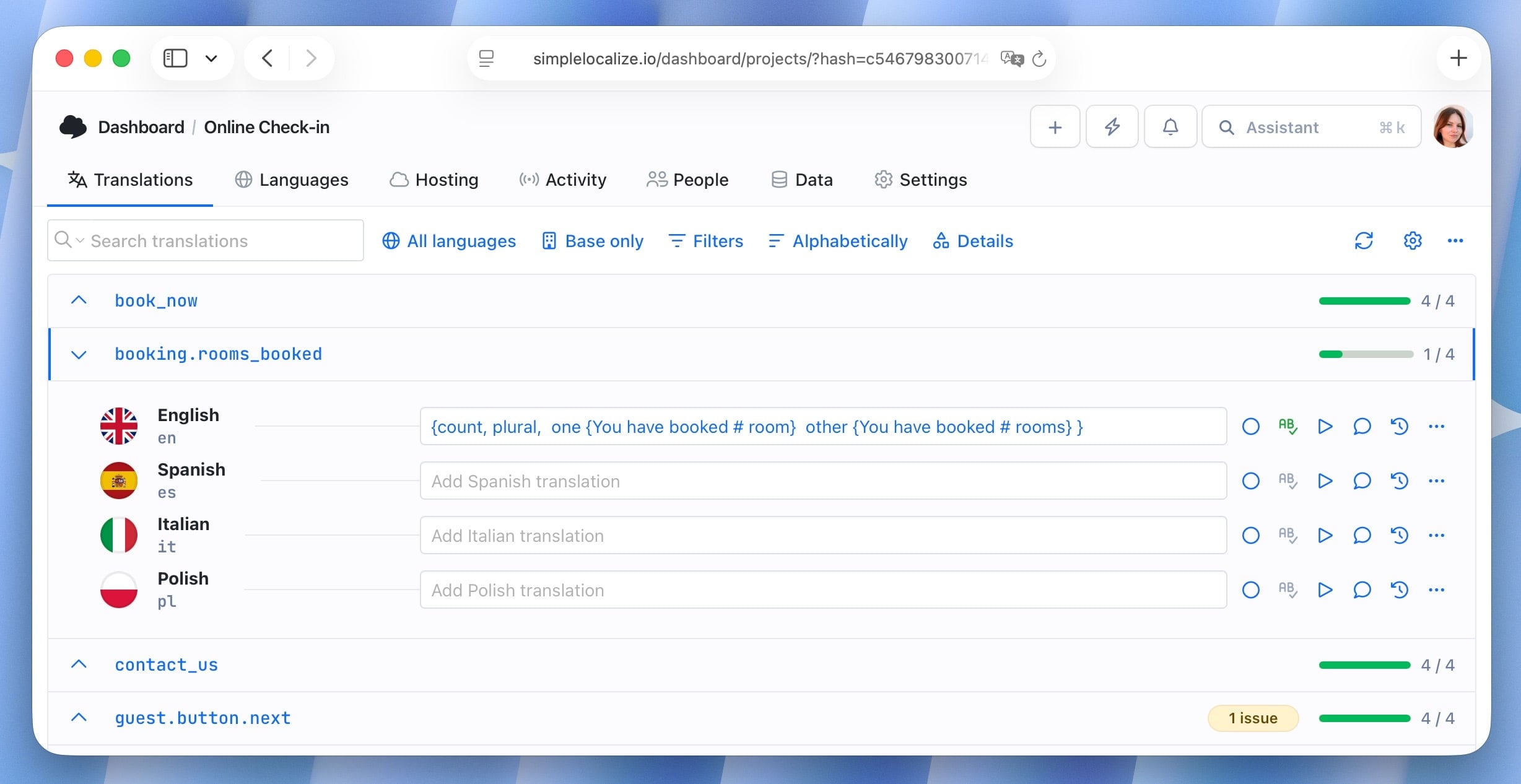
Many languages require more plural forms than English. Polish has three (one, a few, many), Arabic has six. Gender agreement affects word forms across entire sentences in languages like French, Spanish, and German.
MT and LLM systems can handle pluralization correctly if you provide the plural form structure, but they need explicit guidance. If you pass a single English string without ICU format, the model may produce a single-form translation that is grammatically wrong for all quantities other than the one it guessed.
The right approach is to use ICU message format in your translation files and pass the full plural structure to the model. See how to handle pluralization across languages and the ICU message format guide for implementation details.
Character limits
Mobile UI buttons, notification strings, and some web elements have hard character limits. A German translation of "Submit" can easily run to 15 characters if the model is not told to stay short. Character limit constraints passed in the context payload allow the model to optimize for brevity.
When the model cannot satisfy both accuracy and the character limit, it should flag the string for human review rather than silently truncating. Automated QA catches violations, but better to prevent them at generation time.
HTML tags in translation strings
Some translation strings contain HTML: "Please <a href='/help'>contact support</a> if you have questions." Models must preserve tag structure without translating attribute values or altering tag nesting. This is an area where automatic post-processing validation is essential, since even capable models occasionally restructure tags when the surrounding sentence grammar changes significantly.
For practical advice on structuring AI translation requests to handle these cases, see tips for effective auto-translation in software localization.
Translation memory: What it is and why it matters for AI localization
Translation memory (TM) is a database of previously translated segments. When a new translation request arrives, the system first checks the TM for an identical or closely matching source string. If a match exists above a configured threshold, the stored translation is reused rather than sent to the AI.
In a pre-LLM world, TM was primarily a cost and consistency tool for human translation workflows. In AI workflows, it serves both of those purposes plus a third: quality anchoring.
Each time an LLM translates a string, there is variance in the output. Two runs of the same string may produce slightly different but both acceptable translations. Over a product lifecycle, this variance accumulates into inconsistency. Translation memory eliminates this by ensuring that once a string has been approved, the same translation is used every time that string appears, regardless of how many AI translation runs happen afterward.
TM also handles fuzzy matching: strings that are similar but not identical to a stored segment. "Click the button to save" and "Click the button to submit" are a fuzzy match. The system can suggest the stored translation as a starting point, reducing the work the AI (or a human reviewer) needs to do.
Translation memory is not the same as smart caching, though they are related. Smart caching prevents re-translating strings that have not changed. Translation memory stores and retrieves translations for reuse across different contexts, projects, or over time.
AI post-editing: How to integrate it into your workflow
Post-editing is the process of reviewing and correcting machine-generated or AI-generated translations. It is the most practical way to combine the speed of automated translation with the accuracy of human review.
There are two levels:
-
Light post-editing focuses on errors that affect usability: broken placeholders, wrong terminology, character limit violations, and obvious mistranslations. A reviewer skims AI output looking for structural problems and flags anything that requires more than a minor edit. This is appropriate for tier-2 and tier-3 content.
-
Full post-editing treats the AI output as a first draft that a translator refines to meet the quality standard of the original human translation. This is appropriate for tier-1 content (marketing copy, legal text, high-trust UI flows) where brand voice and accuracy are both critical.
In either case, the workflow is: AI translates, reviewer opens the editor, works through the AI suggestions, approves clean translations, and marks flagged strings for revision. Review status tracking ensures nothing is published before it has been through the appropriate check.
One important note: the goal of post-editing is not to rewrite every AI translation. The efficiency gains come from reviewers spending time only on strings that actually need correction. If your AI translations are consistently well-structured and context-aware, a light post-editing pass for tier-2 content should be fast.
Automating the translation pipeline with CI/CD
The biggest efficiency gain in AI localization is not any single provider or model. It is removing manual handoffs from the translation pipeline entirely.
A continuous localization pipeline looks like this:
- Developer adds or modifies translation keys in the codebase
- The CI/CD pipeline (GitHub Actions, GitLab CI, or similar) runs the SimpleLocalize CLI
- The CLI uploads changed source strings to SimpleLocalize
- Translation automations trigger: new keys are auto-translated via the configured AI model
- Translated strings are reviewed (automatically for tier-3, or via review queue for tier-1/2)
- Approved translations are published to the Translation Hosting CDN or pulled back into the repository
- The application serves updated translations without a redeploy
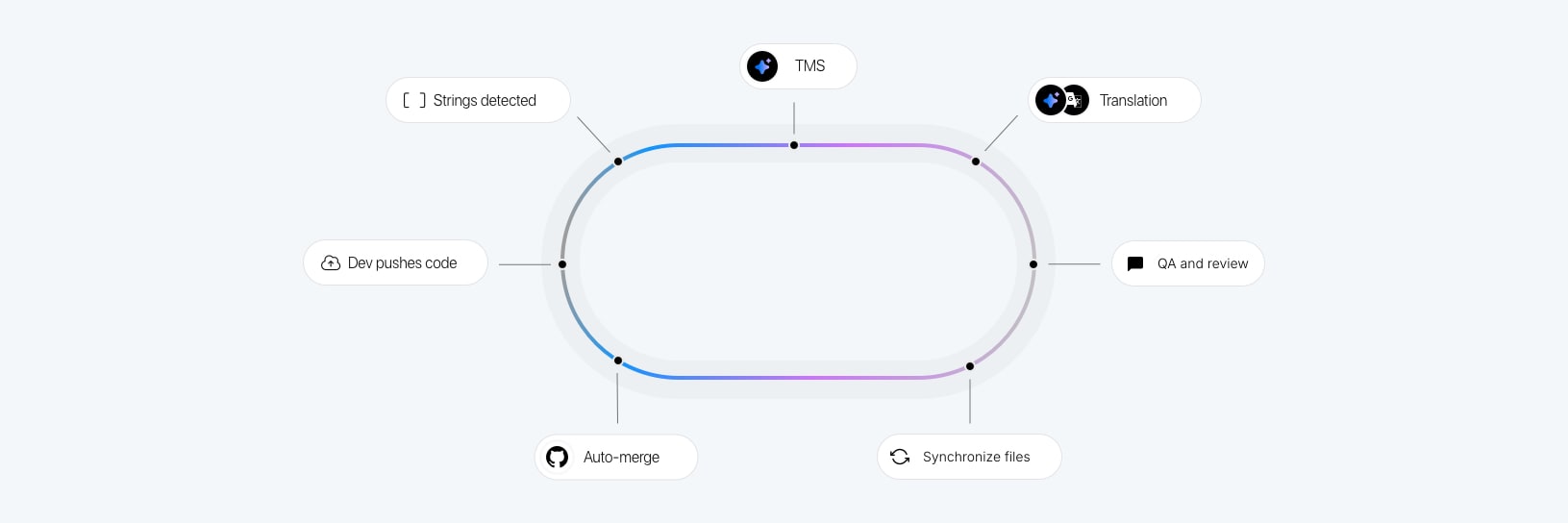
Each step can be configured to run automatically. The developer's only responsibility is writing good source strings with key-level context notes. Everything downstream is automated.
For step-by-step setup, see AI-powered localization workflows for software translation and the step-by-step localization workflow for developers. For complete details on setting up GitHub Actions and the SimpleLocalize GitHub App for your pipeline, read integrating AI translation into your CI/CD pipeline.
SimpleLocalize's automations let you configure rules that trigger translation, review, and publishing actions based on events: a new key is uploaded, a source string changes, a review is approved. Combined with the CLI and the Translation Hosting CDN, the pipeline from source string to production can run entirely without human intervention for qualifying content.
For a broader look at continuous localization as an engineering discipline, see the continuous localization guide.
Using AI agents and MCP for localization
Model Context Protocol (MCP) is an open standard that allows AI coding assistants to interact with external tools and services directly from the IDE. SimpleLocalize provides an official MCP server that lets agents in Cursor, Windsurf, Claude Desktop, or any MCP-compatible client query and update your localization data without leaving the editor.
In practice, this means an AI coding assistant can:
- Query which keys are missing translations in a given language
- Add new keys when the developer writes new UI copy
- Trigger AI translation for the keys just added
- Report back translation status so the developer can continue without context-switching
For teams already working with AI-first development tools, MCP integration closes the gap between writing code and keeping translations current. It is especially useful during rapid feature development when translation keys are created frequently and the overhead of manual CLI runs adds up.
AI translation for specific file formats
AI translation does not care about file format, but your translation pipeline does. Different formats have different placeholder syntax, nesting rules, and structural requirements that the translation request and QA layer must account for.
-
JSON: The most common format in JavaScript ecosystems. Nested key structures, string interpolation with
{variable}or{{variable}}syntax. See how to auto-translate JSON files. -
YAML: Common in Ruby and configuration-heavy projects. Structurally similar to JSON but with indentation-based nesting. See how to auto-translate YAML files.
-
ARB: Flutter's application resource bundle format. Uses
@metadata keys for placeholder definitions and descriptions. See managing ARB translation files in Flutter. -
PO/POT: The gettext format used in Python, PHP, and WordPress. Contains translator comments, context strings, and plural forms. See how to translate PO and POT files.
-
Android XML (
strings.xml): Contains string resources with positional parameters (%1$s). See Android String resources: Complete guide to localizing Android apps. -
iOS strings / xcstrings: Apple's translation formats.
.xcstringsis the modern replacement for separate.stringsand.stringsdictfiles and includes plural forms, developer comments, and state tracking in a single JSON file. See how to manage iOS translation files and the Xcode String Catalog guide.
The critical principle across all formats: placeholders and syntax markers must be preserved exactly. Configure your AI translation requests with format-aware constraints and validate output against the source structure before saving.
AI translation security and data privacy
When you send translation strings to an external API, you are sending data. For most software UI strings, this is not a significant concern. But for some teams and some content types, it is.
What typically goes to the API: translation keys, source strings, key descriptions, and context metadata. This does not normally include personal user data, since properly internationalized applications externalize static strings rather than user-generated content.
Where it matters: regulated industries (healthcare, finance, legal) where application strings may contain domain-specific information that must stay within a defined perimeter. NDA-protected products where competitors could infer product direction from feature string content. Internal tools with sensitive operational terminology.
Options for data-sensitive teams:
- Local models via Ollama: run Llama 3.1, Mistral, or Gemma locally. Your strings never leave your infrastructure.
- Bring Your Own Key (BYOK): connect your own OpenAI or OpenRouter API key. You control the contract terms with the provider directly, including data retention policies.
- Enterprise API agreements: some providers (OpenAI, Anthropic) offer enterprise contracts with explicit data processing agreements that prohibit training on your data.
See the local AI configuration options in SimpleLocalize if your team falls into this category.
Measuring AI translation quality at scale
The most practical quality metrics for automated AI translation in production software:
-
Translation coverage: percentage of keys that have translations in each supported language. Target 100% before a release. Missing translations are usually worse than fallback to the source language because they render as visible key names.
-
Review pass rate: percentage of AI-translated strings that pass automated QA checks without human intervention. A high pass rate (95%+) indicates your context and constraints are well-configured. A low pass rate indicates context problems or an unsuitable model for the content type.
-
Post-edit distance: for content that goes through human review, the average edit distance between the AI draft and the approved translation. High edit distance indicates the AI output is far from the quality target and the model or context needs adjustment.
-
Consistency score: percentage of recurring phrases that use the same translation across the project. Translation memory and smart caching should keep this high. Drift indicates that TM is not being applied correctly.
-
Regression rate: percentage of strings where a translation changed between releases without the source string changing. This should be near zero if delta translation and TM are working correctly.
Track these metrics per language and per content category to identify where the AI translation pipeline is performing well and where it needs tuning.
Localization automation: What to automate and what to keep manual
Not every step in a localization workflow benefits from automation. Knowing the boundaries is as important as knowing what to automate.
Good candidates for full automation:
- Extracting new translation keys from source code on commit
- Uploading changed source strings to the TMS
- Running AI or MT translation on new and changed keys for tier-3 content
- Running automated QA checks on AI output
- Publishing approved translations to the CDN on merge to main
- Notifying review queues when new strings arrive for tier-1 or tier-2 content
Good candidates for human-in-the-loop automation:
- Reviewing AI translations for marketing copy and onboarding flows (automated draft, human approval)
- Approving translations before they ship for content categories where errors are high-impact
- Updating glossaries when new product terminology is introduced
Poor candidates for full automation:
- Translations for legal or compliance content (always require qualified human review)
- Transcreation: creative adaptation of marketing content where the source meaning is a starting point, not a constraint
- Initial glossary creation for a new language market (requires native speaker input on terminology)
The goal of localization automation is not to eliminate human judgment. It is to ensure human judgment is applied only where it adds value, and routine work (translating a button label that says "Save") is handled automatically.
For a broader framework on automation decisions, see 15 tips to make your localization workflow more productive.
Getting started with AI translation in SimpleLocalize
The practical steps to move from no automated translation to a working AI pipeline:
-
Set up your project context: In SimpleLocalize, add a project description and specify your target audience and tone. This is the single highest-leverage action for improving AI output quality.
-
Add key-level descriptions for ambiguous strings: Any short string that could mean different things in different contexts should have a description. Focus on navigation labels, action buttons, and status messages first.
-
Configure your AI provider: Connect an OpenAI, OpenRouter, or other API key. If you want to start with MT, DeepL and Google Translate are available without an API key on paid plans.
-
Run a test translation on a subset of keys: Translate 20-30 representative strings and review the output before running on your full key set. Adjust context and provider settings based on what you see.
-
Set up automations: Configure auto-translation rules for new key imports. Set review status rules so translated strings go to a review queue rather than publishing immediately.
-
Integrate the CLI with your CI/CD pipeline: Add
simplelocalize uploadandsimplelocalize downloadsteps to your pipeline so translation sync happens on every release. -
Monitor and tune: Track coverage, pass rate, and consistency metrics. Adjust context instructions, provider choice, and automation rules based on what the data shows.
For detailed setup guides, see how to use auto-translation and how to auto-translate your app with OpenAI, DeepL & Google.
FAQ
What to read next
This guide covers the core concepts. The cluster posts below go deeper on specific topics:
- List of AI and machine translation providers — provider comparison and selection guide
- AI vs MT: Auto-translation comparison with examples — side-by-side output comparison
- ChatGPT and DeepL translation context — how to structure context for better AI output
- DeepL Glossary in auto-translation — terminology management with DeepL
- Tips for effective auto-translation — practical configuration advice
- AI-powered localization workflows — end-to-end pipeline setup
- How to auto-translate your app with OpenAI, DeepL & Google — step-by-step guide
- How to use auto-translation — getting started with the feature
- How to translate without hiring translators — automation-first approach for small teams
- Continuous localization guide — integrating translation into CI/CD
- How to handle pluralization across languages — pluralization rules and ICU format
- ICU message format guide — ICU syntax reference
- How to optimize your website for AI translation — content structure for better AI output