What is a GitHub App?
SimpleLocalize GitHub App is a powerful integration that connects your GitHub repository with SimpleLocalize, giving you option to automate the translation process in a more developer-friendly way. It allows you to replace the current SimpleLocalize CLI workflow for the most common cases and extend it with features that will come in the future.
Features
- Automatic upload: Upload source translations from your repository on every push or pull request
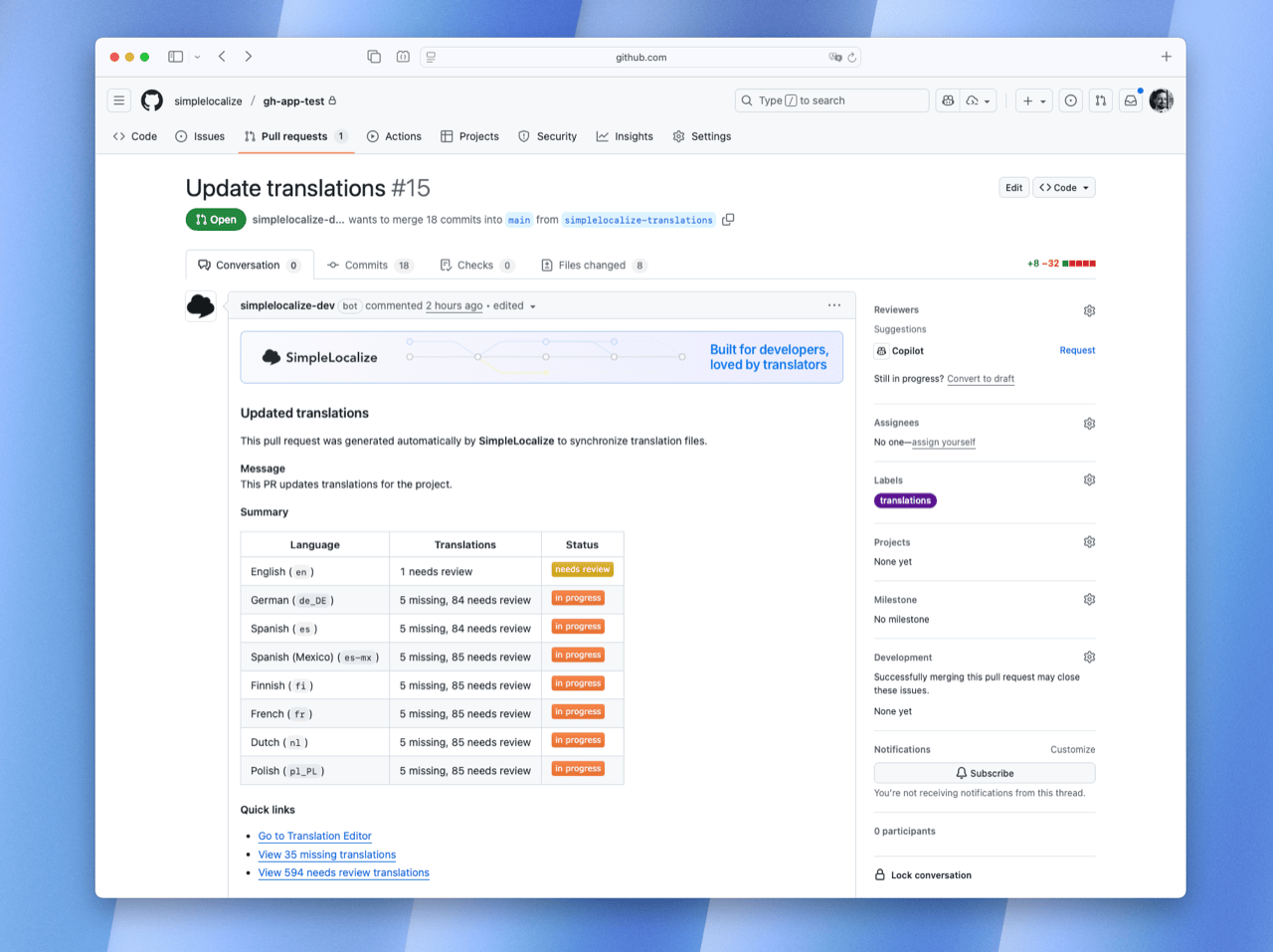
- Automatic download: Download updated translations and create pull requests for review
- Auto-translate: Automatically translate newly uploaded content using auto-translation
- Checks: Run GitHub checks on pull requests for your translations
- Hardcoded strings detection: Get notified about hardcoded strings in your codebase
- Triggers: Configure when uploads and auto-translations should happen
- Tags: Organize translations using tags for better project management
GitHub App vs. CLI
GitHub App covers the most common workflows, and can do basically the same thing, giving you some more benefits like reports. SimpleLocalize CLI is better where you need a more sophisticated workflow that is not yet covered by GitHub App.
GitHub App makes it much easier to transfer and scale the workflow than the CLI, as it requires just a simple configuration file (simplelocalize-github.yml) in your repository and connecting the repository to your SimpleLocalize project.
Getting started
Install the GitHub App
- Navigate to the Project Settings in SimpleLocalize
- Click on "GitHub App" in the left sidebar
- Follow the installation link to add the SimpleLocalize GitHub App to your GitHub account
- Create a configuration file (
simplelocalize-github.yml) in the root of your repository
Configuration
Basic configuration
The basic configuration is a minimal set of steps that can be used to upload translations from GitHub to SimpleLocalize, run auto-translation, download translated texts them back to GitHub, and create pull requests for review with GitHub checks.
# Upload English translations from GitHub to SimpleLocalize on every push
upload:
  when:
    push:
  files:
    - path: "src/locales/source_english.json"
      format: "single-language-json"
      language-key: "en"
      options:
        - UPDATE_TRANSLATIONS

# Download configuration
download:
  files:
    - path: "src/locales/{lang}.json"
      format: "single-language-json"

# Pull request configuration for translation updates
pull-request:
  title: "Update translations"
  body: "This PR updates translations for the project."
  head-branch: "simplelocalize-translations"
  labels:
    - translations

# Customize commits for translation updates
commit:
  title: "My custom commit title (updated: {languageCount} languages)"

# Auto-translate on push
auto-translate:
  when:
    push:
  language-keys:
    - "es"
    - "fr"

# Run GitHub checks on pull requests (beta feature)
checks:
  coverage: # Check missing translations
  acceptance: # Check unreviewed translations
  quality: # Check QA issues
  hardcoded-strings:
    include:
      - "src/**/*.{js,jsx,ts,tsx}"
      - "server/**/*.{js,jsx,ts,tsx}"
    exclude:
      - "**/vendor/**"
      - "**/dist/**"
      - "**/build/**"
This configuration:
- Uploads English translations from
src/locales/source_english.jsonon every push - Auto-translates Spanish and French texts on every push
- Downloads all language translations to
src/locales/{lang}.json - Runs GitHub checks on pull requests for missing or not accepted translations and QA issues
Complete configuration
Complete configuration with all available options.
# Upload from GitHub to SimpleLocalize
upload:
  when:
    push:
      branches:
        - "main"
        - "develop"
        - "feature/*"
    pull-request:
      types:
        - "opened"
        - "synchronize"
      branches:
        - "main"
        - "feature/*"
  files:
    - path: "src/locales/en/{ns}.json"
      format: "single-language-json"
      language-key: "en"
      tags:
        - "frontend"
      options:
        - "UPDATE_TRANSLATIONS"
        - "TRIM_LEADING_AND_TRAILING_WHITESPACES"
        - "ACTIVATE_PRESENT_KEYS"
        - "DEPRECATE_NOT_PRESENT_KEYS"
    - path: "api/locales/en.yml"
      format: "yaml"
      language-key: "en"
      tags:
        - "backend"

# Pull request configuration for translation updates
pull-request:
  title: "🌐 Update translations"
  body: |
    This PR contains updated translations from SimpleLocalize.
    Please review the changes before merging.
  base-branch: "main"
  head-branch: "simplelocalize-translations"
  assignees:
    - "john-doe"
  labels:
    - "translations"
    - "i18n"

# Download from SimpleLocalize to GitHub
download:
  pull-branch: "main"
  push-branch: "simplelocalize-translations"
  files:
    - path: "src/locales/{lang}/{ns}.json"
      format: "single-language-json"
      sort: "LEXICOGRAPHICAL"
      options:
        - "WRITE_NESTED"
        - "EXCLUDE_DEPRECATED_KEYS"
      tags:
        - "frontend"
      language-keys:
        - "pl"
        - "es"
        - "fr"
        - "de"
    - path: "api/locales/{lang}.yml"
      format: "yaml"
      tags:
        - "backend"

# Auto-translate configuration
auto-translate:
  when:
    push:
      branches:
        - "main"
    pull-request:
      types:
        - "opened"
      branches:
        - "main"
  language-keys:
    - "es"
    - "fr"
    - "de"

# GitHub checks configuration (beta feature)
checks:
  coverage: # Missing translations
    filter:
      language-keys:
        - "en"
        - "pl"
  acceptance: # Unreviewed translations
    filter:
      language-keys:
        - "en"
  quality: # QA issues
    filter:
      language-keys:
        - "en"
        - "pl"
      min-severity: "HIGH" # or MEDIUM, or LOW
Upload translations
Upload translation files from GitHub to SimpleLocalize.
upload:
  when:
    push: # Upload on every push
  files:
    - path: "src/locales/source_english.json"
      format: "single-language-json"
      language-key: "en"
      options:
        - UPDATE_TRANSLATIONS
Options
| Option | Description | Required |
|---|---|---|
when.push.branches | Branches that trigger uploads on push | No |
when.pull-request.branches | Branches that trigger uploads on pull request | No |
when.pull-request.types | Pull request activity types | No |
files | Array of file configurations | No |
files[].path | Path to the source file | Yes |
files[].format | Translation file format | Yes |
files[].language-key | Source language code | Format dependent |
files[].options | Upload options | No |
files[].tags | Tags to apply to translations | No |
When pull-request.types is not specified then default types are used:
opened- a new pull request is createdsynchronize- new commits are pushed to an existing pull requestreopened- a previously closed pull request is reopened
Both
when.pushandwhen.pull-requesttriggers can be configured at the same time. The upload will be triggered by either event if it matches the configured filters.
Download translations
Download translation files from SimpleLocalize to the GitHub branch.
download:
  files:
    - path: "src/locales/{lang}/{ns}.json"
      format: "single-language-json"
      sort: "LEXICOGRAPHICAL"
      tags:
        - "frontend"
      language-keys:
        - "pl"
        - "fr"
Options
| Option | Description | Required |
|---|---|---|
push-branch | Into which branch push files | No |
pull-branch | Base branch | No |
files | Array of file configurations | No |
files[].path | Output path pattern | Yes |
files[].format | Translation file format | Yes |
files[].sort | Sort translations | No |
files[].options | Download options | No |
files[].language-keys | Specific languages to download | No |
files[].tags | Filter by tags | No |
Path patterns and placeholders
For upload and download path patterns can contain placeholders for dynamic file handling.
{lang}- language key from "Languages" tab{ns}- namespace (useful for multiple translation files)
# download or upload:
  files:
    - path: "locales/{lang}.json" # locales/en.json, locales/es.json
    - path: "src/{ns}/messages_{lang}.json" # src/common/messages_en.json, src/auth/messages_es.json
    - path: "assets/i18n/{lang}/{ns}.json" # assets/i18n/en/common.json, assets/i18n/es/auth.json
Sort translations
You can change the default sort order using sort parameter with one of those values:
LEXICOGRAPHICAL- sort alphabetically using the lexicographical algorithmNEWEST_KEYS_FIRST- sort by translation key creation date, newest firstNEWEST_KEYS_LAST- sort by translation key creation date, oldest firstNAMESPACES- sort by namespaces alphabeticallyIMPORT_ORDER- sort by the import order
Pull request
Specifies what pull requests for updated translations should look like. Pull requests can be triggered manually using "Push translations to GitHub" from the SimpleLocalize interface, or automatically when "Automatic push" is enabled in your project settings.
When "Automatic push" is enabled, pull requests are created automatically after any changes are made to translations in the editor.
pull-request:
  title: "Update translations"
  body: |
    This PR contains updated translations from SimpleLocalize.
    Please review the changes before merging.
  labels:
    - "translations"
Options
| Option | Description | Required | Default |
|---|---|---|---|
title | PR title | No | "Update translations" |
body | PR description | No | Auto-generated |
labels | Labels to apply to PR | No | - |
assignees | GitHub usernames to assign | No | - |
head-branch | Branch with changes | No | download.push-branch value |
base-branch | Branch to merge into | No | download.pull-branch value |
Auto-translate
Automatically translate your project. Auto-translate is triggered only when at least one file was imported during the upload step.
auto-translate:
  language-keys:
    - "es"
    - "fr"
  when:
    push:
      branches:
        - "main"
    pull-request:
      types:
        - "opened"
        - "synchronize"
      branches:
        - "main"
Options
| Option | Description | Required |
|---|---|---|
language-keys | Target languages for translation | No |
options | Auto-translation options | No |
when.push.branches | Branches that trigger auto-translate on push | No |
when.pull-request.branches | Branches that trigger auto-translate on pull request | No |
when.pull-request.types | Pull request activity types that trigger auto-translate | No |
When pull-request.types is not specified then default types are used:
opened- a new pull request is createdsynchronize- new commits are pushed to an existing pull requestreopened- a previously closed pull request is reopened
GitHub Checks (beta)
This feature is currently in beta, and configuration namings may change in the future, but the basic functionality is stable and safe to use.
GitHub checks create individual check runs on pull requests for every configured rule from the checks section.
# ...rest of the configuration...

checks:
  coverage:
    filter:
      languages-keys: ["en", "pl"]
  acceptance:
    filter:
      languages-keys: ["en"]
  quality:
    filter:
      languages-keys: ["en", "pl", "es"]
      min-severity: HIGH # or MEDIUM, or LOW
  hardcoded-strings:
    include:
      - "src/**/*.{js,jsx,ts,tsx}"
      - "server/**/*.{js,jsx,ts,tsx}"
    exclude:
      - "**/vendor/**"
      - "**/dist/**"
      - "**/build/**"
Check types:
coverage- fails if there are some missing translations in the editoracceptance- fails if there are any not accepted translations in the editorquality- fails if there are any issues in the editorhardcoded-strings- fails if there are any hardcoded strings in commited files
Workflow examples
Here are some examples of how to use SimpleLocalize with GitHub App:
Frontend + Backend setup
upload:
  when:
    push:
      branches: ["main", "develop"]
  files:
    # React frontend translations
    - path: "src/locales/en.json"
      format: "single-language-json"
      language-key: "en"
      tags: ["frontend"]

    # Node.js backend translations
    - path: "server/locales/en.yml"
      format: "yaml"
      language-key: "en"
      tags: ["backend"]

download:
  files:
    # Frontend translations
    - path: "src/locales/{lang}.json"
      format: "single-language-json"
      tags: ["frontend"]

    # Backend translations
    - path: "server/locales/{lang}.yml"
      format: "yaml"
      tags: ["backend"]
Multi-namespace setup
upload:
  files:
    - path: "locales/en/{ns}.json"
      format: "single-language-json"
      language-key: "en"

download:
  files:
    - path: "locales/{lang}/{ns}.json"
      format: "single-language-json"
Upload with auto-translate
Upload source translations on push and automatically translate them to target languages:
upload:
  when:
    push:
      branches:
        - "main"
  files:
    - path: "src/locales/en.json"
      format: "single-language-json"
      language-key: "en"

auto-translate:
  language-keys:
    - "es"
    - "fr"
    - "de"
    - "pl"
  when:
    push:
      branches:
        - "main"
Pull request workflow with auto-translate
Upload translations from pull requests and auto-translate only when new PRs are opened:
upload:
  when:
    pull-request:
      types:
        - "opened"
        - "synchronize"
      branches:
        - "main"
  files:
    - path: "src/locales/en.json"
      format: "single-language-json"
      language-key: "en"

auto-translate:
  language-keys:
    - "es"
    - "fr"
  when:
    pull-request:
      types:
        - "opened"
      branches:
        - "main"
Troubleshooting
Q: The GitHub App is not creating pull requests
- Ensure the app has permissions to your repository
- Check that your
simplelocalize-github.ymlfile is valid YAML - Verify that your download configuration includes the correct file paths
- Pull requests are created only when translations are updated in SimpleLocalize, it may take up to a few minutes after the change to see the pull request
Q: Uploads are not triggered
- Check the
when.push.branchesandwhen.pull-request.branchesconfiguration - For pull request events, make sure the activity type matches. By default, only
opened,synchronize, andreopenedare handled - Ensure the source files exist in the specified paths
- Verify the file format matches your actual files
- Make sure that your
upload.files.pathis correct and points to the existing files in your repository
Q: Auto-translate is not working
- Auto-translate runs only when at least one file was imported during the upload step
- For pull request events, the
when.pull-requestsection must be explicitly configured in theauto-translatesection - Verify that
language-keyscontains the target languages you want to translate to - Check branch filters in
auto-translate.whenmatch the branch where the event occurred
Q: Commited files are not reflecting the content I expect Whenever you change the configuration file, please make sure that you delete the previous branch created by SimpleLocalize GitHub App to make sure that the new configuration is applied correctly. That guarantees that the files are generated from scratch according to the new configuration.
Q: All downloaded files has the same language!
- Make sure that you have the correct
language-keysdefined in thedownload.filesconfiguration for each file.