What is localization QA? Definition, benefits & best practices

Ever seen a button on a website with text spilling out of it, or a date format so confusing you weren't sure if you'd booked for January or December? That's what happens when Localization QA gets skipped.
When you are growing your business internationally, translating your product is just the first step. What really makes or breaks the user experience is Localization QA (Quality Assurance): the process of making sure your product feels right for users in every market.
Skipping this step can lead to confusing, clunky, or even embarrassing results. But with the right approach and tools, like SimpleLocalize, you can make localization QA a structured, collaborative part of every release. If you're still building your overall approach to going global, our localization strategy guide covers the full picture, including where QA fits in the maturity model.
What is Localization QA?
Localization QA (often shortened to LQA) is the process of reviewing localized content inside the product itself to check:
- Does the text fit properly in the design?
- Is the translation accurate and natural in context?
- Are dates, currencies, and units adapted to the local market?
- Does the interface still work correctly after localization?
It's not just about correct grammar, but about delivering a product that feels like it was created locally from the ground up.
Think of LQA as the final dress rehearsal before launching your product on the global stage.
Why is Localization QA important?
Let's look at some practical examples. Imagine you are translating a hotel booking website.
Example 1: The "Book Now" button in French becomes "Réserver Maintenant". If the button is too small, the text might overflow, making it hard to read or click.

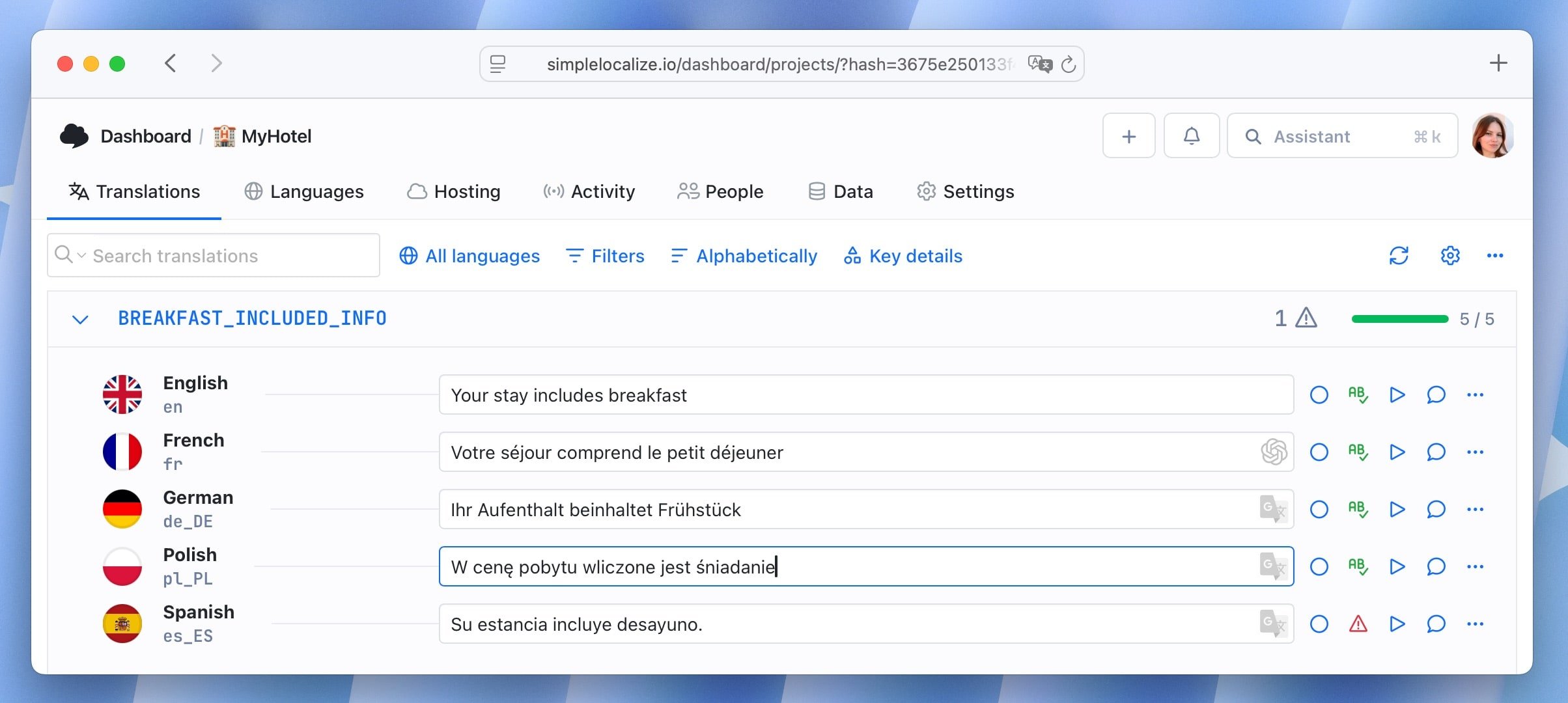
Example 2: "Your stay includes breakfast" is translated by Google Translate to "W cenę pobytu wliczone jest śniadanie" in Polish. While accurate, a more natural phrasing would be "Śniadanie wliczone w cenę pobytu".
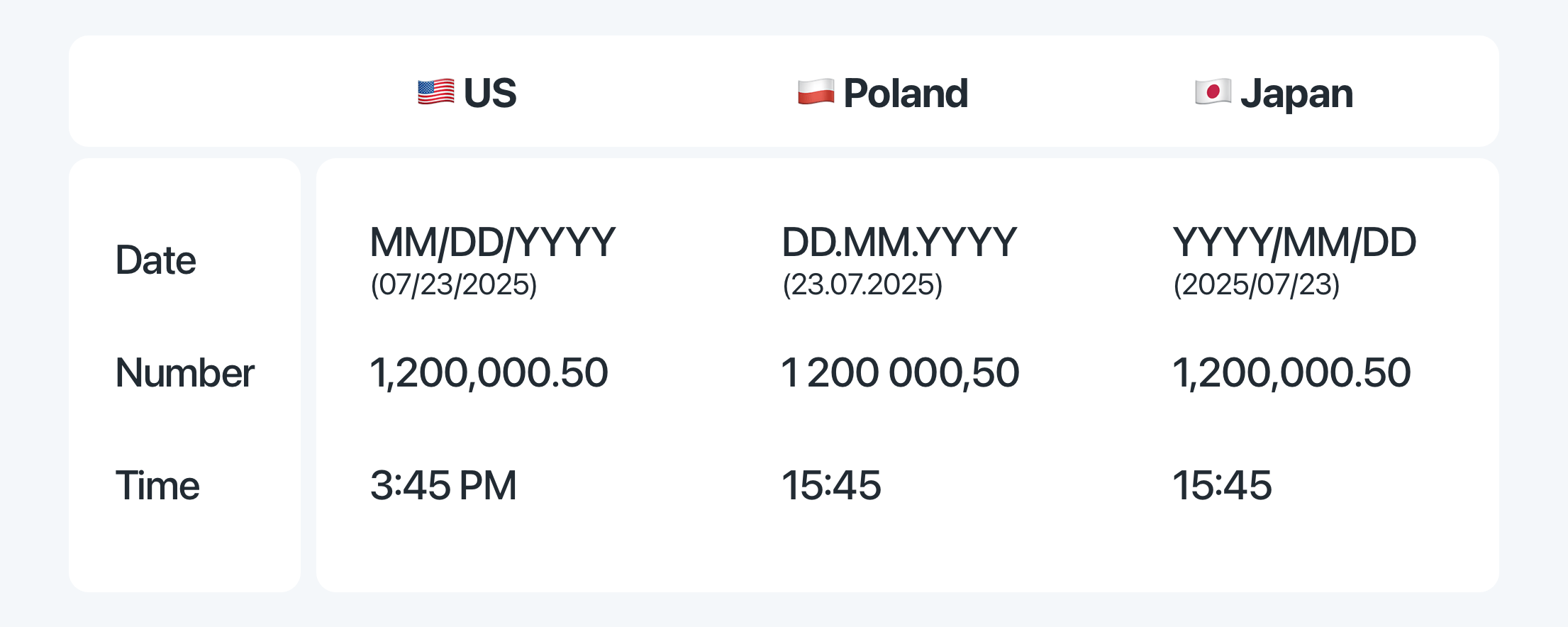
Example 3: The date format "MM/DD/YYYY" is used in the US, but in Germany, it should be "DD.MM.YYYY". If this isn't changed, users might get confused about their booking dates.
These small details can lead to big problems if not caught during Localization QA:
- Text length issues. If the translated text is too long, it might break the layout, making buttons hard to click or text unreadable.
- Overly literal translations. If the translation is too literal, it might sound awkward or confusing to native speakers.
- Date and number formats. If formats aren't adapted, users might misinterpret booking dates, prices, or measurements, leading to frustration.
- Broken functionality. If interface elements don't function properly after localization, users may encounter bugs or errors.
- Cultural disconnects. If cultural references aren't adapted, users might feel the product is out of touch with their local context.
- Visual elements. If images or icons aren't appropriate for the local culture, users might feel alienated or confused.
- Device compatibility. If localized content isn't tested on different devices and screen sizes, users may have a poor experience on mobile or tablets.
The four types of Localization QA
LQA isn't a single activity. In practice it covers four distinct areas, each catching a different class of issue.
1. Linguistic QA
Linguistic QA checks whether the translation reads naturally in the target language. This goes well beyond grammar and spelling. A linguist or native speaker reviews whether the tone matches the product's voice, whether idioms have been adapted rather than translated word-for-word, and whether terminology is consistent throughout the product.
What failure looks like: A SaaS dashboard that addresses German users with the informal du when the market expects the formal Sie. It's technically correct, but culturally wrong.
2. Functional QA
Functional QA checks whether the localized product still works correctly from a technical standpoint. This means verifying that placeholders haven't been broken ({name}, %d, {{count}}), plural rules resolve correctly for languages with complex plural forms (Polish, Arabic, Russian), and that dynamic values like dates, prices, and units render in the right format.
What failure looks like: A notification reading Hello, {name}! in production because the translator accidentally deleted the placeholder, or a plural string that always renders the other form in a language where few should apply.
3. Visual and UI QA
Visual QA checks how localized strings actually look inside the interface, not in a translation editor, but in the rendered product. This is where text expansion issues surface: German and Finnish strings regularly run 30-40% longer than their English source, and a layout that looks perfect in English can become completely broken in another language.
What failure looks like: A navigation menu where the French label "Paramètres du compte" wraps to two lines inside a fixed-height sidebar, or a mobile button where "Einstellungen" gets clipped to "Einstellun…".
4. Cultural QA
Cultural QA checks whether the overall experience is appropriate for the target market beyond the language itself. This includes imagery, color choices, icons, and metaphors that may carry different meanings in different regions.
What failure looks like: Using a thumbs-up icon in a context where it carries an offensive meaning in certain Middle Eastern markets, or displaying a calendar that starts on Sunday in a region where Monday is the conventional week start.
How Localization QA is done: a practical workflow
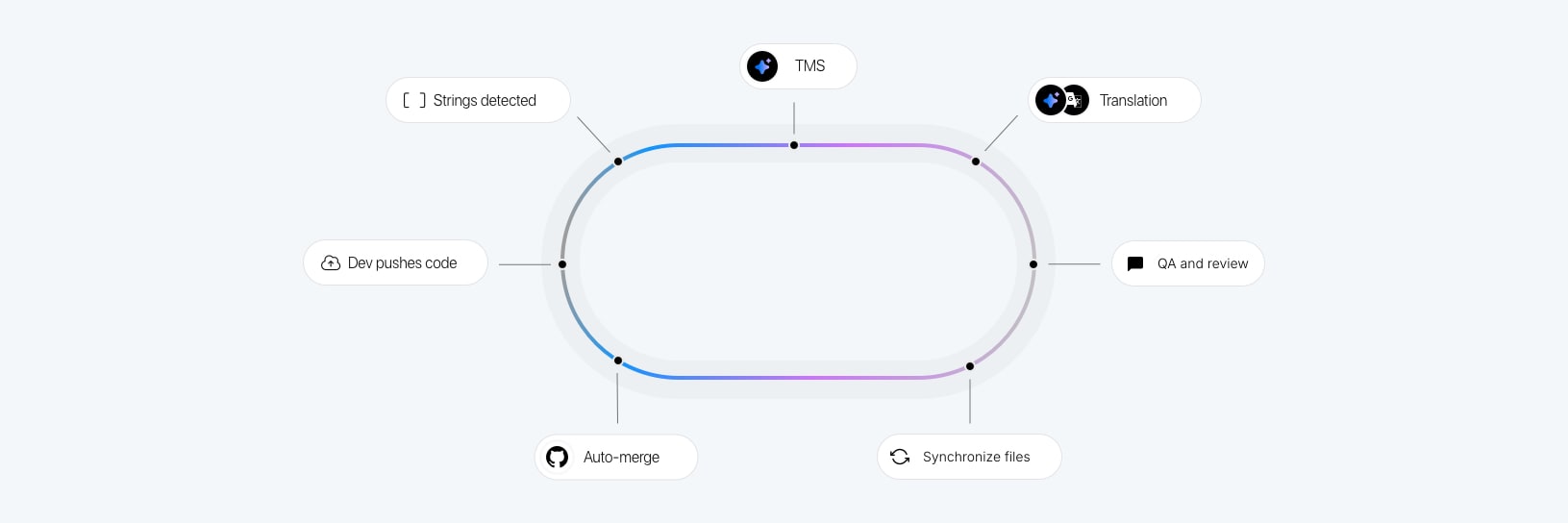
LQA works best when it's treated as a phase with clear stages and owners, not a single sign-off at the end of a release.
Stage 1: Pre-translation preparation
Before any strings go to translators, prepare the context. Add key descriptions, attach screenshots, and set character limits on constrained fields like button labels and menu items. The better the input, the fewer issues appear downstream. This is also a good point to run pseudo-localization — a technique that replaces source strings with visually distinct variants (e.g. "Save changes" becomes "[Ŝàvé çhàñgéš]") to catch hardcoded strings and layout problems before real translations even exist.
Stage 2: Automated checks during translation
While translators work, automated QA runs in the background. This catches placeholder mismatches, missing translations, length violations, and formatting errors without human intervention. In SimpleLocalize, live QA checks highlight issues directly in the editor as translators type.
Stage 3: Linguistic review
A native speaker or professional linguist reviews translations in context, ideally inside the product rather than in a spreadsheet. Comments and review statuses allow reviewers to flag issues and route them back to the translator without switching tools.
Stage 4: In-product visual testing
Reviewers check the rendered UI across the supported languages, device sizes, and operating systems. This is the stage where text expansion, truncation, and layout regressions become visible. Testing on real devices matters: a layout that looks fine on a desktop viewport may break on a 375px mobile screen with a longer German string.
Stage 5: RTL layout review
For languages that use right-to-left scripts (Arabic, Hebrew, Persian, Urdu), visual testing is not enough. RTL layouts require a dedicated review pass because the entire spatial logic of the interface is mirrored. Common issues include hardcoded directional margins that don't flip, icons with directional meaning (back/forward arrows, progress indicators) that weren't mirrored, and bidirectional text rendering edge cases where an embedded English model name or URL sits inside an Arabic sentence.
A full walkthrough of what to test and how to fix it is in our RTL design guide for developers.
Stage 6: Sign-off and release
Approved translations are marked as reviewed and published. Any remaining issues are either fixed in the current cycle or logged as known issues with a fallback defined.
How SimpleLocalize helps with Localization QA
With SimpleLocalize, you can:
- Collaborate easily: Developers, translators, and QA testers work in one platform, reducing back-and-forth emails.
- See translations in context: Preview them in your app or website to avoid guesswork (use in-context editor, add screenshots and descriptions).
- Catch UI issues early: Ensure text length, placeholders, and RTL languages like Arabic or Hebrew are handled correctly.
- Automate checks: Validate placeholders, plural rules, and formatting before they cause bugs.
- Track the review process: Leave comments and approve translations when ready.
- Centralize your localization: No more scattered spreadsheets — all your translations live in one place.
Learn more about live automated QA checks and using review status in SimpleLocalize.
Best practices for effective Localization QA
To get the most out of your Localization QA process, keep the below tips in mind.
People
- Involve native speakers: They can catch nuances, idioms, and cultural references that non-native speakers or machine translation might miss.
- Engage with local communities: Whenever possible, gather input from real users in your target markets, nothing beats authentic feedback. Use our public suggestions feature to collect ideas and corrections from your user base.
- Communicate and document clearly: Make sure translators, developers, and testers understand expectations. Document decisions and feedback to improve consistency over time.
Process
- Run pseudo-localization before real translations: Pseudo-localization lets you catch hardcoded strings and layout issues at zero translation cost. See the pseudo-localization guide for a practical walkthrough.
- Plan for localization early: Integrate localization into your design (Figma plugin) and development process (check GitHub integration) from the start, this avoids costly layout fixes later.
- Use a standardized QA checklist: Define what to check (text length, placeholders, date formats, tone, visuals), so nothing slips through the cracks.
- Prioritize and iterate: Focus QA on your key markets first, gather feedback from users, and use analytics to refine future releases.
- Test RTL languages separately: Don't treat Arabic or Hebrew as just another language pass. Schedule a dedicated RTL review that looks at layout direction, icon mirroring, and bidirectional text rendering.
Technology
- Test in context and on real devices: Always check how translations look and work within the actual product across different screen sizes, operating systems, and browsers.
- Leverage technology: Tools like SimpleLocalize help streamline collaboration, automate format checks, and centralize translations so your QA process is faster and more reliable.
- Automate where possible: Use automated tests to catch common issues like missing placeholders or formatting errors before they reach human reviewers.
Conclusion
Localization QA isn't just quality control, it's an investment in trust. When users feel at home in your product, they are far more likely to stay, recommend it, and come back.
By combining the four types of LQA with a structured workflow and a translation management tool like SimpleLocalize, you can catch issues early, ship with confidence, and build products that genuinely work for every market you enter. For the broader context of where LQA fits inside a mature localization program, the complete technical guide to internationalization covers testing as part of the full localization pipeline.
Ready to make localization QA a consistent part of your workflow? Try SimpleLocalize today and see how much easier managing translations can be.