Vue.js i18n: The complete guide to localizing Vue and Nuxt apps


Vue.js has a mature, first-class i18n ecosystem. Between vue-i18n for Vue 3, @nuxtjs/i18n for Nuxt, and typesafe-i18n for teams that want compile-time key safety, you have solid options for every project type and every team size.
But "solid options" doesn't mean effortless. Locale detection, translation file architecture, pluralization across languages with complex rules, lazy loading, and keeping translations in sync across releases all require deliberate decisions.
This guide walks through everything you need to localize a Vue 3 or Nuxt application properly: from initial setup and translation key organization through RTL support, CI/CD automation, and connecting your project to SimpleLocalize for ongoing translation management.
If you're new to internationalization concepts, start with our complete technical guide to i18n and software localization before diving in here.
The Vue i18n ecosystem
Before writing code, it helps to understand what you're working with and which tool fits which situation. Here's a quick comparison to help you choose your path:
| Feature | vue-i18n v11 | @nuxtjs/i18n | typesafe-i18n |
|---|---|---|---|
| Framework | Vue 3 (Vite/Webpack) | Nuxt 3 only | Vue 3 / any framework |
| API style | Composition + Options | Composition (auto-injected) | Fully typed functions |
| Translation format | JSON / YAML / <i18n> blocks | JSON / YAML (lazy-loaded) | TypeScript .ts files |
| Type safety | Optional (via .d.ts declaration) | Optional (via .d.ts declaration) | Built-in, compile-time |
| Pluralization | Pipe syntax + ICU | Pipe syntax + ICU | Custom plural rules |
| Locale routing | Manual | Automatic (/en/, /es/) | Manual |
| SEO (hreflang) | Manual | Automatic | Manual |
| Lazy loading | Manual (dynamic imports) | Built-in (lazy: true) | Built-in (code splitting) |
| Best for | Most Vue 3 + Vite apps | All Nuxt 3 apps | TypeScript-heavy teams |
-
vue-i18n v9+ is the standard i18n library for Vue 3. It supports Composition API, Options API, pluralization, datetime and number formatting, fallback chains, and, with the Vite plugin, pre-compiled translation files and
<i18n>blocks in Single File Components. -
@nuxtjs/i18n is a Nuxt module built on top of vue-i18n. It adds automatic locale-prefixed routing (
/en/,/es/), SEO hreflang tags, server-side locale detection, lazy loading of translation files, and domain-based routing strategies. If you're on Nuxt, this is the right choice rather than wiring up vue-i18n manually. -
typesafe-i18n is a TypeScript-first alternative that stores translations as
.tsfiles and generates full type definitions. Instead oft('some.key')returningstring, you callLL.some.key()with fully typed parameters. It catches missing translations and wrong argument types at compile time, not at runtime in production. -
i18next-vue brings the battle-tested i18next ecosystem (used widely in React via react-i18next) to Vue. A good choice if your team already uses i18next on other parts of the stack. See the i18next-vue integration docs for setup details.
-
vue-intl wraps FormatJS for Vue, providing ICU message format support natively. Good for teams that need robust plural rules from day one across many target languages. See the vue-intl integration docs.
The decision tree for most projects is simple: Nuxt → @nuxtjs/i18n. Vue 3 with Vite and TypeScript team → consider typesafe-i18n or vue-i18n. Vue 3 with existing i18next investment → i18next-vue.
Setting up vue-i18n in Vue 3
Installation
npm install vue-i18n
v11 of vue-i18n is the current stable release. v9 and v10 have reached EOL.
Optionally add the Vite plugin for pre-compiled messages and <i18n> SFC block support:
npm install -D @intlify/unplugin-vue-i18n
Vite config
// vite.config.ts
import { defineConfig } from 'vite'
import vue from '@vitejs/plugin-vue'
import VueI18nPlugin from '@intlify/unplugin-vue-i18n/vite'
import { resolve, dirname } from 'node:path'
import { fileURLToPath } from 'node:url'

export default defineConfig({
  plugins: [
    vue(),
    VueI18nPlugin({
      include: resolve(dirname(fileURLToPath(import.meta.url)), './src/i18n/locales/**'),
    }),
  ],
})
Translation files
Create translation files under src/i18n/locales/. Each language gets its own JSON file:
src/
  i18n/
    locales/
      en.json
      es.json
      fr.json
      pl.json
A typical en.json:
{
  "site": {
    "name": "Pillow Hotel",
    "slogan": "Your comfort, our priority"
  },
  "navigation": {
    "home": "Home",
    "rooms": "Rooms",
    "dining": "Dining",
    "spa": "Spa & Wellness",
    "booking": "Book Now",
    "contact": "Contact Us"
  },
  "homepage": {
    "title": "Welcome to Pillow Hotel",
    "description": "Your comfort, our priority"
  },
  "booking": {
    "price": "Price per night: {price}",
    "checkIn": "Check-in: {date}",
    "roomsBooked": "You have {count} room booked | You have {count} rooms booked"
  },
  "guest": {
    "greeting": "Welcome back, {name}!"
  },
  "common": {
    "save": "Save",
    "cancel": "Cancel",
    "required": "This field is required"
  }
}
The corresponding es.json:
{
  "site": {
    "name": "Hotel Almohada",
    "slogan": "Tu comodidad, nuestra prioridad"
  },
  "navigation": {
    "home": "Inicio",
    "rooms": "Habitaciones",
    "dining": "Restaurante",
    "spa": "Spa y bienestar",
    "booking": "Reservar ahora",
    "contact": "Contáctenos"
  },
  "homepage": {
    "title": "Bienvenido al Hotel Almohada",
    "description": "Tu comodidad, nuestra prioridad"
  },
  "booking": {
    "price": "Precio por noche: {price}",
    "checkIn": "Entrada: {date}",
    "roomsBooked": "Tiene {count} habitación reservada | Tiene {count} habitaciones reservadas"
  },
  "guest": {
    "greeting": "¡Bienvenido de nuevo, {name}!"
  },
  "common": {
    "save": "Guardar",
    "cancel": "Cancelar",
    "required": "Este campo es obligatorio"
  }
}
i18n plugin setup
// src/i18n/index.ts
import { createI18n } from 'vue-i18n'
import en from './locales/en.json'
import es from './locales/es.json'

export type MessageSchema = typeof en

export const i18n = createI18n({
  legacy: false,      // Composition API mode — always use this for Vue 3
  locale: 'en',
  fallbackLocale: 'en',
  globalInjection: true, // Makes $t available in templates globally
  messages: { en, es },
})
Warning: The
legacy: falseflag is essential. It switches vue-i18n from its Options API compatibility mode (Vue 2-style) to proper Composition API mode, unlockinguseI18n()in<script setup>and accurate TypeScript types. Omitting it is the single most common setup mistake: everything will appear to work, butuseI18n()will throw errors and TypeScript types won't resolve correctly.
Register in main.ts
// src/main.ts
import { createApp } from 'vue'
import App from './App.vue'
import { i18n } from './i18n'

createApp(App).use(i18n).mount('#app')
Pro-Tip: If you need to use the
i18ninstance outside of components (for example, in Vue Router navigation guards to translate page titles or in API interceptors to setAccept-Languageheaders), make sure to export it fromsrc/i18n/index.ts(as shown above) and import it directly:import { i18n } from '@/i18n'. Then usei18n.global.t('key')instead ofuseI18n(), which only works insidesetup(). However, avoid injecting the i18n instance into Pinia stores, stores should remain locale-agnostic and pass translation keys through state for components to resolve. If a store captures a translated string during a background process and the user switches locale mid-flight, the stored value becomes stale and out of sync with the UI.
Using translations in components
Composition API (<script setup>)
<script setup lang="ts">
import { useI18n } from 'vue-i18n'

const { t, locale } = useI18n()
</script>

<template>
  <div>
    <h1>{{ t('homepage.title') }}</h1>
    <p>{{ t('guest.greeting', { name: 'Anna' }) }}</p>

    <button @click="locale = 'es'">Español</button>
    <button @click="locale = 'en'">English</button>
  </div>
</template>
Language switcher component
<!-- components/LanguageSwitcher.vue -->
<template>
  <div class="language-switcher">
    <select v-model="currentLocale">
      <option v-for="lang in availableLanguages" :key="lang.code" :value="lang.code">
        {{ lang.name }}
      </option>
    </select>
  </div>
</template>

<script setup lang="ts">
import { computed } from 'vue'
import { useI18n } from 'vue-i18n'

const { locale } = useI18n()

const availableLanguages = [
  { code: 'en', name: 'English' },
  { code: 'es', name: 'Español' },
  { code: 'fr', name: 'Français' },
  { code: 'pl', name: 'Polski' },
]

const currentLocale = computed({
  get: () => locale.value,
  set: (value) => {
    locale.value = value
    localStorage.setItem('user-locale', value)
  },
})
</script>
For guidance on language selector UX, including why you should not use country flags, see our posts on language selector best practices and why flags hurt UX in language selectors.
For inspiration, check out our selected examples of language switchers in real-world apps.
Translation key architecture
How you name and structure translation keys determines how maintainable your project is at scale. A flat key structure ("save_button", "cancel_button") works for small projects but becomes unnavigable past a few dozen keys. An overly nested three-level structure is verbose to write and read.
The sweet spot for most Vue apps is two-level namespacing that mirrors your feature or page structure:
{
  "common": {},
  "navigation": {},
  "booking": {},
  "rooms": {},
  "guest": {},
  "errors": {}
}
Keep common for strings shared across the app (Save, Cancel, Loading, etc.), and give each feature or page its own namespace. This makes it easy to track translation completeness per feature and assign ownership to the right team.
Warning: Avoid over-nesting translation keys beyond two levels. Deeply nested structures are painful to type, hard to search, and create visual noise in translation editors. Here's a "don't" example:
{
  "pages": {
    "dashboard": {
      "widgets": {
        "analytics": {
          "chart": {
            "tooltip": {
              "label": "Revenue this month"
            }
          }
        }
      }
    }
  }
}
Using t('pages.dashboard.widgets.analytics.chart.tooltip.label') in a template is unreadable and error-prone. Flatten it to t('dashboard.revenueTooltip'); the key is shorter, easier to search, and just as descriptive.
For detailed naming conventions, see our guides on best practices for translation keys and what is a translation key.
SFC <i18n> blocks
When using unplugin-vue-i18n, you can embed translations directly in a Single File Component. This is useful for component-specific strings that don't belong in global locale files:
<script setup>
import { useI18n } from 'vue-i18n'
const { t } = useI18n()
</script>

<template>
  <div>
    <h2>{{ t('title') }}</h2>
    <p>{{ t('description') }}</p>
  </div>
</template>

<i18n lang="json">
{
  "en": {
    "title": "Payment method",
    "description": "Update your billing information for Pillow Hotel"
  },
  "es": {
    "title": "Método de pago",
    "description": "Actualice su información de facturación en Hotel Almohada"
  }
}
</i18n>
Pro-Tip: The Vite plugin pre-compiles
<i18n>blocks at build time for better runtime performance. One trade-off: these translations are scoped to the component and don't appear in your global locale files, which makes them harder to export to SimpleLocalize without dedicated extraction tooling. For most teams, keeping translations in global JSON files with clear namespacing is the more maintainable path.
Pluralization
vue-i18n uses a pipe | separator for plural forms in its default message format:
{
  "roomsBooked": "No rooms booked | One room booked | {count} rooms booked"
}
<template>
  <!-- v11: use t() with count, not $tc() -->
  <p>{{ t('roomsBooked', { count }, count) }}</p>
</template>
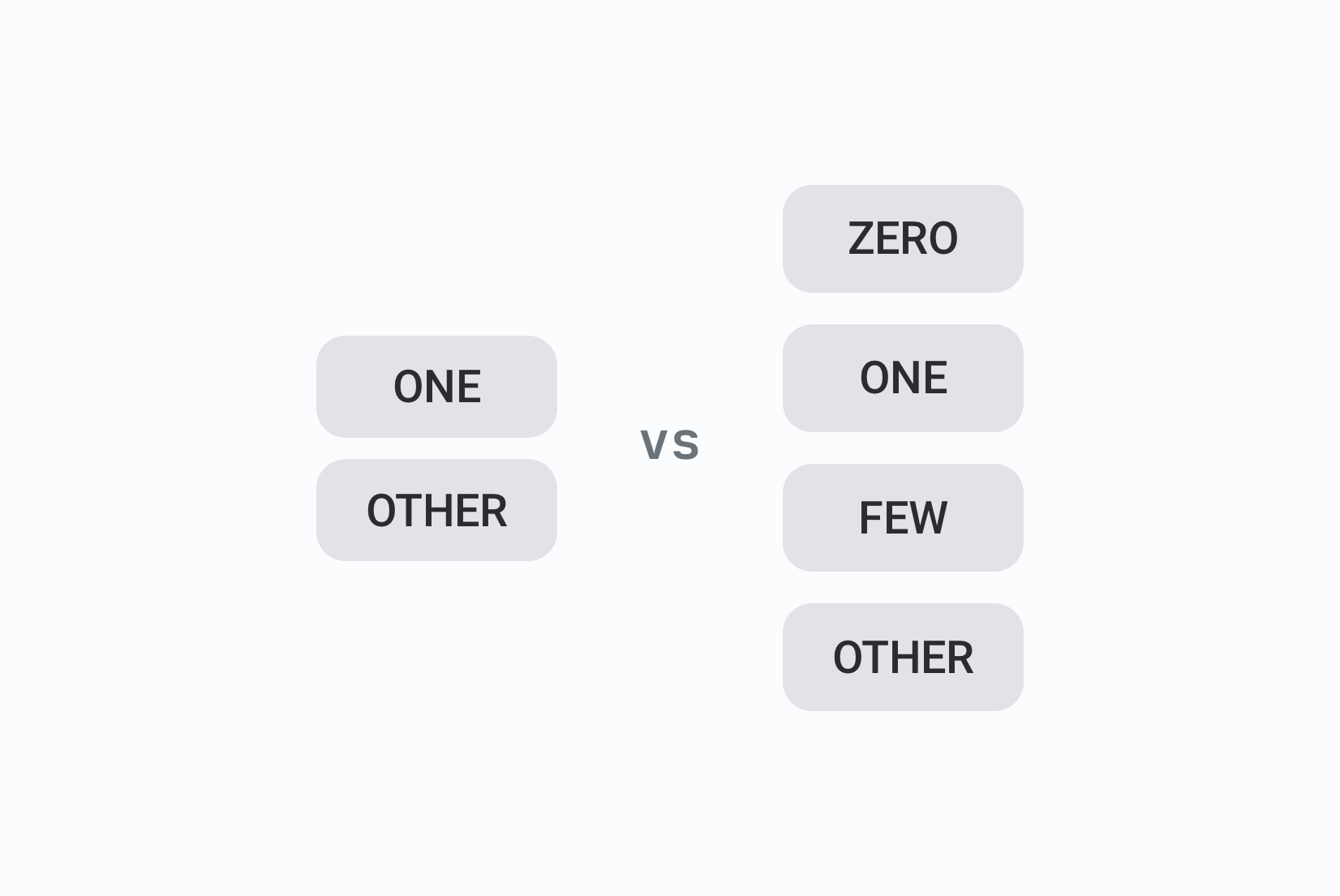
This pipe syntax covers English and other two-form languages well. For languages with more complex plural rules (e.g., Polish has four forms, Arabic has six), you need the full ICU message format.
Warning:
tc()is the old pluralization function from vue-i18n v8 and earlier. In v9+, uset()with thecountparameter for pluralization. Thetc()function is no longer needed and doesn't support ICU syntax.
ICU pluralization (recommended for multilingual apps)
ICU defines plural categories (zero, one, two, few, many, other) and lets translators write the appropriate form for each category in their language. The application code stays the same across all languages; only the translation string changes.
// src/i18n/index.ts
export const i18n = createI18n({
  legacy: false,
  locale: 'en',
  fallbackLocale: 'en',
  messages: {
    en: {
      roomsBooked: `{count, plural,
        =0 {No rooms booked}
        one {One room booked}
        other {{count} rooms booked}
      }`,
    },
    es: {
      roomsBooked: `{count, plural,
        one {Una habitación reservada}
        other {{count} habitaciones reservadas}
      }`,
    },
    pl: {
      // Polish requires four plural forms
      roomsBooked: `{count, plural,
        one {Jedna zarezerwowana sala}
        few {{count} zarezerwowane sale}
        many {{count} zarezerwowanych sal}
        other {{count} zarezerwowanych sal}
      }`,
    },
  },
})
SimpleLocalize uses ICU format internally, so translations round-trip correctly between your codebase and the translation editor. For a deeper dive into plural rules across languages, see our pluralization guide and ICU message format guide.
Locale detection strategies
How your app determines which locale to serve is one of the most consequential i18n architecture decisions. Each approach has real trade-offs in SEO, UX, and implementation complexity.
-
URL-based detection encodes the locale in the path (
/en/rooms,/es/rooms) or subdomain (es.example.com). This is the recommended approach for public-facing apps because URLs are indexable, shareable, and cacheable. Search engines can index each locale independently. The trade-off is routing complexity. -
Accept-Language header detection reads the browser's preferred language list. Zero friction for the user, but unreliable as the sole mechanism; it reflects browser preferences, not necessarily the user's preference for your product. Use it as a starting hint, not a final decision.
-
localStorage persistence stores the user's explicit language choice across sessions. Works well for authenticated apps where locale is a user preference rather than a routing concern. Not indexable by search engines.
-
The production pattern combines all three: use Accept-Language on first visit for an initial guess, encode in the URL for SEO, and persist the user's explicit choice in localStorage. Always let the user override; detection is inference, not fact.
// src/i18n/detection.ts
const SUPPORTED_LOCALES = ['en', 'es', 'fr', 'pl']
const STORAGE_KEY = 'preferred-locale'

export function detectLocale(): string {
  // 1. Check localStorage for explicit user preference
  const stored = localStorage.getItem(STORAGE_KEY)
  if (stored && SUPPORTED_LOCALES.includes(stored)) return stored

  // 2. Try Accept-Language header via navigator.languages
  for (const lang of navigator.languages || [navigator.language]) {
    const code = lang.split('-')[0]
    if (SUPPORTED_LOCALES.includes(code)) return code
  }

  // 3. Fall back to default
  return 'en'
}

export function persistLocale(locale: string) {
  localStorage.setItem(STORAGE_KEY, locale)
}
For a comprehensive breakdown of URL structure options, subdomains, cookies, and the SEO implications of each, see our guide on URLs in localization for multilingual websites.
Nuxt with @nuxtjs/i18n
Nuxt handles most of the detection, routing, and SEO complexity through the @nuxtjs/i18n module.
Installation
npm install @nuxtjs/i18n@next
nuxt.config.ts
// nuxt.config.ts
export default defineNuxtConfig({
  modules: ['@nuxtjs/i18n'],

  i18n: {
    locales: [
      { code: 'en', language: 'en-US', name: 'English', file: 'en.json' },
      { code: 'es', language: 'es-ES', name: 'Español', file: 'es.json' },
      { code: 'fr', language: 'fr-FR', name: 'Français', file: 'fr.json' },
      { code: 'pl', language: 'pl-PL', name: 'Polski', file: 'pl.json' },
    ],
    defaultLocale: 'en',
    strategy: 'prefix_except_default', // /rooms for EN, /es/rooms for ES
    langDir: 'locales/',
    lazy: true, // Load translation files on demand
    baseUrl: 'https://pillowhotel.com',
    seo: true,  // Auto-generate hreflang tags
    detectBrowserLanguage: {
      useCookie: true,
      cookieKey: 'i18n_redirected',
      redirectOn: 'root',
      fallbackLocale: 'en',
    },
  },
})
Using translations in Nuxt pages
@nuxtjs/i18n exposes useI18n(), useLocalePath(), and useSwitchLocalePath() globally across all pages and components:
<!-- pages/index.vue -->
<script setup lang="ts">
const { t } = useI18n()
const localePath = useLocalePath()

useSeoMeta({
  title: () => t('meta.title'),
  description: () => t('meta.description'),
})
</script>

<template>
  <div>
    <h1>{{ $t('homepage.title') }}</h1>
    <!-- localePath prepends the locale prefix automatically -->
    <NuxtLink :to="localePath('/contact')">{{ $t('navigation.contact') }}</NuxtLink>
  </div>
</template>
Language switcher for Nuxt
<!-- components/LanguageSwitcher.vue -->
<template>
  <div class="language-switcher">
    <button @click="isOpen = !isOpen">
      {{ currentLocale?.name }}
    </button>
    <div v-if="isOpen" class="dropdown">
      <NuxtLink
        v-for="loc in availableLocales"
        :key="loc.code"
        :to="switchLocalePath(loc.code)"
        @click="isOpen = false"
      >
        {{ loc.name }}
      </NuxtLink>
    </div>
  </div>
</template>

<script setup lang="ts">
const { locale, locales } = useI18n()
const switchLocalePath = useSwitchLocalePath()
const isOpen = ref(false)

const currentLocale = computed(() => locales.value.find(l => l.code === locale.value))
const availableLocales = computed(() => locales.value.filter(l => l.code !== locale.value))
</script>
Use localePath() for all internal navigation links, it automatically applies the correct locale prefix. Use switchLocalePath() to generate links that switch language while staying on the current page.
@nuxtjs/i18n with seo: true automatically generates <link rel="alternate" hreflang="..."> tags for each locale. It also handles Server-Side Rendering (SSR) out of the box: translated content is rendered into the initial HTML response, so search engine crawlers index fully localized pages without needing to execute JavaScript. For more on multilingual SEO, see our guide on hreflang and how to use it.
Typesafe-i18n: the TypeScript-first alternative
For TypeScript teams who want compile-time key safety rather than runtime string lookups, typesafe-i18n is worth considering. Instead of JSON files with string keys, translations live in .ts files, and a code generator creates type definitions from the base locale.
Installation
npm install typesafe-i18n
npx typesafe-i18n --setup-auto --adapter vue
This scaffolds the project structure:
src/i18n/
  en/
    index.ts    # Base locale: source of truth for types
  es/
    index.ts
  i18n-types.ts  # Auto-generated type definitions
  i18n-util.ts
Translation files as TypeScript
// src/i18n/en/index.ts
import type { BaseTranslation } from '../i18n-types'

const en = {
  navigation: {
    home: 'Home',
    rooms: 'Rooms',
    booking: 'Book Now',
  },
  booking: {
    price: 'Price per night: {price:string}',
    roomsBooked: 'You have {count:number} room{{count|s}} booked',
  },
  guest: {
    greeting: 'Welcome back, {name:string}!',
  },
} satisfies BaseTranslation

export default en
// src/i18n/es/index.ts
import type { Translation } from '../i18n-types'

const es = {
  navigation: {
    home: 'Inicio',
    rooms: 'Habitaciones',
    booking: 'Reservar ahora',
  },
  booking: {
    price: 'Precio por noche: {price}',
    roomsBooked: 'Tiene {count} habitaciones reservadas',
  },
  guest: {
    greeting: '¡Bienvenido de nuevo, {name}!',
  },
} satisfies Translation

export default es
Usage in components
<script setup lang="ts">
import { useTypesafeI18n } from '../i18n/i18n-vue'

const { LL, locale, setLocale } = useTypesafeI18n()
</script>

<template>
  <div>
    <h1>{{ LL.navigation.home() }}</h1>
    <!-- TypeScript enforces that 'name' is a string -->
    <p>{{ LL.guest.greeting({ name: 'Anna' }) }}</p>
    <!-- TypeScript enforces that 'count' is a number -->
    <p>{{ LL.booking.roomsBooked({ count: 5 }) }}</p>
  </div>
</template>
The key difference from vue-i18n: LL.guest.greeting() is a function call with typed parameters. If you pass the wrong type or forget a required argument, TypeScript catches it at compile time. Keys removed from the base locale become type errors in all consuming components immediately.
For SimpleLocalize integration with typesafe-i18n, the format identifier is typesafe-i18n in your simplelocalize.yml. See the typesafe-i18n integration docs for the full setup.
Dates, numbers, and currencies
vue-i18n provides d() (datetime) and n() (number) functions that wrap the native Intl API:
// src/i18n/index.ts
export const i18n = createI18n({
  legacy: false,
  locale: 'en',
  numberFormats: {
    en: {
      currency: { style: 'currency', currency: 'USD' },
      decimal: { style: 'decimal', minimumFractionDigits: 2 },
    },
    es: {
      currency: { style: 'currency', currency: 'EUR' },
      decimal: { style: 'decimal', minimumFractionDigits: 2 },
    },
  },
  datetimeFormats: {
    en: {
      short: { year: 'numeric', month: '2-digit', day: '2-digit' },
      long: { year: 'numeric', month: 'long', day: 'numeric', weekday: 'long' },
    },
    es: {
      short: { year: 'numeric', month: '2-digit', day: '2-digit' },
      long: { year: 'numeric', month: 'long', day: 'numeric', weekday: 'long' },
    },
  },
})
<script setup>
const { n, d } = useI18n()
const price = 1234.50
const today = new Date()
</script>

<template>
  <!-- en: $1,234.50 | es: 1.234,50 € -->
  <p>{{ n(price, 'currency') }}</p>

  <!-- en: 03/25/2026 | es: 25/03/2026 -->
  <p>{{ d(today, 'short') }}</p>

  <!-- en: Wednesday, March 25, 2026 | es: miércoles, 25 de marzo de 2026 -->
  <p>{{ d(today, 'long') }}</p>
</template>
For more on locale-aware number and date formatting, see our guide on number formatting in JavaScript.
RTL support
Supporting Arabic, Hebrew, Persian, or Urdu requires more than adding a translation file. Layout direction affects the entire UI: padding, margins, icon orientation, flex direction, and animation axes all need to respond to direction changes.
Setting the HTML dir attribute
The cleanest approach is a composable that updates the root element when the locale changes:
// src/composables/useLocaleDirection.ts
import { watch } from 'vue'
import { useI18n } from 'vue-i18n'

const RTL_LOCALES = new Set(['ar', 'he', 'fa', 'ur'])

export function useLocaleDirection() {
  const { locale } = useI18n()

  function applyDirection(loc: string) {
    const dir = RTL_LOCALES.has(loc) ? 'rtl' : 'ltr'
    document.documentElement.setAttribute('dir', dir)
    document.documentElement.setAttribute('lang', loc)
  }

  watch(locale, applyDirection, { immediate: true })
}
Call this composable in your root App.vue:
<script setup>
import { useLocaleDirection } from './composables/useLocaleDirection'
useLocaleDirection()
</script>
CSS logical properties
Use logical properties throughout your styles so layout adapts automatically without per-locale overrides:
/* Instead of: */
.nav-icon { margin-right: 8px; }

/* Use: */
.nav-icon { margin-inline-end: 8px; }

/* Instead of: */
.sidebar { padding-left: 16px; }

/* Use: */
.sidebar { padding-inline-start: 16px; }

/* Instead of: */
p { text-align: left; }

/* Use: */
p { text-align: start; }
When dir="rtl" is set on the root element, margin-inline-end maps to the left side automatically. No additional CSS overrides needed.
Lazy loading translation files
Bundling all locales into the initial JavaScript payload adds unnecessary bytes for every user, most of whom only need one language. Lazy loading loads each locale file only when it's first requested.
Dynamic import pattern
// src/i18n/index.ts
import { createI18n } from 'vue-i18n'

export const i18n = createI18n({
  legacy: false,
  locale: 'en',
  fallbackLocale: 'en',
  messages: {}, // Start empty
})

const loadedLocales = new Set()

export async function loadLocale(locale: string): Promise {
  if (loadedLocales.has(locale)) return

  const messages = await import(`./locales/${locale}.json`)
  i18n.global.setLocaleMessage(locale, messages.default)
  loadedLocales.add(locale)
}

export async function switchLocale(locale: string): Promise {
  await loadLocale(locale)
  i18n.global.locale.value = locale
  localStorage.setItem('preferred-locale', locale)
}
This means Spanish, French, and Polish translation files are never downloaded by an English-only user. In apps with many supported languages, this can meaningfully reduce initial load times.
Pro-Tip: In Nuxt, lazy loading is handled automatically by setting
lazy: trueinnuxt.config.ts, no additional code needed. For vanilla Vue 3 apps, the dynamic import pattern above is the standard approach.
Managing translations with SimpleLocalize
With your Vue app properly internationalized, you need a workflow for the ongoing work of managing translations: extracting new strings, getting them translated, and syncing the results back into your codebase. This is where SimpleLocalize comes in.
Install the CLI
# macOS / Linux / Windows (WSL)
curl -s https://get.simplelocalize.io/2.10/install | bash

# Windows (PowerShell)
. { iwr -useb https://get.simplelocalize.io/2.10/install-windows } | iex;

# npm
npm install @simplelocalize/cli
simplelocalize.yml for vue-i18n
Create simplelocalize.yml in your project root:
apiKey: YOUR_PROJECT_API_KEY

uploadFormat: single-language-json
uploadPath: ./src/i18n/locales/en.json
uploadLanguageKey: en
uploadOptions:
  - REPLACE_TRANSLATION_IF_FOUND

downloadPath: ./src/i18n/locales/{lang}.json
downloadLanguageKeys: ['en', 'es', 'fr', 'pl']
downloadFormat: single-language-json
simplelocalize.yml for Nuxt (@nuxtjs/i18n)
apiKey: YOUR_PROJECT_API_KEY

uploadFormat: single-language-json
uploadPath: ./locales/en.json
uploadLanguageKey: en
uploadOptions:
  - REPLACE_TRANSLATION_IF_FOUND

downloadPath: ./locales/{lang}.json
downloadLanguageKeys: ['en', 'es', 'fr', 'pl']
downloadFormat: single-language-json
downloadOptions:
  - CREATE_DIRECTORIES
simplelocalize.yml for typesafe-i18n
apiKey: YOUR_PROJECT_API_KEY

uploadFormat: single-language-json
uploadPath: ./src/i18n/en/index.ts
uploadLanguageKey: en
uploadOptions:
  - REPLACE_TRANSLATION_IF_FOUND

downloadPath: ./src/i18n/{lang}/
downloadLanguageKeys: ['en', 'es', 'fr', 'pl']
downloadFormat: typesafe-i18n
Upload and download
# Upload source (English) strings to SimpleLocalize
simplelocalize upload

# Download all translated languages back
simplelocalize download
Add npm scripts for convenience:
{
  "scripts": {
    "i18n:upload": "simplelocalize upload",
    "i18n:download": "simplelocalize download",
    "i18n:sync": "simplelocalize upload && simplelocalize download"
  }
}
Adding context for translators
A key like navigation.home with the value "Home" is ambiguous, is it a house, a navigation button, or a landing page label? A one-line description resolves this immediately and prevents mistranslations before they reach production.
Add descriptions directly in the SimpleLocalize translation editor, or via the API. The AI translation engine uses these descriptions automatically, for example, a description like "Navigation button linking to the hotel homepage" tells Claude or GPT to use "Inicio" (website home) in Spanish rather than "Hogar" (a house). For more on this, see how context improves AI translation quality.
Visual context: screenshots and tasks
Beyond text descriptions, SimpleLocalize lets you attach screenshots to translation keys so translators can see exactly where a string appears in the UI. A translator looking at a screenshot of a checkout page immediately understands that "Total" is a price summary label, not a generic heading. This eliminates an entire category of ambiguity-driven mistranslations.
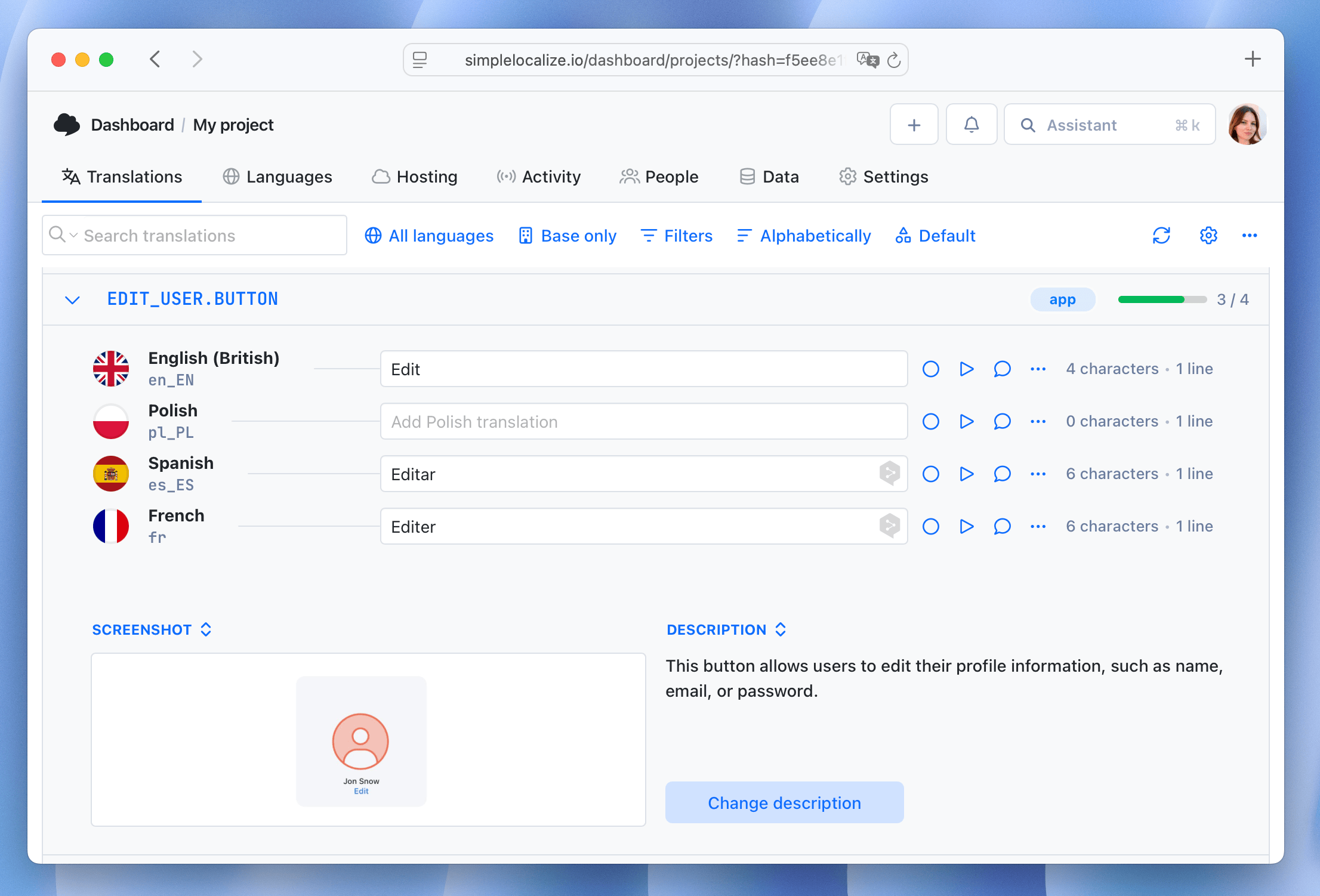
You can also create tasks and assign them to specific translators or reviewers, making it easy to coordinate work across languages. For example, after a feature release, create a task for "Translate new booking flow keys" and assign it to your Spanish and French translators. They'll see only the relevant untranslated keys, with screenshots and descriptions attached, and can complete their work without digging through the entire project.
Auto-translation on key upload
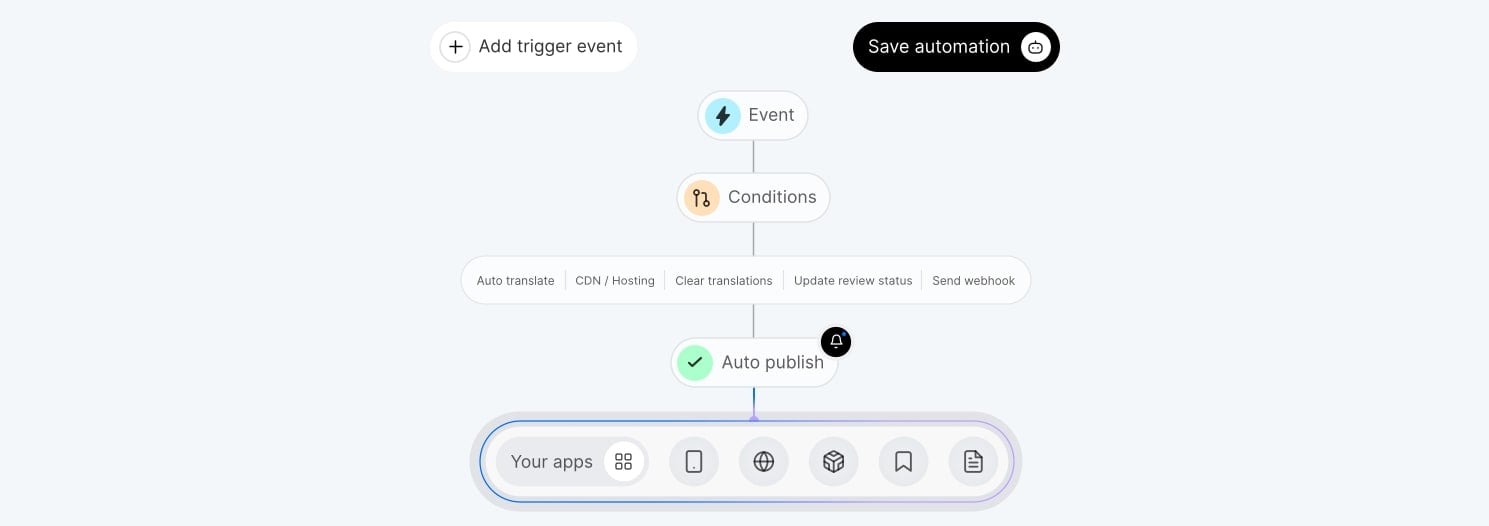
When a developer pushes a new key via the CLI (simplelocalize upload), SimpleLocalize can immediately auto-translate that key to all languages defined in your simplelocalize.yml — whether that's 5, 15, or 50 target languages. Configure an automation rule to trigger auto-translation on every upload, and new strings are translated within seconds of being merged.
This means a developer who adds a new booking.promoCodeApplied key in English can run npm run i18n:sync and immediately pull back machine-translated versions in Spanish, French, and Polish — allowing for instant localized testing without waiting for human translators. Translators can then review and refine the auto-translated strings at their own pace, while the development team moves forward without blocking on translations.
CI/CD integration
Manual upload and download steps don't scale past a handful of languages. Add them to your deployment pipeline to keep translations continuously in sync with code changes.
Automating Localization with GitHub Actions and SimpleLocalize
This pipeline runs whenever the English source file changes: uploads new keys, downloads the latest translations (including auto-translated strings), and commits the updated files back to the repository. New strings added by developers are available to translators within minutes of being merged.
# .github/workflows/localization.yml
name: Sync Translations

on:
  push:
    branches: [main]

env:
  cli-version: '2.10.0'

jobs:
  sync-translations:
    runs-on: ubuntu-latest
    steps:
      - uses: actions/checkout@v3

      - name: Upload source strings
        uses: simplelocalize/github-action-cli@v3
        with:
          api-key: ${{ secrets.SIMPLELOCALIZE_API_KEY }}
          command: 'upload'
          cli-version: ${{ env.cli-version }}
          args: '--uploadPath ./src/i18n/locales/{lang}.json --uploadFormat single-language-json'

      - name: Auto-translate project
        uses: simplelocalize/github-action-cli@v3
        with:
          api-key: ${{ secrets.SIMPLELOCALIZE_API_KEY }}
          command: 'auto-translate'
          cli-version: ${{ env.cli-version }}

      - name: Download translations
        uses: simplelocalize/github-action-cli@v3
        with:
          api-key: ${{ secrets.SIMPLELOCALIZE_API_KEY }}
          command: 'download'
          cli-version: ${{ env.cli-version }}
          args: '--downloadPath ./src/i18n/locales/{lang}.json --downloadFormat single-language-json'

      - name: Commit translation updates
        uses: stefanzweifel/git-auto-commit-action@v5
        with:
          commit_message: "chore: sync translations from SimpleLocalize"
          file_pattern: "src/i18n/locales/*.json"
If you've configured auto-translation automation in SimpleLocalize, the workflow becomes even more powerful:
- a developer merges a PR with new English strings
- GitHub Actions uploads them
- SimpleLocalize auto-translates to all target languages
- the action downloads the translations and commits them back.
The entire round-trip, from new English key to translated strings in your repository for all languages, happens in a single CI run with zero manual intervention.
You can also use the SimpleLocalize GitHub App for a tighter integration that syncs translations on every push without maintaining a custom workflow file.
For more on this approach and how to structure pipelines for different team sizes, see our guides on continuous localization, GitHub Actions for localization, and the localization workflow for developers.
TypeScript: type-safe translation keys with vue-i18n
vue-i18n has solid TypeScript support in Composition API mode. A type declaration file enables full key autocompletion and catches typos at compile time:
// src/i18n/i18n.d.ts
import en from './locales/en.json'

type MessageSchema = typeof en

declare module 'vue-i18n' {
  export interface DefineLocaleMessage extends MessageSchema {}
}
With this in place:
const { t } = useI18n()

t('navigation.home')    // TypeScript confirms this key exists
t('navigation.homee')   // TypeScript error: key doesn't exist
t('common.save')        // valid
This is one of the most underused features of vue-i18n. It's a five-line addition that catches missing translations at build time instead of silently rendering wrong text in production.
Common mistakes in Vue i18n
Here are some of the most common pitfalls that lead to maintainability issues, translation errors, and poor user experience in Vue i18n projects:
-
Using
legacy: truein new Vue 3 projects. The legacy mode exists for migrating Vue 2 codebases. For new projects, always setlegacy: false. It unlocksuseI18n(), better TypeScript types, and Composition API patterns. -
Hardcoding strings in
<script setup>or templates. Any string that could ever need translation belongs in a locale file. Hardcoded strings are invisible to extraction tools, invisible to translators, and require a code change to fix rather than a translation update. -
Using raw
<RouterLink>in Nuxt withoutlocalePath(). This bypasses the locale prefix logic entirely. A link to/roomsin a Spanish locale session should resolve to/es/rooms. Always uselocalePath()for internal navigation in Nuxt. -
Forgetting
dirwhen adding RTL languages. Adding Arabic or Hebrew translations without callingdocument.documentElement.setAttribute('dir', 'rtl')renders translated text with a completely wrong visual layout for native readers. -
Flat keys for any project beyond a demo.
"save","cancel","title","message"multiplied across hundreds of features becomes unnavigable and collision-prone. Two-level namespacing from the start costs nothing and saves significant pain later. -
Not adding key descriptions. Ambiguous keys like
"action","status", or"label"without context descriptions produce systematically wrong translations. A translator who doesn't know whether"status"refers to a user's account status, a shipping status, or an HTTP status code will make a reasonable guess — and the guess is often wrong. -
Manual
v-iflogic for pluralization instead oft(). This is a common and dangerous pattern:<!-- DON'T: breaks for languages with more than 2 plural forms --> <span v-if="count === 1">{{ count }} item</span> <span v-else>{{ count }} items</span>This works for English, but breaks completely for Polish (4 forms), Arabic (6 forms), or Russian (3 forms). Always use the built-in pluralization:
<!-- DO: works for all languages -->
<span>{{ t('items', { count }, count) }}</span>
The
t()function delegates to CLDR plural rules, which handle every language correctly. Manualv-iflogic hardcodes English assumptions into your template. -
Bundling all locale files at startup. Importing all language files in
createI18n({ messages: { en, es, fr, pl, ja, ... } })sends every user every language's strings on page load. Use dynamic imports. -
Using
$tc()in v11. The$tcfunction was removed in v11. Uset('key', { count }, count)instead. The pipe|pluralization format still works, but only through the standardt()function. -
Using the
v-tdirective. Deprecated in v11 and will be removed in v12. Use{{ $t('key') }}in templates ort()in<script setup>instead.
Learn more about common localization mistakes and how to avoid them.
Testing
Testing i18n is often overlooked, but it's critical for catching missing keys, layout issues, and mistranslations before they reach production. Here are some strategies for testing Vue i18n:
Unit testing with Vitest
// tests/components/HomePage.spec.ts
import { describe, it, expect } from 'vitest'
import { mount } from '@vue/test-utils'
import { createI18n } from 'vue-i18n'
import HomePage from '../src/pages/HomePage.vue'

const i18n = createI18n({
  legacy: false,
  locale: 'en',
  messages: {
    en: { homepage: { title: 'Welcome to Pillow Hotel' } },
    es: { homepage: { title: 'Bienvenido al Hotel Almohada' } },
  },
})

describe('HomePage', () => {
  it('renders title in English', () => {
    const wrapper = mount(HomePage, { global: { plugins: [i18n] } })
    expect(wrapper.text()).toContain('Welcome to Pillow Hotel')
  })

  it('renders title in Spanish after locale switch', async () => {
    i18n.global.locale.value = 'es'
    const wrapper = mount(HomePage, { global: { plugins: [i18n] } })
    expect(wrapper.text()).toContain('Bienvenido al Hotel Almohada')
  })
})
Pseudo-localization for layout testing
Before real translations exist, pseudo-localization replaces strings with visually distinct but readable variants. Brackets mark the extent of each string, accented characters reveal font coverage issues, and hardcoded strings show up immediately as untransformed English text.
// src/i18n/pseudo.ts
const ACCENT_MAP: Record = {
  a: 'à', e: 'é', i: 'î', o: 'ô', u: 'û', c: 'ç', n: 'ñ',
}

export function pseudolocalize(messages: Record): Record {
  function transform(value: unknown): unknown {
    if (typeof value === 'string') {
      return '[' + value.replace(/[aeiouncn]/g, c => ACCENT_MAP[c] || c) + ']'
    }
    if (typeof value === 'object' && value !== null) {
      return Object.fromEntries(
        Object.entries(value as Record).map(([k, v]) => [k, transform(v)])
      )
    }
    return value
  }
  return transform(messages) as Record
}
Enable it in development by adding a pseudo locale. Run this before any real translations exist to catch layout regressions early and identify any strings that were hardcoded and missed extraction. See our pseudo-localization guide for more on this technique.
Best practices summary
Doing i18n right in Vue requires attention to both technical implementation and operational workflow. Here are the key best practices to follow:
- Set
legacy: falsefor all new Vue 3 projects — always. - Use two-level namespaced keys (
feature.action) from the very first string. - Use the full ICU message format for pluralization in any app targeting more than two languages.
- Lazy-load locale files with dynamic imports; use
lazy: truein Nuxt. - Use
localePath()andswitchLocalePath()in Nuxt for all internal navigation. - Update
document.documentElement.dirdynamically when locale changes to RTL. - Use CSS logical properties (
margin-inline-startnotmargin-left) throughout. - Add the TypeScript type declaration for vue-i18n to catch key errors at compile time.
- Write descriptions for every ambiguous key in SimpleLocalize.
- Automate upload and download in CI/CD — manual sync does not scale past a few languages.
- Test with pseudo-localization before real translations exist.
FAQ
Conclusion
Vue's i18n ecosystem gives you everything you need to build genuinely multilingual applications. vue-i18n in Composition API mode, lazy-loaded locale files, ICU pluralization, and @nuxtjs/i18n handling routing and SEO in Nuxt cover the technical foundation. typesafe-i18n is a strong alternative for TypeScript teams that want compile-time safety over runtime string lookups.
The harder challenge is operational: keeping translation files in sync with a codebase that changes daily, ensuring translators have enough context to produce accurate output, and not letting missing translations slip through to production. A simplelocalize.yml config connected to your CI/CD pipeline — uploading new keys on every merge to main and downloading completed translations automatically — turns localization from a periodic manual task into a continuous, low-friction process.
Ready to set up your Vue localization workflow? Check out the full documentation for vue-i18n with SimpleLocalize, @nuxtjs/i18n with SimpleLocalize, or typesafe-i18n with SimpleLocalize, and import your first locale file to get started.