AI translation for software teams: MT engines vs. LLMs vs. local models

Every software team localizing today has access to the same basic options: a specialized MT engine like DeepL or Google Translate, an LLM like GPT-4o or Claude, or a local model running on their own infrastructure. All three can produce a translated string. What they can't do is replace judgment about which one to use where.
This post is a practical guide to that decision. It covers how each type of AI translation actually behaves on the content that appears in real software products, what to try if you want to test them yourself, and how to route content so you're not overpaying for quality you don't need or under-investing where it shows.
For a full technical breakdown of how LLMs compare to MT engines under the hood, see the complete AI and machine translation guide. For quality scores with benchmarked examples across providers, see the DeepL, Google Translate, and OpenAI comparison. For cost numbers, see the AI translation cost comparison for 2026.
TL;DR: Which AI model for which content?
A simple way to think about the three types of AI translation is in terms of content type, quality, and cost. The table below summarizes the main differences:
| Translation type | Best for | Main advantage | Main limitation | Typical role in a workflow |
|---|---|---|---|---|
| MT engines (DeepL, Google, Microsoft) | High-volume, low-context UI strings | Fast, cheap, consistent output | Weak on ambiguity, tone, and product-specific intent | Default engine for most UI keys and system text |
| LLMs (GPT-4o, Claude, Gemini) | Tone-sensitive, context-heavy, high-visibility strings | Follows instructions (tone, placeholders, limits, terminology) | Higher cost and more variable output if prompts are weak | Premium path for onboarding, marketing, nuanced UX copy |
| Local models (Llama, Mistral, Gemma) | Sensitive or regulated content that must stay in-house | Data stays on your infrastructure and can reduce API costs | More ops overhead; quality can trail top cloud models | Privacy-first route for NDA, legal, healthcare, or PII-adjacent text |
If you're unsure where to start: use MT as the default, route high-impact copy to an LLM, and reserve local models for strict privacy requirements.
The three types of AI translation in 2026
The old taxonomy of RBMT, SMT, and NMT is mostly history. What matters for software teams today is a simpler split:
-
MT engines (DeepL, Google Translate, Microsoft Translator) are specialized neural networks trained entirely on translation tasks. They're fast, cheap per character, and highly consistent. They have no concept of what your product is, who your users are, or what tone you want. They translate sentences, not products.
-
LLMs (GPT-4o, Claude, Gemini, and others via OpenRouter) are general-purpose language models that happen to be excellent translators. They can follow instructions: translate formally, preserve placeholders, keep this under 20 characters, treat "workspace" as a product name. That instruction-following capability is the meaningful difference.
-
Local models (Llama, Mistral, Gemma via Ollama) are LLMs you run on your own infrastructure. In 2026, the performance gap has narrowed significantly; open-weights models now handle translation and placeholder retention at a near-frontier level. The data never leaves your servers, making them perfect for compliance-heavy setups or eliminating API variable costs entirely.
The right choice is rarely one of these exclusively. Most mature localization setups use a combination, routing content by type.

What each type handles well
MT engines: UI strings at volume
MT engines are well-suited to short, self-contained UI strings where the meaning is unambiguous and the volume is high: button labels, form field names, status messages, error codes. Anything where the English is clear enough that a sentence-level model gets it right without extra context.
They break down when context is missing. The word "Home" has different correct translations in German depending on context: it's "Start" as a navigation button and "Zuhause" as a location field. An MT engine has no way to know which one applies. If your string IDs and key names aren't feeding into the translation request, you'll get unpredictable results on ambiguous strings. We break this ambiguity pattern down in detail in this context guide.
Where they genuinely shine is throughput. For a project with 3,000 UI keys where 200 changed in the last sprint, an MT engine handles the batch in seconds at very low cost.
LLMs: context-sensitive and tone-aware content
LLMs earn their price on content where tone, terminology, or ambiguity would cause an MT engine to produce a technically correct but wrong result. A few categories where the difference is consistent and visible:
-
Marketing and onboarding copy.
A headline like "Get your team moving" should not translate to a literal equivalent in German. It should land with energy. MT engines produce flat, literal output. An LLM given a brief about your product, audience, and tone produces copy that reads like it was written in the target language. -
Error messages and empty states.
These are short but carry emotional weight. "We couldn't find anything" is a different register from "No results found". If your product has a distinct voice, error messages are where it shows, and MT won't preserve it. -
Strings with placeholders and constraints.
A string likeYou have {count} items in your {cartName}needs a model that will preserve the placeholders exactly, respect their position in the target language's grammar, and stay under a character limit if one exists. LLMs can follow these instructions reliably when the constraints are passed in the prompt. MT engines handle some placeholder preservation but don't take instruction-based constraints. -
Product-specific terms.
If your product uses "workspace" to mean something specific, you can tell an LLM not to translate it. Glossary features in MT engines handle pre-defined terms, but LLMs can apply more nuanced rules: for example, "keepworkspaceuntranslated in technical documentation but translate it in user-facing copy".

Local models: privacy-constrained environments
Local models handle cases where content cannot leave your infrastructure: legal documents, healthcare data, anything under NDA, internal tooling in regulated industries. Translation quality is typically a step below frontier cloud LLMs, but for many enterprise contexts "good enough privately" beats "excellent with an external API call."
Setup requires more ops work (running Ollama or a compatible server, pointing SimpleLocalize at your local endpoint), but the data flow is clean: nothing leaves your servers.
A practical test you can run
If you want to see how these types behave on your actual content, here's a short test protocol. Pick five strings from your product that represent different content types:
- One ambiguous short label
- One onboarding headline
- One error message
- One string with a placeholder
- One technical UI term that is also a common word
Run each through your chosen providers with the same input. For MT engines, that's typically a bare string. For LLMs, include a brief system prompt. Here's one to start with:
You are translating UI strings for a SaaS product.
Product: [one-sentence description]
Tone: [e.g., friendly and informal, or professional and precise]
Target language: [language]
Rules:
- Preserve all placeholders exactly as written: {variable_name}
- Keep translations under [N] characters where noted
- Do not translate proper nouns: [list any]
Translate the following string only, no explanation:
Example strings to test (adapt to your product):
| Key | English | Notes |
|---|---|---|
nav.home | Home | Ambiguous: navigation vs. location |
onboarding.headline | Get your team moving | Tone-dependent |
error.not_found | We couldn't find what you're looking for | Voice-dependent |
billing.summary | You have {count} items in your cart | Placeholder + grammar order |
settings.workspace | Workspace settings | Product term that's also a common word |
Run the same strings through DeepL, GPT-4o (or GPT-4o-mini for cost), and if you're testing local options, a Llama or Mistral instance. You don't need a large sample to get a directional read. Five strings per content type is usually enough to see the patterns clearly.
For a full benchmarked comparison with quality scoring across providers, the DeepL, Google Translate, and OpenAI comparison has the deep dive.
Routing content by type
Once you've seen how providers behave on your content, the practical question is how to structure the routing. A common pattern that works well:
-
Default to MT for volume, LLM for visibility.
Run MT engines on the bulk of your UI keys: navigation, form labels, system messages, generic error codes. Reserve LLM calls for high-visibility strings, landing page copy, onboarding flows, anything a new user sees in their first session. -
Use key metadata to route automatically.
If your translation keys are tagged or namespaced by feature area, you can define routing rules in your automation pipeline. Keys taggedmarketingoronboardinggo to the LLM; keys taggeduiorerrorsgo to the MT engine. SimpleLocalize automations support this kind of conditional routing without custom scripting. -
Use local models for sensitive content types, not all content.
Running everything locally slows throughput and reduces quality. A more targeted approach: route PII-adjacent strings (notifications, emails that reference user data) through local models, and use cloud providers for generic UI content where the text itself isn't sensitive.
What context means in practice
The single most important variable in AI translation quality, regardless of which type you use, is context. An MT engine with good context outperforms an LLM with no context on many content types.
Context has two levels:
-
Project-level context tells the model what your product is and who it's for. Even a single sentence makes a measurable difference on ambiguous strings. "This is a fintech app for Gen Z users with an informal, concise tone" changes how an LLM handles every string it sees.
-
Key-level context is more specific: what this particular string is, where it appears, and what constraints apply. A description like "Navigation button in the main menu, not a home address" on the key
nav.homeprevents the "Zuhause" mistranslation that an MT engine would produce without any additional signal.
Adding key-level descriptions takes some upfront effort, but it scales well. Once added, descriptions persist and benefit every future translation request for that key, including re-translations as languages are added.
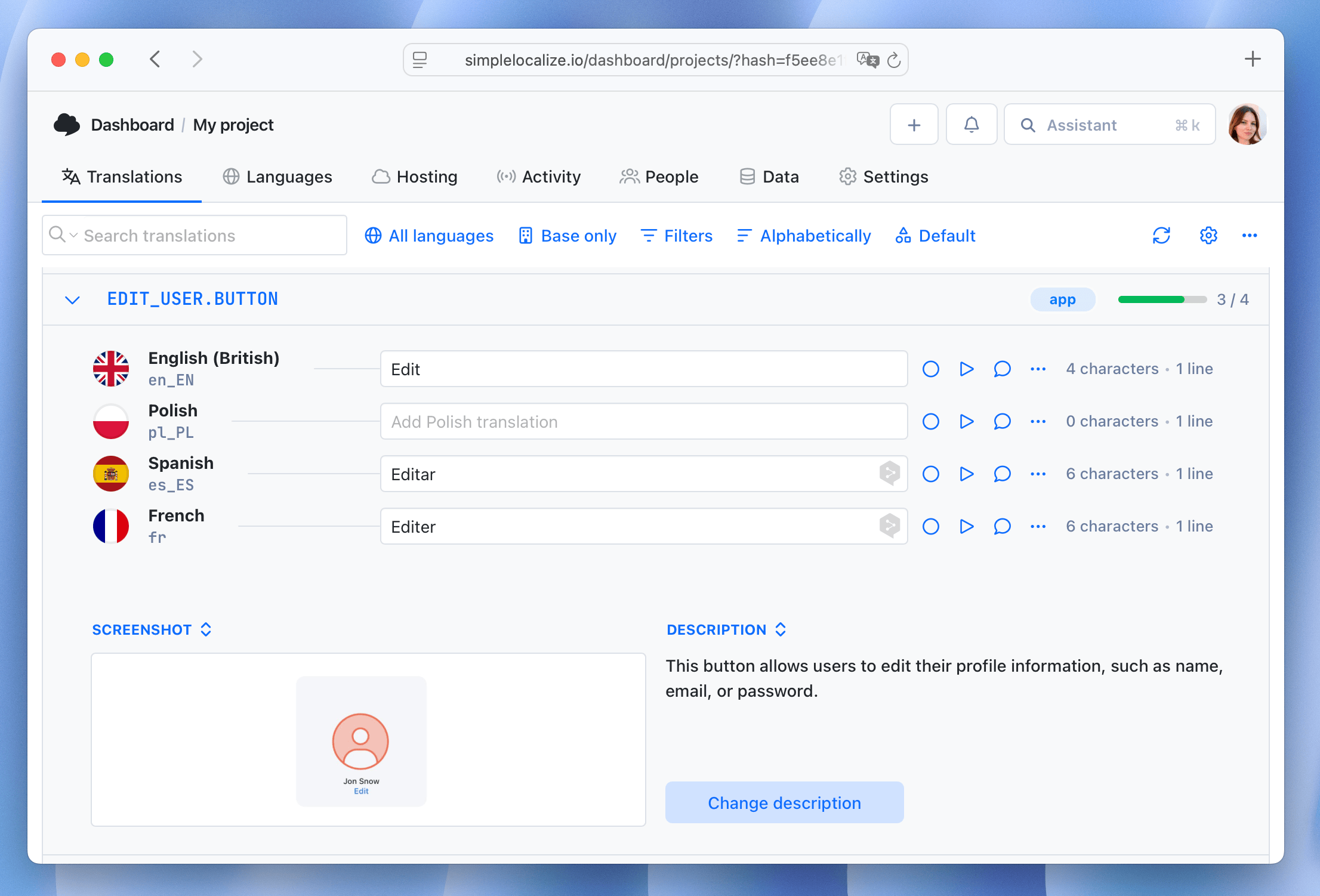
For how to set up context in SimpleLocalize at both the project and key level, see tips for effective auto-translation. For deeper examples of ambiguous UI strings and how project, key, and glossary context work together, see the context deep dive.
When to introduce human review
AI translation of any type produces a draft. Whether that draft needs human review depends on where the string appears and what it says. A rough heuristic that most localization teams converge on:
- Publish directly (no review): routine UI strings with low ambiguity, internal tooling, developer-facing error codes
- Light review (native speaker spot-check): onboarding copy, help documentation, product feature names
- Full review (translator or native copywriter): homepage headlines, pricing page copy, legal disclosures, anything that's also a sales touchpoint
The category determines the tool, not the other way around. Using an LLM for low-visibility UI strings adds cost without adding meaningful quality. Using an MT engine for your pricing page headline and publishing it without review is how embarrassing mistranslations happen.
For a structured approach to quality review within a translation pipeline, see translation quality and review in SimpleLocalize.
Conclusion
AI translation in software localization is not a one-time choice but an ongoing strategy of content routing that, once defined, can be automated. A practical place to begin is:
- Categorize your content types (UI keys, onboarding, marketing, legal, internal)
- Run a small test across MT and LLM providers on real examples from each category
- Define routing rules based on what you see
- Set up automation to apply those rules on every new key
- Calibrate review thresholds based on where strings appear in the product
The goal is to spend translation budget where quality is visible and matters, and let automation handle the rest efficiently.
For the full pipeline, from key extraction through CI/CD automation and delivery, see the AI-powered localization workflows guide. For specifics on setting up automated translation in GitHub Actions and the SimpleLocalize GitHub App, see integrating AI translation into your CI/CD pipeline.