Scaling localization from 1 to 100 languages: A practical guide for SaaS teams

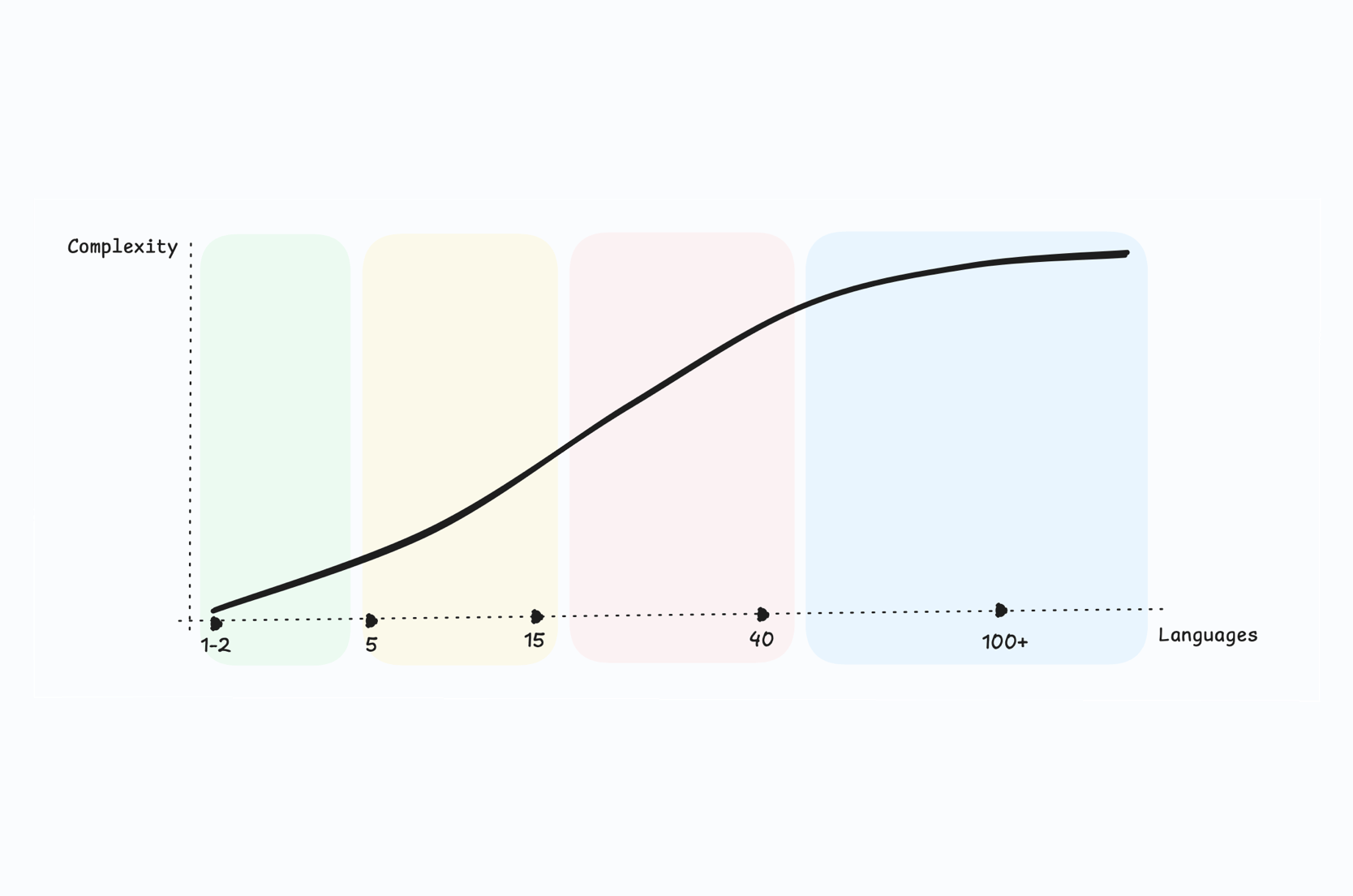
Going from one language to two feels like a project. Going from two to ten feels like a process. Going from ten to a hundred feels like building infrastructure.
Most SaaS teams start localization with optimism: a few JSON files, a freelance translator, and a PR to merge. That works when you support English and one other language. But the moment you cross five, ten, or twenty languages, everything that once felt manageable, terminology, quality, release timing, costs, starts compounding into operational complexity.
This guide covers the practical reality of scaling localization through every stage of growth: from your first language to your hundredth. Not theory. Real decisions, trade-offs, and strategies that determine whether localization accelerates revenue or becomes a bottleneck.
This article is part of our localization strategy guide, which covers the full framework for planning, executing, and measuring localization at scale.
Why scaling localization is different from starting it
Adding your first language is a contained task. You select strings, translate them, ship them. There's one translator, one reviewer, one target audience.
Scaling is fundamentally different because complexity grows non-linearly:
| Languages | Strings | Total translations | Coordination |
|---|---|---|---|
| 1 | 2,000 | 2,000 | Minimal |
| 5 | 2,000 | 10,000 | Manageable |
| 20 | 5,000 | 100,000 | Structured workflows required |
| 50 | 10,000 | 500,000 | Governance mandatory |
| 100 | 15,000 | 1,500,000 | Full infrastructure |
At 5 languages, you can manually track what's translated. At 50, you need automated systems to detect missing keys, enforce terminology, and measure quality. At 100, localization is a production system with its own SLAs, pipelines, and monitoring.
The challenge isn't translation. It's operations.
If you haven't mapped where your team sits on this spectrum, our localization maturity model can help you assess readiness and plan the next stage.
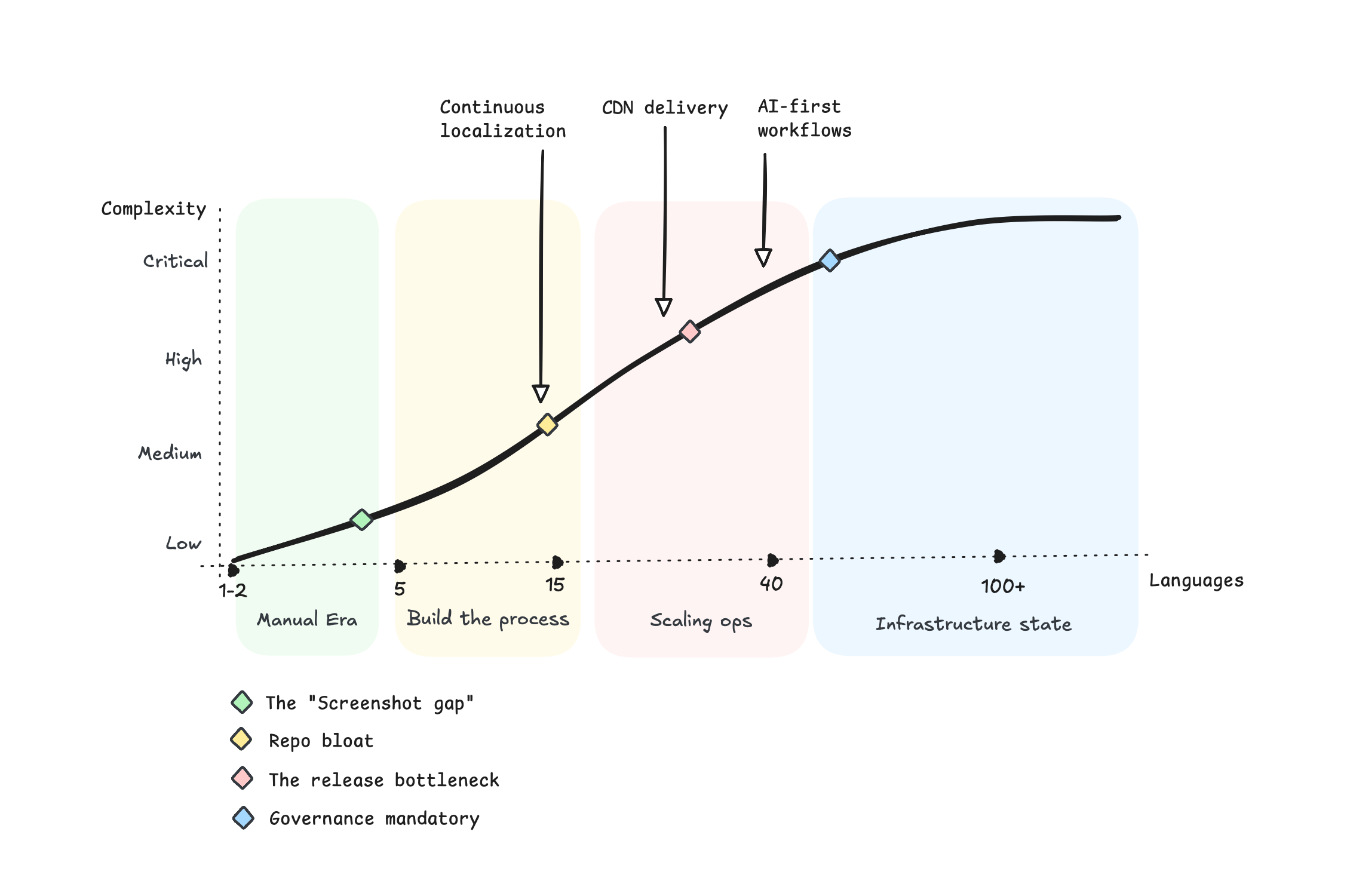
Stage 1: The first language (1-2 languages)
At this stage, localization is a project, not a process. Someone on the team decides to add Spanish or German, exports strings, and coordinates with a translator.
What works
- Manual export/import of translation files
- A single translator or small agency
- Direct communication over email or Slack
- Quick turnaround because scope is small
What to get right early
Even at one language, decisions you make now compound at scale:
-
Externalize all strings from day one.
Hardcoded text is the single biggest blocker to scaling later. If your internationalization foundations are weak, fix them before adding languages. See our internationalization guide for the technical setup.
-
Use a proper file format.
JSON, YAML, or platform-native formats (.strings, .xml) that your tooling can parse. Avoid spreadsheets as your source of truth.
-
Establish translation key conventions.
Consistent naming saves enormous rework later. Read our guide on best practices for translation keys.
Here's a quick example of what good vs. bad key naming looks like:
// ❌ Bad: vague, flat, impossible to organize at scale
{
  "text1": "Submit",
  "msg": "Welcome back!",
  "err": "Something went wrong"
}

// ✅ Good: namespaced, descriptive, self-documenting
{
  "auth.login.button.submit": "Submit",
  "dashboard.greeting.returning_user": "Welcome back!",
  "common.error.generic": "Something went wrong"
}
At 5 languages, bad keys are annoying. At 50 languages, they're a nightmare to maintain, search, and debug.
-
Pick a TMS early.
Even for one language, a translation management system centralizes work and makes scaling painless. Starting in spreadsheets means migrating later.
Related:
How to get started with a translation management system
How to choose a TMS for SaaS startups
Stage 2: Building the process (3-10 languages)
This is where most teams feel the first pain. What worked for two languages becomes unsustainable at five. Release cycles slow down because translations aren't ready. Terminology drifts. Some languages get attention, others fall behind.
The shift that matters
You move from "person who translates" to "process that scales".
Key changes:
-
Centralized TMS
All languages managed in one place. Translation memory starts saving time and money. Context helps translators produce better results.
-
Continuous localization
New strings enter the translation pipeline during development, not after release. This is the biggest single improvement you can make. See our continuous localization guide for implementation details.
-
Automation
CLI or API integration pushes new keys and pulls translations as part of your CI/CD pipeline. Manual exports disappear.
-
Glossaries
Shared terminology across languages prevents drift. "Workspace", "project", and "dashboard" should translate consistently everywhere.
-
Basic QA
Placeholder validation, length checks, and missing translation detection become standard.
Pro-Tip: Never use string concatenation for translatable text (e.g.,
"Hello, " + userName + "! You have " + count + " messages."). Different languages have completely different word orders. German puts verbs at the end, Japanese reverses subject-object order, and Arabic reads right-to-left. Always use ICU message formats or named placeholders like{userName}and{count}instead.
The screenshot gap
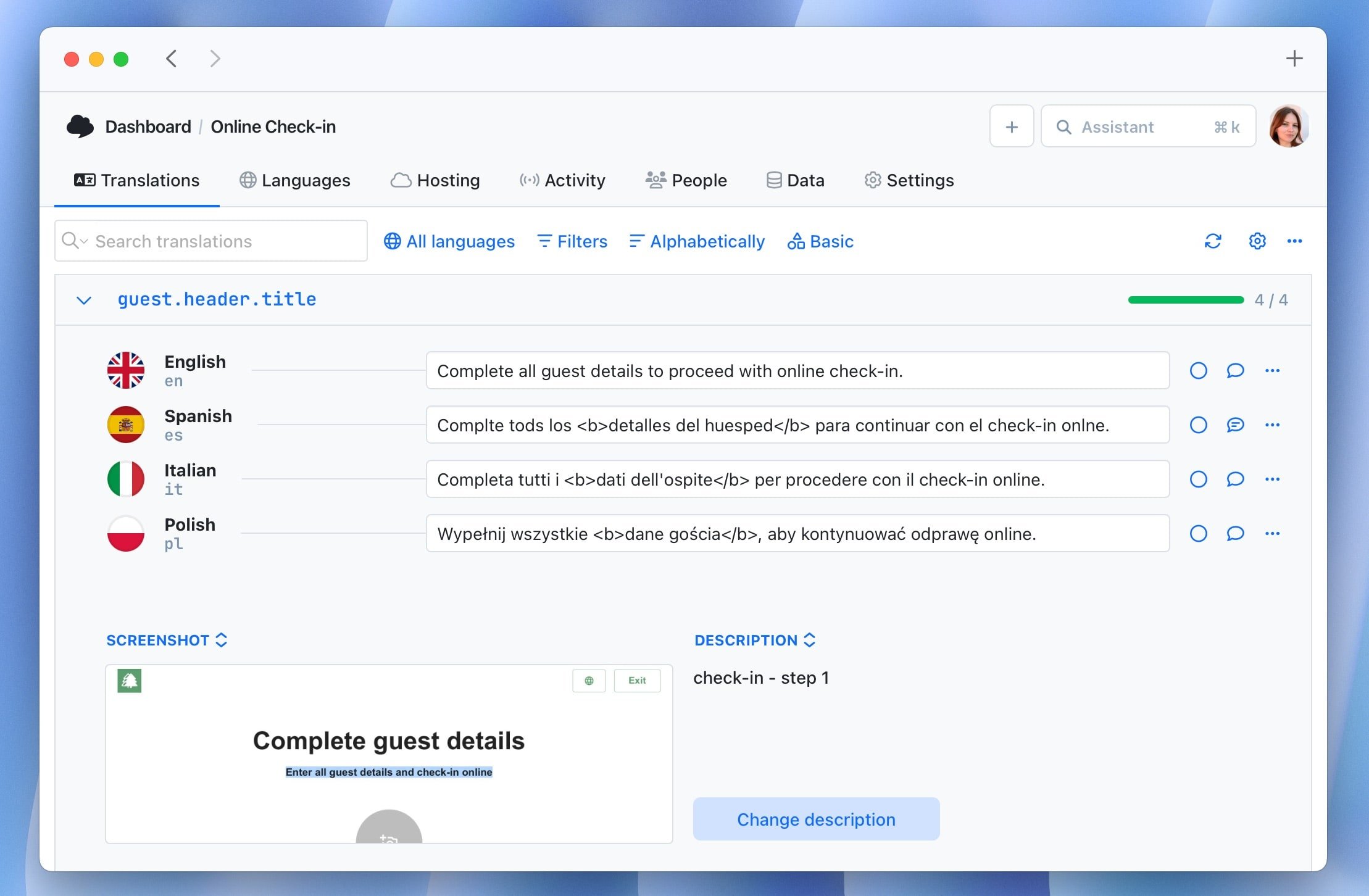
Here's a pain point that hits hard at 5+ languages: translators have no idea where strings appear in your product.
A key like dashboard.widget.empty_state could be a tooltip, a heading, or a full-page message. Without visual context, translators guess, and guesses lead to awkward phrasing, wrong tone, or text that doesn't fit the UI.
This is the "screenshot gap", and it gets worse with every language you add. At 10 languages, that's 10 translators all guessing independently. The result? Inconsistent quality that's expensive to fix.
Solutions that work:
- Attach screenshots or visual context to translation keys in your TMS
- Use in-context editing where translators see the live UI
- Add descriptions or comments to keys that explain where and how strings are displayed
Providing context is one of the highest-ROI investments you can make at this stage. It reduces revision cycles, improves quality, and makes translators faster.
Related: The role of context in localization
Language prioritization
At 3-10 languages, every addition is a strategic choice. Don't add languages because they're "popular". Add them because market data supports it.
Signals that justify a new language:
- Significant traffic from a specific country
- High trial signups but low conversion in a region
- Sales pipeline blocked by language gaps
- Regulatory requirements in target markets
- Customer requests with revenue attached
For a structured approach to choosing languages, read how to plan localization for your first 5 languages.
Budget and cost awareness
At this stage, translation costs are visible but manageable. The real cost risk is process inefficiency: retranslating unchanged strings, fixing terminology inconsistencies after launch, or losing context between translators.
Translation memory and glossary enforcement pay for themselves quickly. If you're evaluating tools, keep in mind that TMS pricing doesn't have to be expensive when you choose the right approach.
Stage 3: Scaling operations (10-30 languages)
This is the inflection point where localization either becomes infrastructure or becomes technical debt.
What breaks at this stage
-
Release bottlenecks
20 languages means 20 sets of translations to coordinate per release. Without automation, localization delays ship dates.
-
Quality variance
Some languages have excellent translators; others don't. Without governance, quality becomes inconsistent.
-
Ownership gaps
Nobody clearly owns localization. Product, engineering, and marketing all touch it, but nobody is accountable.
-
Cost escalation
Linear cost growth per language adds up. Without translation memory reuse and smart automation, budgets balloon.
What mature teams build
Tiered language strategy
Not all languages deserve equal investment. Categorize:
| Tier | Investment | Translation method | QA level |
|---|---|---|---|
| Tier 1 (Core) | High | Professional human translation | 100% review + localization QA |
| Tier 2 (Growth) | Medium | MT/AI + human post-editing | High-visibility strings reviewed |
| Tier 3 (Test) | Low | Pure AI / machine translation | Automated checks only |
- Tier 1 (Core): Full human translation, dedicated QA, localized marketing, support documentation. These are your top revenue markets.
- Tier 2 (Growth): Human translation for product, machine translation with review for secondary content. Strong demand signals but still proving ROI.
- Tier 3 (Coverage): AI-powered translation with light review. Product-only localization. Used to test demand before deeper investment.
This tiered approach is essential for cost control. Spending equally on a Tier 3 language and a Tier 1 language is a budgeting mistake.
Pro-Tip: Start every new language at Tier 3. Promote to Tier 2 when you see measurable engagement (trial signups, feature usage). Promote to Tier 1 only when the locale generates meaningful revenue. This approach lets you test 30 markets quickly without committing enterprise-level budgets to unproven regions.
Governance framework
At 10+ languages, you need:
- A designated localization owner or team
- Enforced glossaries inside your TMS
- Style guides per language or locale
- Approval workflows before translations go live
- Rules for handling untranslated strings at release (fallback to English? Block release?)
Without governance, common localization mistakes multiply across every language.
Automation as default
Manual processes don't scale. Period.
At this stage, localization automation should include:
- Automatic string extraction from code
- CI/CD-triggered translation sync
- Automated QA checks (placeholders, formatting, length)
- CDN-based translation delivery for instant updates without redeployment
- Webhook-based notifications when translations are ready
Related:
Step-by-step localization workflow for developers
GitHub Actions for localization
Stage 4: Operating at scale (30-100+ languages)
At this level, localization is a production system. It has uptime requirements, performance SLAs, and operational monitoring, just like your application infrastructure.
Why 100 languages? The hyper-localization reality
You might think 100 languages sounds extreme. But consider: "100 languages" often doesn't mean 100 countries. It means 100 locales.
French alone can require separate localization for France (fr-FR), Canada (fr-CA), Belgium (fr-BE), and Switzerland (fr-CH). Portuguese splits into Brazil (pt-BR) and Portugal (pt-PT). Spanish has distinct variants for Spain (es-ES), Mexico (es-MX), and Argentina (es-AR). Chinese has Simplified (zh-CN) and Traditional (zh-TW).
Once you account for regional dialects, formal/informal registers, and locale-specific formatting (date formats, currencies, number separators), a SaaS product targeting 30 countries can easily reach 60-80 locales. Add a few more regions and you're at 100 faster than expected.
This is hyper-localization: going beyond language to adapt for specific regional expectations. And it's what separates products that "support" a market from products that win in a market.
Characteristics of 100-language operations
- Millions of translation units across all locales
- Multiple product surfaces: web app, mobile apps, marketing site, documentation, emails, in-app messages
- Diverse content types: UI strings, legal text, support articles, marketing copy, transactional emails
- Mixed translation sources: human translators, AI translation, machine translation, community contributions
- Global teams: translators, reviewers, product managers, and engineers across time zones
Architecture decisions
Translation delivery
At scale, bundling translations into your application build becomes impractical. A 100-language app with 15,000 keys means loading massive bundles.
There's also a developer experience (DX) problem that hits earlier than most teams expect: storing all translation files in your Git repository. At 50+ languages, this means thousands of JSON/YAML files bloating your repo, slowing git clone, inflating CI/CD build times, and creating merge conflicts whenever translations update. Your developers shouldn't wait 3 extra minutes per build because translation files doubled the repo size.
Instead, use CDN-hosted translations:
- Translations update independently of app releases
- Users always get the latest version
- Rollback is instant if issues are found
- Regional CDN nodes reduce latency globally
- Your Git repo stays lean and build times stay fast
Namespace and project organization
Break your translation keys into logical namespaces:
product.dashboard.*product.settings.*marketing.landing.*emails.transactional.*legal.terms.*
This allows different teams to own different namespaces, different translation workflows per content type, and parallel work without conflicts.
Multi-product and microservice support
Large SaaS platforms often have multiple products or services. Your TMS should support multiple projects under one account, with shared translation memory and glossaries across projects.
For enterprise-scale requirements, see Enterprise translation management for large SaaS.
Quality at scale
Quality management shifts from reactive to systematic:
- Automated QA: Every translation passes through automated checks before publishing. Placeholders, formatting, character limits, and bidirectional text (RTL) issues are caught automatically.
- Sampling-based review: You can't human-review every string in every language. Instead, review a statistically meaningful sample per release, prioritizing high-visibility strings.
- In-context review: Translators and reviewers see translations within the actual UI, not isolated in a spreadsheet. This dramatically reduces context-related errors.
- Locale-specific regression testing: Date formats, number formats, currency symbols, and pluralization rules must be validated per locale. Our pluralization guide covers the linguistic complexities involved.
- Localization QA as a discipline: At this stage, localization QA becomes a dedicated practice with its own processes and metrics.
Cost optimization at scale
Translation costs at 100 languages can become significant. Strategies that matter:
- Translation memory: Reuse previously translated segments. At scale, 40-70% of new content matches existing translations, drastically reducing costs.
- AI-first, human-second: Use AI translation as the first pass for Tier 2 and Tier 3 languages, then route to human review only for high-impact strings.
- Incremental translation: Only translate what changed. Check last modified dates, detect unchanged strings, and skip them automatically.
- Shared glossaries: Consistent terminology reduces translator questions and revision cycles.
- Flat pricing: The hidden cost-saver. Most industry-standard platforms (like Lokalise, Phrase, or Crowdin) traditionally use "per-seat" or "per-locale" pricing. At 2 or 3 languages, this is negligible. But at 100 languages with a cross-functional team of 30+ people, these models become exponentially expensive. You can easily find yourself paying $2,000-$5,000+ per month just for the "right" to access your own data. At scale, look for a TMS with flat, predictable pricing. Your budget should go toward better translations, not "seat taxes" for your developers and reviewers.
Common pitfalls when scaling localization
Teams that have scaled from 1 to 100 languages consistently report the same mistakes. Avoid these:
1. Translating everything at once
Don't launch 30 languages simultaneously. Roll out in waves. Each wave teaches you something about your process, tooling, and quality.
A phased rollout might look like:
- Wave 1: Top 5 revenue markets, full localization
- Wave 2: Next 10 markets, product localization only
- Wave 3: Remaining markets, AI translation with review
- Wave 4+: Long-tail languages based on demand data
2. Ignoring internationalization debt
Scaling languages on weak i18n foundations is like building floors on a cracked foundation. Hardcoded strings, concatenated sentences, and locale-unaware formatting will break in ways that are expensive to fix at scale.
Fix i18n before scaling. Our internationalization guide covers the technical requirements.
Pro-Tip: A quick i18n debt check: search your codebase for string concatenation patterns like
"Hello " + nameor`Welcome ${user}`used for user-facing text. Every instance is a ticking time bomb that will produce broken translations in languages with different word orders. Refactor to ICU message format or named placeholders before you add the next language.
3. No single source of truth
When translations live in spreadsheets, emails, GitHub comments, and a TMS simultaneously, conflicts are inevitable. One authoritative system. One workflow. One source of truth.
4. Treating all languages equally
Equal treatment sounds fair but is strategically wrong. Your top 5 revenue markets should get premium translation quality, dedicated reviewers, and localized marketing. Your bottom 30 languages can start with AI translation and graduate to human review as revenue justifies it.
5. Measuring by word count instead of impact
Word count measures activity. Revenue per locale measures impact. Track what matters: conversion rates, retention, NPS, and support ticket volume by language.
For a comprehensive framework on measuring localization ROI, see Measuring localization ROI and revenue impact.
The scaling checklist
Use this checklist to evaluate your readiness for each stage. Bookmark this page, it works as a living roadmap you can revisit as your localization grows from stage to stage.
Ready for 3-10 languages?
- All strings externalized (no hardcoded text)
- Translation key naming conventions established
- TMS selected and configured
- At least one CI/CD integration for translation sync
- Glossary created for core product terms
- Language prioritization based on market data, not assumptions
Ready for 10-30 languages?
- Continuous localization pipeline operational
- Translation memory actively reducing costs
- Tiered language strategy documented
- Localization owner or team designated
- Automated QA checks in place
- Style guides for top-tier languages
Ready for 30-100+ languages?
- CDN-based translation delivery
- Namespace/project organization for multi-team workflows
- Governance framework with enforced glossaries and approval flows
- Cost optimization through TM reuse and AI-assisted translation
- Locale-specific QA and regression testing
- Localization metrics tied to business KPIs
- Rollback capability for translation updates
Tools and infrastructure for scaling
The right tooling makes scaling possible. The wrong tooling makes it painful.
What to look for in a TMS as you scale:
| Capability | Why it matters at scale |
|---|---|
| API & CLI integration | Enables CI/CD automation and continuous localization |
| CDN translation hosting | Decouples translation updates from app releases |
| Translation memory | Reduces cost and ensures consistency across 100+ languages |
| Glossary management | Enforces terminology at scale |
| Automated QA | Catches errors before they reach users |
| Role-based access | Different permissions for translators, reviewers, and admins |
| Multiple project support | Organizes translations across products and teams |
| Flat pricing | Predictable costs that don't explode with team size |
| Format support | Handles JSON, YAML, iOS .strings, Android XML, PO, and more |
SimpleLocalize is built for this exact scaling journey. From solo developers shipping their first language to enterprise teams managing 100+ locales, it provides CDN hosting, CLI automation, API access, AI-assisted translation, and flat pricing without per-seat or per-language costs: the same price whether you have 5 languages or 100. See pricing or explore integrations.
From 1 to 100: It's a journey, not a switch
Scaling localization successfully means evolving your approach at every stage. What works at 2 languages will fail at 20. What works at 20 will crumble at 100.
The companies that scale localization well share common traits:
- They treat localization as infrastructure, not a feature
- They automate early and govern consistently
- They prioritize markets strategically, not linguistically
- They measure impact, not activity
- They invest in tooling that grows with them
Start where you are. Fix what's broken. Build for the next stage, not the final one.
Related:
Localization strategy guide
Localization maturity model
Localization strategy for global SaaS growth
Best practices in software localization